Everything 1.5b Beta - Upgrade Guide

Discussion related to "Everything" 1.5.
Post Reply
void
Developer
Posts: 19830
Joined: Fri Oct 16, 2009 11:31 pm

Everything 1.5b Beta - Upgrade Guide

Post by void »

A special thank you to everyone who helped test the alpha version.

The Everything 1.5 beta is now available for testing.

Installing Everything 1.5b will overwrite your existing Everything 1.4 installation.
Any existing Everything 1.5a installation is unaffected by the Everything 1.5b installation.

Installation Recommendations
Portable Version Upgrade Recommendations
Manual Import
Update Plugins
Backup settings and data
Restore settings and data
Manual Everything 1.5a Uninstallation
Run Everything 1.4 and 1.5b
Set Title to Include Version Information
Troubleshooting


Installation Recommendations

Before installing, please backup your settings and data.

To upgrade Everything 1.5a:
  • The following only needs to be done once when upgrading from Everything 1.5a.
  • In the Everything 1.5b installer, on the last Install Options page, check Copy Everything 1.5a settings and data:
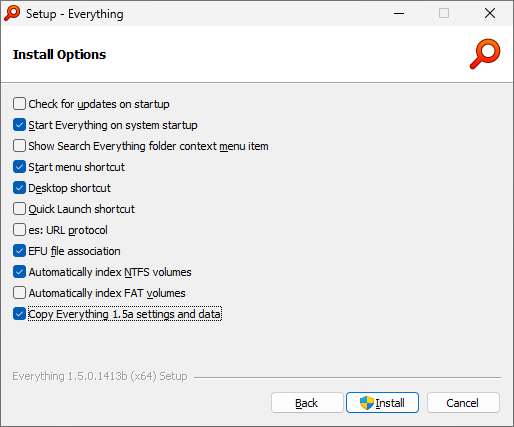
  • Install Everything 1.5b.
  • Run Everything 1.5b.
  • After Everything 1.5b is installed and running, uninstall Everything 1.5a.


To upgrade Everything 1.4:
  • Simply install Everything 1.5b.


Portable Version Upgrade Recommendations

Before installing, please backup your portable folder.

To upgrade the Everything 1.5a portable version:
  • The following only needs to be done once when upgrading from Everything 1.5a.
  • In Everything 1.5a, from the Tools menu, click Options.
  • Click the General tab on the left.
  • Uncheck Start Everything on system startup.
  • Uncheck Everything Service.
  • Uncheck Show Search Everything folder context menu item.
  • Uncheck Start menu shortcut.
  • Uncheck Desktop shortcut.
  • Uncheck Quick Launch shortcut.
  • Uncheck es: URL Protocol.
  • Uncheck EFU file association.
  • Click OK.
  • Exit Everything (File -> Exit)
  • In your Everything portable location, delete or move the following files: (they might not exist)

    Code: Select all

    Bookmarks.csv
    Everything.ini
    Omit Results.csv
    Run History.csv
    Search History.csv
    Synonyms.txt
    Filters.csv
    Macros.csv
    Plugins.ini
    Session.json
    
  • Replace your Everything.exe with the Everything.exe from the Everything 1.5b portable zip.
  • Launch Everything.exe.
  • Everything 1.5b will automatically copy your Everything 1.5a settings and data.
  • Accept the prompt to run indexing process as administrator or install the Everything Service.
  • In Everything 1.5b, from the Tools menu, click Options.
  • Click the General tab on the left.
  • Optionally check Start Everything on system startup.
  • Optionally check Show Search Everything folder context menu item.
  • Optionally check Start menu shortcut.
  • Optionally check Desktop shortcut.
  • Optionally check Quick Launch shortcut.
  • Optionally check es: URL Protocol.
  • Optionally check EFU file association.
  • Click OK.


Manual Import

Everything 1.5b will use your Everything 1.4 settings and data.
If the Everything 1.4 settings and data do not exist, Everything 1.5b will automatically import your Everything 1.5a settings and data.

To manually import all settings and data:
  • Exit Everything (File -> Exit)
  • In
    %APPDATA%\Everything
    , copy the following files:
    • Bookmarks-1.5a.csv => Bookmarks.csv
    • Everything-1.5a.ini => Everything.ini
    • Omit Results-1.5a.csv => Omit Results.csv
    • Run History-1.5a.csv => Run History.csv
    • Search History-1.5a.csv => Search History.csv
    • Synonyms-1.5a.txt => Synonyms.txt
    • Filters-1.5a.csv => Filters.csv
    • Macros-1.5a.csv => Macros.csv
    • Plugins-1.5a.ini => Plugins.ini
    • Session-1.5a.json => Session.json
  • In
    %LOCALAPPDATA%\Everything
    , copy the following files:
    • Everything-1.5a.db => Everything.db
  • Launch Everything 1.5b.
Everything will automatically copy the -1.5a version if the filename without the -1.5a suffix does not exist.
For example, if Bookmarks.csv does not exist, Everything 1.5b will automatically copy Bookmarks-1.5a.csv to Bookmarks.csv


To manually import settings:
  • In Everything 1.5b, from the Tools menu, click Import and Export Settings.
  • Select Import settings.
  • Click Next.
  • Click Browse....
  • Type in the following filename and press ENTER:
    %APPDATA%\Everything
  • Select your Everything-1.5a.ini file and click Open.
  • Click Import.
  • Check Restart Everything.
  • Click Finish.
    Everything will restart to apply your old settings.


To manually import search history:
  • In Everything 1.5b, from the History menu, click Show All Search History.
  • Click Import....
  • Select your Search History-1.5a.csv file and click Open.
  • Click OK.


To manually import run history:
  • In Everything, from the Tools menu, click Run History.
  • Click Import....
  • Select your Run History-1.5a.csv file and click Open.
  • Click OK.


To manually import filters:
  • In Everything 1.5b, from the Search menu, click Organize Filters....
  • Click Import....
  • Select your Filters-1.5a.csv file and click Open.
  • Click OK.


To manually import bookmarks:
  • In Everything 1.5b, from the Bookmarks menu, click Organize Bookmarks....
  • Click Import....
  • Select your Bookmarks-1.5a.csv file and click Open.
  • Click OK.


Update Plugins

To update plugins:
  • Exit Everything 1.5b (File -> Exit).
  • Copy your Plugins folder from your Everything 1.5a folder to your Everything 1.5b folder.
  • For example: Copy
    C:\Program Files\Everything 1.5a\Plugins
    to
    C:\Program Files\Everything\Plugins
  • Copy
    %APPDATA%\Everything\Plugins-1.5a.ini
    to
    %APPDATA%\Everything\Plugins.ini
  • For the portable version, copy your
    Plugins-1.5a.ini
    to
    Plugins.ini
    in the same location as your Everything.exe
  • Restart Everything.
Everything 1.5b will load plugins from
C:\Program Files\Everything 1.5a\Plugins
if
C:\Program Files\Everything\Plugins
does not exist.


Backup settings and data

To backup Everything 1.5a settings and data:
  • Exit Everything 1.5a (File -> Exit).
  • Copy your Everything installation folder:
    C:\Program Files\Everything 1.5a
  • Copy your Everything settings and data folder:
    %APPDATA%\Everything
  • Copy your Everything database folder:
    %LOCALAPPDATA%\Everything
  • Optionally restart Everything 1.5a.


To backup Everything 1.4 settings and data:
  • Exit Everything 1.4 (File -> Exit).
  • Copy your Everything installation folder:
    C:\Program Files\Everything
  • Copy your Everything settings and data folder:
    %APPDATA%\Everything
  • Copy your Everything database folder:
    %LOCALAPPDATA%\Everything
  • Optionally restart Everything 1.4.


Restore settings and data

To restore Everything 1.5a settings and data:
  • Exit Everything 1.5a (File -> Exit).
  • Restore your Everything installation folder:
    C:\Program Files\Everything 1.5a
  • Restore your Everything settings and data folder:
    %APPDATA%\Everything
  • Restore your Everything database folder:
    %LOCALAPPDATA%\Everything
  • Restart Everything 1.5a.

To restore Everything 1.4 settings and data:
  • Exit Everything 1.4 (File -> Exit).
  • Restore your Everything installation folder:
    C:\Program Files\Everything
  • Restore your Everything settings and data folder:
    %APPDATA%\Everything
  • Restore your Everything database folder:
    %LOCALAPPDATA%\Everything
  • Restart Everything 1.4.


Manual Everything 1.5a Uninstallation

Uninstalling Everything from Add/Remove Programs is recommended.

Any system changes can be uninstalled easily by running the portable Everything 1.5a and unchecking all options under Tools -> Options -> General.

To manually uninstall Everything 1.5a:
  • Exit Everything (File -> Exit)
  • From the Start menu, search for:
    services
  • Right click Services and click Run as administrator.
  • Right click Everything (1.5a) and click Stop.
  • Delete the following files from
    %APPDATA%\Everything
    :
    (Delete from the same location as your Everything.exe for the portable version)
    • Code: Select all

      Bookmarks-1.5a.csv
      Bookmarks-1.5a.csv.tmp
      Bookmarks-1.5a.backup.csv
      Everything-1.5a.ini
      Everything-1.5a.ini.tmp
      Everything-1.5a.backup.ini
      Omit Results-1.5a.csv
      Omit Results-1.5a.csv.tmp
      Omit Results-1.5a.backup.csv
      Run History-1.5a.csv
      Run History-1.5a.csv.tmp
      Run History-1.5a.backup.csv
      Search History-1.5a.csv
      Search History-1.5a.csv.tmp
      Search History-1.5a.backup.csv
      Synonyms-1.5a.txt
      Filters-1.5a.csv
      Filters-1.5a.csv.tmp
      Filters-1.5a.backup.csv
      Macros-1.5a.csv
      Macros-1.5a.csv.tmp
      Macros-1.5a.backup.csv
      Plugins-1.5a.ini
      Plugins-1.5a.ini.tmp
      Plugins-1.5a.backup.ini
      Session-1.5a.json
      Session-1.5a.json.tmp
      Session-1.5a.backup.json
      
  • Delete the following files from
    %LOCALAPPDATA%\Everything
    :
    (Delete from the same location as your Everything.exe for the portable version)
    • Code: Select all

      Everything-1.5a.db
      Everything-1.5a.db.tmp
      Everything-1.5a.backup.db
      
  • Delete the following folders:
    • Code: Select all

      C:\Program Files\Everything 1.5a
      C:\Program Files (x86)\Everything 1.5a
      
  • Delete the following files:
    • Code: Select all

      %USERPROFILE%\Start Menu\Programs\Everything 1.5a.lnk
      %USERPROFILE%\Desktop\Search Everything 1.5a.lnk
      %APPDATA%\Microsoft\Windows\Start Menu\Programs\Everything 1.5a.lnk
      %APPDATA%\Microsoft\Internet Explorer\Quick Launch\Search Everything 1.5a.lnk
      
  • Delete the following registry keys:
    • Code: Select all

      HKEY_LOCAL_MACHINE\software\voidtools\everything 1.5a
      HKEY_LOCAL_MACHINE\Software\Microsoft\Windows\CurrentVersion\Uninstall\Everything 1.5a
      HKEY_LOCAL_MACHINE\Software\Wow6432Node\Microsoft\Windows\CurrentVersion\Uninstall\Everything 1.5a
      HKEY_LOCAL_MACHINE\SYSTEM\CurrentControlSet\Services\Everything (1.5a)
      HKEY_CLASSES_ROOT\Folder\shell\Search Everything 1.5a...
      HKEY_CLASSES_ROOT\Directory\Background\shell\Search Everything 1.5a...
      HKEY_CLASSES_ROOT\ES
      HKEY_CLASSES_ROOT\.efu
      HKEY_CLASSES_ROOT\Everything.FileList
      HKEY_CURRENT_USER\Software\voidtools\Everything 1.5a
      HKEY_CURRENT_USER\Software\Classes\Folder\shell\Search Everything 1.5a...
      HKEY_CURRENT_USER\Software\Classes\Directory\Background\shell\Search Everything 1.5a...
      HKEY_CURRENT_USER\Software\Classes\ES
      HKEY_CURRENT_USER\Software\Classes\.efu
      HKEY_CURRENT_USER\Software\Classes\Everything.FileList
      HKEY_CURRENT_USER\Software\Microsoft\Windows\CurrentVersion\Uninstall\Everything 1.5a
      HKEY_CURRENT_USER\Software\Wow6432Node\Microsoft\Windows\CurrentVersion\Uninstall\Everything 1.5a
      
  • Delete the following registry values from
    HKEY_LOCAL_MACHINE\SOFTWARE\Microsoft\Windows\CurrentVersion\Run
    :
  • Delete the following registry values from
    HKEY_LOCAL_MACHINE\SOFTWARE\Wow6432Node\Microsoft\Windows\CurrentVersion\Run
    :
  • Delete the following registry values from
    HKEY_CURRENT_USER\SOFTWARE\Microsoft\Windows\CurrentVersion\Run
    :
  • Delete the following registry values from
    HKEY_CURRENT_USER\SOFTWARE\Wow6432Node\Microsoft\Windows\CurrentVersion\Run
    :


Run Everything 1.4 and 1.5b

Everything 1.5b will run in the default unnamed instance.
Everything 1.4 will run in the default unnamed instance.

Normally, you cannot run Everything 1.4 and Everything 1.5b at the same time, since they both share the same unnamed instance.

To run Everything 1.4 and Everything 1.5b at the same time:
  • Download the portable zip of Everything 1.4 and put it in its own folder, eg: C:\Everything-1.4
  • Copy the following files from %APPDATA%\Everything or your portable Everything.exe 1.4 location:
    • Bookmarks.csv => Bookmarks-1.4.csv
    • Everything.ini => Everything-1.4.ini
    • Run History.csv => Run History-1.4.csv
    • Search History.csv => Search History-1.4.csv
    • Filters-1.5a.csv => Filters-1.4.csv
  • Copy the following files from %LOCALAPPDATA%\Everything or your portable Everything.exe 1.4 location:
    • Everything.db => Everything-1.4.db
  • Run Everything 1.4 in a named instance, for example:
    C:\Everything-1.4\Everything.exe -instance 1.4


The Everything Service for 1.4 and 1.5b are not compatible.
Everything 1.4 will create a unique Everything Service for each instance.
Everything 1.5b will share the same Everything Service for all instances.

To run Everything 1.4 in the unnamed instance and Everything 1.5b at the same time:
  • Download the portable zip of Everything 1.5b and put it in its own folder, eg: C:\Everything-1.5b
  • Create an Everything-1.5b.ini in this location and set it to:

    Code: Select all

    [Everything]
    service_name=Everything 1.5b
    
  • Run Everything 1.5b in a named instance, for example:
    C:\Everything-1.5b\Everything.exe -instance 1.5b


Everything 1.5a will run in a 1.5a instance.
You can run Everything 1.5b and 1.5a at the same time. They do not interfere with each other.
You can run Everything 1.4 and 1.5a at the same time. They do not interfere with each other.


Set Title to Include Version Information

To change the title formatting to include version information:
  • In Everything 1.5, from the Tools menu, click Options.
  • Click the Advanced tab on the left.
  • To the right of Show settings containing, search for:
    title
  • Select: window_title_format
  • Set the value to:
    $s?{$s - }$a?{$a - }$d?{$d - }$t$i?{ ($i)} $v<if:isadmin:," [Administrator]"><if:isdbreadonly:," [Read-only]">

  • Select: taskbar_notification_title_format
  • Set the value to:
    $t$i?{ ($i)} $v<if:isadmin:," [Administrator]"><if:isdbreadonly:," [Read-only]">

  • Select: dialog_title_format
  • Set the value to:
    $s?{$s - }$t$i?{ ($i)} $v

  • Click OK.
Title Formatting


Troubleshooting

If Everything is reindexing after upgrading:
  • Terminate Everything.exe
  • Manually copy your Everything-1.5a.db to Everything.db in your custom Everything database location.
  • Restart Everything.exe
Import settings and data.


If Everything 1.5a was previously pinned to the taskbar, Windows may use the cached 1.5a shortcut for the Everything 1.5b pinned icon, resulting in a blank icon with the wrong target and start location.

To fix the pinned Everything icon in the taskbar:
  • Right click the pinned Everything button in the taskbar, right click Everything and click Properties.
  • Change the Target to:
    "C:\Program Files\Everything\Everything.exe" -is-relaunch-command
  • Change the Start in to:
    "C:\Program Files\Everything"
  • Click Change Icon.
  • Set Look for icons in this file to:
    %ProgramFiles%\Everything\Everything.exe
  • Press ENTER.
  • Click OK to select the icon.
  • Click OK.
  • Restart Windows.


Only one instance can be associated with .efu files and the ES: url protocol.
therube
Posts: 5711
Joined: Thu Sep 03, 2009 6:48 pm

Re: Everything 1.5b Beta - Upgrade Guide

Post by therube »

Any existing Everything 1.5a installation is unaffected by the Everything 1.5b installation.
Let me think about that...

1.5a instance - running Everything 1.5a .exe - was not finding the 1.5b Service... is that correct?
Suppose so.

So in that instance ;-) you need to update the Everything.exe to (beta) too.


Revised:
Any existing Everything 1.5a installation is unaffected by the Everything 1.5b installation - so long as Everything.exe is updated to beta.

(In my case, I typically have separate directories holding my Instances, along with separate Everything.exe's in said Instance directories.

And 1.5a .exe will not work with 1.5b Service.)
therube
Posts: 5711
Joined: Thu Sep 03, 2009 6:48 pm

Re: Everything 1.5b Beta - Upgrade Guide

Post by therube »

Window Title Format, am I doing that correctly? - NO!, see below.

(in Everything.ini):
window_title_format=window_title_format=$search: - Everything ($instance:) $version:


But I'm getting (something like):
window_title_format=Win8.1 - Everything (OFFICEMULE) 1.5.0.1411b (x86)


with, 'window_title_format=', in the Title - literally?
therube
Posts: 5711
Joined: Thu Sep 03, 2009 6:48 pm

Re: Everything 1.5b Beta - Upgrade Guide

Post by therube »

Run Everything 1.4 and 1.5b

Run Everything 1.4 in a named instance
If you're wanting to keep an existing 1.4, & If you use the (1.4) named instance method,
you'll need to rename your existing .db & .ini files to reflect the instance <name>.

So if your instance is "1.4":
Everything.db -> Everything-1.4.db
Everything.ini -> Everything-1.4.ini
tuska
Posts: 1378
Joined: Thu Jul 13, 2017 9:14 am

Re: Everything 1.5b Beta - Upgrade Guide

Post by tuska »

EDIT 19.5.2026 11:30
Here is a summary and an update on the settings listed below: Window Title Format
 
therube wrote: Thu May 14, 2026 5:31 pm Window Title Format, am I doing that correctly?
Hi,

Options - 1.5.0.1411b (x64) > Advanced > Show settings containing: window_title_format >
hover the cursor over the “Value for window_title_format” field for a few seconds to see the options.

I am currently using the following entries:

window_title_format
$t $v$i?{ - ($i)}#if:<#isadmin:, - [Administrator]>


taskbar_notification_title_format
$s?{$s - }$f?{$f - }$t$i?{ ($i)} $v [if:isadmin:,"- [Administrator]"]


dialog_title_format
$s?{$s - }$v$i?{ - ($i)}[if:isadmin:," - [Administrator]"]


EDIT: Added ...

tabs_title_format
$s?{$s }$f?{$f }$t$i?{ ($i)} [if:isadmin:,"[Administrator]"]
Last edited by tuska on Tue May 19, 2026 9:34 am, edited 2 times in total.
therube
Posts: 5711
Joined: Thu Sep 03, 2009 6:48 pm

Re: Everything 1.5b Beta - Upgrade Guide

Post by therube »

Well,
window_title_format=$t $v$i?{ - ($i)}#if:<#isadmin:, - [Administrator]>
works.
And so does,
window_title_format=$search: --- $t $v$i?{ - ($i)}#if:<#isadmin:, - [Administrator]>
.

But not what I posted above?

Heh!
I typo'd, duplicating the 'window_title_format=' part, so it got inserted literally!

Now I'm good, back to looking like 1.5a, thanks.
window_title_format=$search: - Everything ($instance:) $version:


And with that, the way I go about things, using named Instances, I won't have to change - anything
- except to ensure that I'm using the beta Service & beta .exe.
(Over time, I might get around to dropping the -instance 15 [in my case], but for now, should be a simple plug in & go.)
void
Developer
Posts: 19830
Joined: Fri Oct 16, 2009 11:31 pm

Re: Everything 1.5b Beta - Upgrade Guide

Post by void »

Thanks for testing the beta release therube and tuska,
Any existing Everything 1.5a installation is unaffected by the Everything 1.5b installation - so long as Everything.exe is updated to beta.
I have removed:
Any existing Everything 1.5a installation is unaffected by the Everything 1.5b installation.
(while is it mostly true..)

and added:
You can run Everything 1.5a and 1.5b at the same time.

Everything 1.5b will remove the Everything 1.5a service when installing the 1.5b service.
If you run both 1.5a and 1.5b, the next time you launch Everything 1.5a, accept the prompt to re-install the Everything 1.5a service.

I'll revert this for the next beta release.
The next beta release will not touch the 1.5a service.


And 1.5a .exe will not work with 1.5b Service.)
Technically they are the same service, but Everything 1.5a doesn't connect to the 1.5b service.
It can be done by setting service_name to
Everything
in your Everything-1.5a.ini in the same location as your 1.5a Everything.exe
(but it's easier to just let Everything 1.5a install its own service)


added a note about formatting the title.
void
Developer
Posts: 19830
Joined: Fri Oct 16, 2009 11:31 pm

Re: Everything 1.5b Beta - Upgrade Guide

Post by void »

Everything 1.5.0.1412b will no longer uninstall the Everything 1.5a service when installing the Everything 1.5b service.

Everything 1.5.0.1412b will now copy your Everything 1.5a database when using a custom database location or multi-user database filename.
WishingStars
Posts: 14
Joined: Mon Apr 06, 2026 12:31 am

Re: Everything 1.5b Beta - Upgrade Guide

Post by WishingStars »

after I upgraded from portable 1.5a and confirmed files named without 1.5a are generated after exited 1.5b, can/do I manually remove or move all the *1.5a* files from the directory and put them in a backup directory to make the now 1.5b directory cleaner?


also noticed a few things going from 1409a to 1412b
  • Everything shortcut (...\Everything.exe -is-relaunch-command) pinned at taskbar can launch Everything, but Everything window is not grouped to the shortcut. same thing when launch new Everything window from tray icon
  • Everything 1.5b picked up most of the settings but not window position, so window showed up in the middle of the screen at the top
  • forgot... let me report back when I recalled
Last edited by WishingStars on Fri May 15, 2026 11:23 am, edited 1 time in total.
void
Developer
Posts: 19830
Joined: Fri Oct 16, 2009 11:31 pm

Re: Everything 1.5b Beta - Upgrade Guide

Post by void »

Yes, please delete the following files:

Optionally make a backup before deleting.

Code: Select all

Bookmarks-1.5a.csv
Bookmarks-1.5a.csv.tmp
Bookmarks-1.5a.backup.csv
Everything-1.5a.ini
Everything-1.5a.ini.tmp
Everything-1.5a.backup.ini
Omit Results-1.5a.csv
Omit Results-1.5a.csv.tmp
Omit Results-1.5a.backup.csv
Run History-1.5a.csv
Run History-1.5a.csv.tmp
Run History-1.5a.backup.csv
Search History-1.5a.csv
Search History-1.5a.csv.tmp
Search History-1.5a.backup.csv
Synonyms-1.5a.txt
Filters-1.5a.csv
Filters-1.5a.csv.tmp
Filters-1.5a.backup.csv
Macros-1.5a.csv
Macros-1.5a.csv.tmp
Macros-1.5a.backup.csv
Plugins-1.5a.ini
Plugins-1.5a.ini.tmp
Plugins-1.5a.backup.ini
Session-1.5a.json
Session-1.5a.json.tmp
Session-1.5a.backup.json
Manually uninstall Everything 1.5a
Last edited by void on Fri May 15, 2026 11:39 am, edited 2 times in total.
Reason: added Search History.csv and Session.json
WishingStars
Posts: 14
Joined: Mon Apr 06, 2026 12:31 am

Re: Everything 1.5b Beta - Upgrade Guide

Post by WishingStars »

void wrote: Fri May 15, 2026 11:15 am Yes, please delete the following files:

Optionally make a backup before deleting.

Code: Select all

Bookmarks-1.5a.csv
Bookmarks-1.5a.csv.tmp
Bookmarks-1.5a.backup.csv
Everything-1.5a.ini
Everything-1.5a.ini.tmp
Everything-1.5a.backup.ini
Omit Results-1.5a.csv
Omit Results-1.5a.csv.tmp
Omit Results-1.5a.backup.csv
Run History-1.5a.csv
Run History-1.5a.csv.tmp
Run History-1.5a.backup.csv
Synonyms-1.5a.txt
Filters-1.5a.csv
Filters-1.5a.csv.tmp
Filters-1.5a.backup.csv
Macros-1.5a.csv
Macros-1.5a.csv.tmp
Macros-1.5a.backup.csv
Plugins-1.5a.ini
Plugins-1.5a.ini.tmp
Plugins-1.5a.backup.ini
Manually uninstall Everything 1.5a
I think instruction is missing the Search History-1.5a* and Session-1.5a* files from uninstallations. for now, I'm just moving all 1.5a files to a separate backup directory while testing 1.5b since I don't expect 1.5a files to change anymore
void
Developer
Posts: 19830
Joined: Fri Oct 16, 2009 11:31 pm

Re: Everything 1.5b Beta - Upgrade Guide

Post by void »

added Search History-1.5a* and Session-1.5a*
I forgot these, thanks for pointing this out.

Generally, deleting *-1.5a* is fine.
therube
Posts: 5711
Joined: Thu Sep 03, 2009 6:48 pm

Re: Everything 1.5b Beta - Upgrade Guide

Post by therube »

And with that, the way I go about things, using named Instances, I won't have to change - anything
- except to ensure that I'm using the beta Service & beta .exe. ... should be a simple plug in & go
True.
menes
Posts: 11
Joined: Wed Apr 21, 2021 10:26 am

Re: Everything 1.5b Beta - Upgrade Guide

Post by menes »

Please have in mind that if you use Total Commander then you need to remove this line from the Wincmd.ini

Code: Select all

UseEverythingInstance=1.5a
It took me some time to figure this out.

Now I'm happy camper, since Everything works both for Opus and Total Commander!
tuska
Posts: 1378
Joined: Thu Jul 13, 2017 9:14 am

Re: Everything 1.5b Beta - Upgrade Guide

Post by tuska »

Search queries in Total Commander using 'Everything'

14.5.2026: Everything 1.5 Beta (Previously: 1.5 Alpha)
- Everything 1.5b Beta - Upgrade Guide

These configuration options for Everything 1.5a will no longer be required when using an Everything Beta version starting May 14, 2026:
- File: NO_ALPHA_INSTANCE -> (in the EV program directory) You can delete this file yourself when using an Everything Beta version!
- Everything.ini -> alpha_instance=1 or alpha_instance=0 -> has been automatically removed in the Everything Beta version!

- Total Commander: wincmd.ini - [Configuration] UseEverythingInstance=1.5a -> Instance name “1.5a” no longer required!
   "1.5a" can be deleted or changed to “1.5b,” for example, if you want an instance of "Everything 1.5b".
   Any instance name can be used in Total Commander.

See first post: Points 13.1.b., 13.2.b, 13.2.c.

______________________________________________________________________________
Windows 11 Pro (x64) Version 25H2 (OS build 26200.8457) - 11.05.2026 | TC 11.57 x64/x86

'Everything' 1.5.0.1412b (x64) - 15.5.2026 - "Unnamed instance" - Portable on system drive C:
Example: C:\Everything\Everything.exe -startup

'Everything' 1.4.1.1032   (x64) - 23.1.2026 - "Named instance" -    Portable on system drive C:
Example: C:\Everything\Everything_1.4\everything.exe -instance "1.4" -startup (... or ... -instance 1.4)
user123
Posts: 36
Joined: Sat Jan 23, 2021 4:16 pm

Re: Everything 1.5b Beta - Upgrade Guide

Post by user123 »

Any existing Everything 1.5a installation is unaffected by the Everything 1.5b installation.
Yet, I have two instances of everything.exe running now after installing the latest version (as I usually do), and I had to delete "Everything 1.5a" from Program Files manually.
And then deleted the false registry entry via bulk crap uninstaller.
image.png
image.png (76.49 KiB) Viewed 7353 times
Other than that all the db data - run counts, frequent search queries etc seem to be intact.
void
Developer
Posts: 19830
Joined: Fri Oct 16, 2009 11:31 pm

Re: Everything 1.5b Beta - Upgrade Guide

Post by void »

Everything 1.5a will still be installed after installing Everything 1.5b.

You will need to uninstall Everything 1.5a after installing Everything 1.5b.

I recommend using the Everything 1.5a uninstaller to remove Everything 1.5a
(Start -> Add/Remove Programs)

Upgrading Everything 1.5a to 1.5b
runmode
Posts: 47
Joined: Sat May 27, 2023 11:22 pm

Re: Everything 1.5b Beta - Upgrade Guide

Post by runmode »

Got a problem with bookmark folders here:

During installation of Version 1.5.0.1412b Bookmarks-1.5a.csv has been 'imported' to Bookmarks.csv (not Bookmarks-1.5b) in the same roaming folder, which might be intended, but:

Only the first bookmark folder of many has been taken over, and bookmarks on root level were also skipped, even those which were ranked before the first bookmark folder.

Solution: I manually copied Bookmarks-1.5a.csv to Bookmarks.csv, which worked out well.

I infer from this, that the installer does not simply copy the bookmarks as a whole, but line by line. My question is, if copying the entire bookmark file manually can lead to a compatibility issue with single bookmarks, though I did not find any.
void
Developer
Posts: 19830
Joined: Fri Oct 16, 2009 11:31 pm

Re: Everything 1.5b Beta - Upgrade Guide

Post by void »

Everything 1.5b uses Bookmarks.csv
(not Bookmarks-1.5b.csv)

Everything 1.5b will only import your Bookmarks-1.5a.csv when Bookmarks.csv doesn't exist.
You had an old Everything 1.4 bookmarks file.
runmode
Posts: 47
Joined: Sat May 27, 2023 11:22 pm

Re: Everything 1.5b Beta - Upgrade Guide

Post by runmode »

I can agree only partly. It is true I had Everything 1.4 installed before, but I uninstalled it 2 years ago. I was not aware of the Everything 1.4 the csv and ini files remaining in %APPDATA%\Everything.
void wrote: Thu May 14, 2026 5:01 am If you have Everything 1.4 and Everything 1.5a installed and want to keep your Everything 1.5a settings
When reading this I thought that's not my case, because Everything 1.4 was not installed.
void wrote: Thu May 14, 2026 5:01 am Everything 1.5b will use your Everything 1.4 settings and data.
If the Everything 1.4 settings and data do not exist, Everything 1.5b will automatically import your Everything 1.5a settings and data.
Honestly, I did not realize this when reading, because in my logic an upgrade would use the previous (alpha) version settings. It never came to my mind that my previous settings would be skipped and settings from the past would be reactivated, and my expectation proved to be right, because the following did not happen:
void wrote: Thu May 14, 2026 5:01 am Everything will automatically copy the -1.5a version if the filename without the -1.5a suffix does not exist.
For example, if Bookmarks.csv does not exist, Everything 1.5b will automatically copy Bookmarks-1.5a.csv to Bookmarks.csv
This worked out different, because in fact Everything 1.5a did continue at least with some of my 1.5a settings, although the 1.4 settings (without the -1.5a suffix) still existed.

On first vision the entire layout (custom colors and the side bars) was taken over from v1.5a and also my recently created filters from v1.5a are available in v1.5b. So I didn't realize that I should have deleted the old files, until your reply. If v.1.5b used 1.4 settings and data, I would have had no filters and bookmarks at all.

Just my bookmarks have been taken over only partly from 1.5a, which let me think of a possible error in the import procedure, which was the motivation of my foregoing post. It is still unclear why this happened.

My question:
To which extend can I rely that v1.5b recognized my v1.5a settings, which apparently was not the intention, or should I take the hard way and make the manual import of settings and data anyway?

Example: The Runcounts have been conserved, but the search history looks short (but I could easily go without).
void
Developer
Posts: 19830
Joined: Fri Oct 16, 2009 11:31 pm

Re: Everything 1.5b Beta - Upgrade Guide

Post by void »

Thanks for the feedback runmode,

Everything 1.5.0.1413b simplifies upgrading from Everything 1.5a by adding a Copy Everything 1.5a settings and data option.

@runmode, install the latest version with the Copy Everything 1.5a settings and data checked.
(only needs to be done once)
runmode
Posts: 47
Joined: Sat May 27, 2023 11:22 pm

Re: Everything 1.5b Beta - Upgrade Guide

Post by runmode »

Thank you void,
the import installation option for 1.5a settings is the solution!
Post Reply