context menu - add "exclude"
-
tj765242026
- Posts: 1
- Joined: Mon Mar 23, 2026 12:56 pm
context menu - add "exclude"
if this feature doesnt already exist in other way i would like to be able to right click on the results screen and be able to exclude the path. maybe prompt showing the full path and allow user to modify it, or leave as is.
-
therube
- Posts: 5808
- Joined: Thu Sep 03, 2009 6:48 pm
Re: context menu - add "exclude"
Not quite sure what you're meaning, but, if you right-click the Path column header, you can deselect various columns (including Path), thereby hiding them (it).
Re-select it & it will again show.
Re-select it & it will again show.
-
void
- Developer
- Posts: 20208
- Joined: Fri Oct 16, 2009 11:31 pm
Re: context menu - add "exclude"
Everything 1.5 has result omissions.
Enable result omissions from the Index menu -> Check Enable Result Omissions.
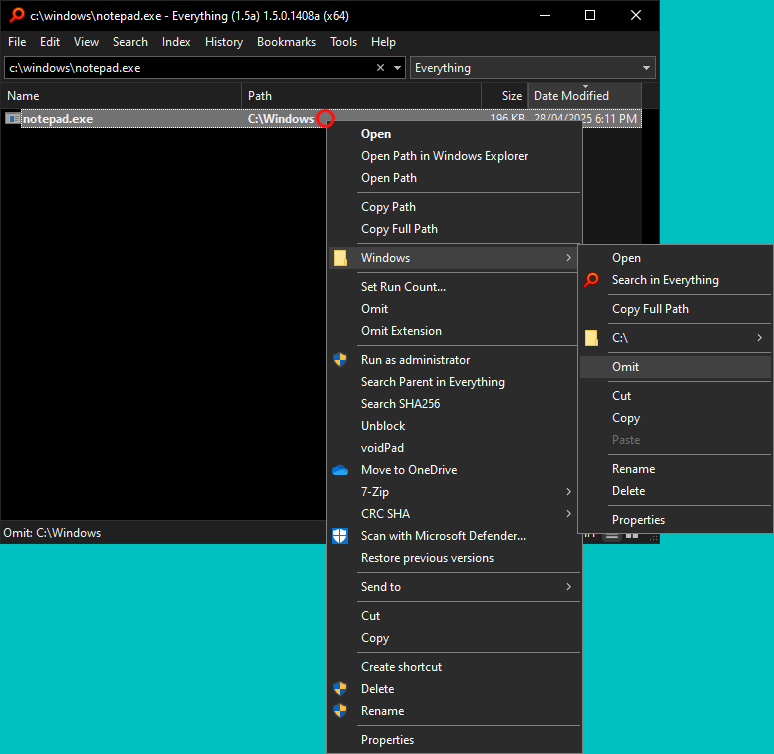
Right click under the Path column, then under the parent folder, click Omit.
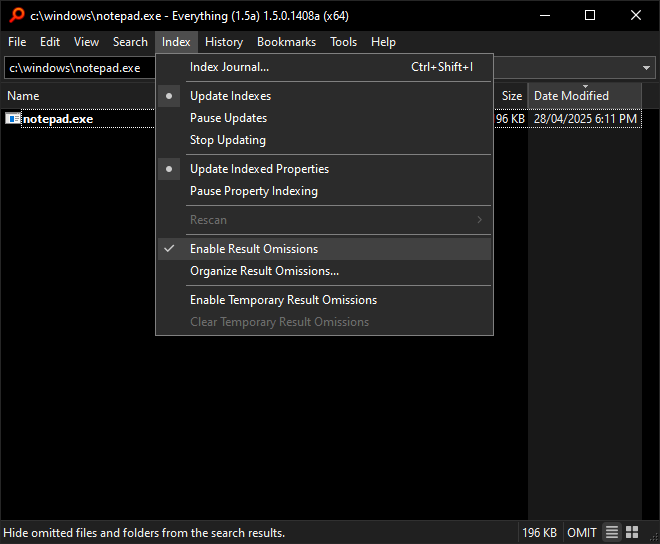
Enable result omissions from the Index menu -> Check Enable Result Omissions.
Right click under the Path column, then under the parent folder, click Omit.
-
Herkules97
- Posts: 259
- Joined: Tue Oct 08, 2019 6:42 am
Re: context menu - add "exclude"
What do you mean by "other way"?tj765242026 wrote: Mon Mar 23, 2026 1:03 pm if this feature doesnt already exist in other way i would like to be able to right click on the results screen and be able to exclude the path. maybe prompt showing the full path and allow user to modify it, or leave as is.
You can do !"C:\Windows" to exclude that folder.
Maybe !"C:\Windows\" excludes all files and folders under it but not itself, I am too lazy to test.
You can use left-side shift+ctrl+c to copy path and input in the search bar.
Or if you mean toggle hiding a folder, or a few, for a set of searches I guess the results omission thing Void mentioned works.