@zonetrooperex
May I assume that those bookmarks are fitted specifically to you Windows installation?
I see many bookmarks that do exclude folders named FileHistory or similar. I guess I can safely remove those folder names or adapt them to my needs, correct?
Really Useful Set of Bookmark Searches 2.6 for Everything 1.5 Beta
-
Michi
- Posts: 69
- Joined: Thu Jul 28, 2022 9:23 am
-
horst.epp
- Posts: 1664
- Joined: Fri Apr 04, 2014 3:24 pm
Re: Really Useful Set of Bookmark Searches 2.1 for Everything
The FileHistory parts are not specific to the posters system.
They are usefull if you have enabled Windows versioning
and you don't want to see the old versions of a searched file.
They are usefull if you have enabled Windows versioning
and you don't want to see the old versions of a searched file.
-
Michi
- Posts: 69
- Joined: Thu Jul 28, 2022 9:23 am
Re: Really Useful Set of Bookmark Searches 2.1 for Everything
Ah, OK thanks for those details!
-
ChrisGreaves
- Posts: 838
- Joined: Wed Jan 05, 2022 9:29 pm
Re: Really Useful Set of Bookmark Searches 2.1 for Everything
Hi kazzybash. If by "crap" you mean transient files no longer useful, here is my embryonic set of masks:-kazzybash wrote: Thu Feb 10, 2022 8:17 am Suggestions for more crap-extensions are welcome[/b]
!FileHistory\ ext:$$$;gpk;asd;dmp;~;tmp;~bk;old;
Code: Select all
~*.*
Erase*.*
Backup of*.*
*.wbk
*.bakCheers, Chris
-
zonetrooperex
- Posts: 79
- Joined: Tue Jun 10, 2014 4:06 pm
Re: Really Useful Set of Bookmark Searches 2.2 for Everything
Version 2.2 is out:
- Added Miscellaneous category
- Some minor organization fixes
- Added some new bookmarks (dealing with file cleanup)
-
ChrisGreaves
- Posts: 838
- Joined: Wed Jan 05, 2022 9:29 pm
Re: Really Useful Set of Bookmark Searches 2.2 for Everything
Hi zonetrooperex. I can't get this to work, and that means I have misunderstood your instructions.zonetrooperex wrote: Tue Jun 10, 2014 5:09 pm [*]I've created a bunch of really useful in-app bookmarked searches for Everything[*] Close off Search Everything (including tray icon)Code: Select all
Name,Type,Folder,Case,Whole Word,Path,Diacritic,Prefix,Suffix,Ignore Punctuation,Ignore Whitespace,Regex,Search,Filter,Columns,Sort,Descending,View,Index,File List,Host,Link Type,Macro,Key,Icon
...
[*] Backup your original Everything "Bookmarks.csv" file in Everything's Roaming Profile. (%APPDATA%\Everything)
[*] Copy and replace using the downloaded file.
[*] Relaunch Search Everything, check the Bookmarks Menu Item.
(1) I shut down Everything 1.5.0.1343a(x64)
(2) I pasted the first CODE panel here into a file “B:\Bookmarks20230420.csv”
(3) I renamed my current CSV file to be “Bookmarks-1.5a - Copy.csv.txt” with the txt extension hiding it from Everything’s view.
(4) I copied my “B:\Bookmarks20230420.csv” into the Everything %appdata% folder.
(5) I renamed that “Bookmarks20230420.csv” file to be the original “Bookmarks-1.5a.csv”
(6) At this point I checked the %appdata% folder. My beginner’s CSV file is 1 KB in Windows Explorer; my replacement CSV file is 8 KB, so I believe I have installed your bookmarks correctly.
(7) I edited the INI file to read “menu_folders=1” and saved my changes.
(8) I restarted Everything 1.5a and chose Bookmarks, Show all bookmarks. (9) But I don’t see an anticipated mammoth set of bookmarks.
We can be confident that I have missed out a step somewhere, but Please and Thank you – where have I gone wrong?
At this stage, I am not too worried about which version of your bookmarks come into view, as long as some bookmarks come into view!
Thanks, Chris
You do not have the required permissions to view the files attached to this post.
-
ToSamJa
- Posts: 9
- Joined: Fri Mar 18, 2016 7:26 am
Re: Really Useful Set of Bookmark Searches 2.2 for Everything
You need to do:
Bookmarks
Show all Bookmarks
and after that you need to use the button import and choose the new .csv file.
Hope this work for you now
Bookmarks
Show all Bookmarks
and after that you need to use the button import and choose the new .csv file.
Hope this work for you now
-
ChrisGreaves
- Posts: 838
- Joined: Wed Jan 05, 2022 9:29 pm
Re: Really Useful Set of Bookmark Searches 2.2 for Everything
ToSamJa , thank you. I was sure I had misunderstood the steps.ToSamJa wrote: Thu Apr 20, 2023 7:53 am... and after that you need to use the button import and choose the new .csv file.
Now I can really get myself into trouble

Thanks again.
Chris
You do not have the required permissions to view the files attached to this post.
-
kazzybash
- Posts: 118
- Joined: Mon Mar 02, 2020 9:55 pm
Re: Really Useful Set of Bookmark Searches 2.1 for Everything
Thanks Chris! regards, KazzyChrisGreaves wrote: Tue Apr 11, 2023 6:43 pm I generally delete these files after my nightly backup to an external USB drive.
Cheers, Chris
-
shodan
- Posts: 40
- Joined: Wed Mar 17, 2021 8:40 am
Re: Really Useful Set of Bookmark Searches 2.2 for Everything
Please consider adding the following search bookmarks
Completely empty folders (empty: or childcount:0)
Folders with only folders in them (childfilecount:0 childcount:>0)
Folders with only folders including in sub-folders (descendantfilecount:0 childcount:>0) v1.5 only
Folders with more than 1000 files in them (childfilecount:>1000)
Folders with more than x files in them, including files in sub-folders (descendantfilecount:0) v1.5 only
Completely empty folders (empty: or childcount:0)
Folders with only folders in them (childfilecount:0 childcount:>0)
Folders with only folders including in sub-folders (descendantfilecount:0 childcount:>0) v1.5 only
Folders with more than 1000 files in them (childfilecount:>1000)
Folders with more than x files in them, including files in sub-folders (descendantfilecount:0) v1.5 only
Last edited by void on Sun Jun 04, 2023 3:50 am, edited 2 times in total.
Reason: fixed es: URLs
Reason: fixed es: URLs
-
shodan
- Posts: 40
- Joined: Wed Mar 17, 2021 8:40 am
Re: Really Useful Set of Bookmark Searches 2.2 for Everything
Also please add es:// to the list of valid URL protocols to this phpBB forum ?
https://www.phpbb.com/community/viewtopic.php?t=2382206
https://www.phpbb.com/community/viewtopic.php?t=2382206
-
void
- Developer
- Posts: 20291
- Joined: Fri Oct 16, 2009 11:31 pm
-
zonetrooperex
- Posts: 79
- Joined: Tue Jun 10, 2014 4:06 pm
Re: Really Useful Set of Bookmark Searches 2.2 for Everything
Thanks for the suggestions, I'll consider them in the next version.shodan wrote: Sat Jun 03, 2023 8:06 pm Please consider adding the following search bookmarks
Completely empty folders (empty: or childcount:0)
Folders with only folders in them (childfilecount:0 childcount:>0)
Folders with only folders including in sub-folders (descendantfilecount:0 childcount:>0) v1.5 only
Folders with more than 1000 files in them (childfilecount:>1000)
Folders with more than x files in them, including files in sub-folders (descendantfilecount:0) v1.5 only
I'll wait for Everything 1.5's first full release for the next update.
-
BKPB
- Posts: 27
- Joined: Fri Aug 19, 2011 9:13 pm
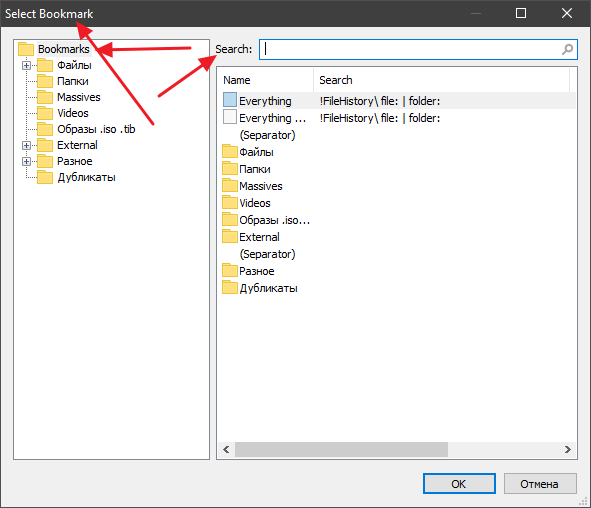
 Rename labels
How do I rename these labels ? Translate into my language ?
-
void
- Developer
- Posts: 20291
- Joined: Fri Oct 16, 2009 11:31 pm
Re: Really Useful Set of Bookmark Searches 2.2 for Everything
Translation templates will be available when Everything 1.5 is in beta.
For now, the Everything 1.5 alpha is English only.
For now, the Everything 1.5 alpha is English only.
-
BKPB
- Posts: 27
- Joined: Fri Aug 19, 2011 9:13 pm
Re: Really Useful Set of Bookmark Searches 2.2 for Everything
Thank you for your work.
-
Thy Grand Voidinesss
- Posts: 825
- Joined: Wed Jun 01, 2022 5:01 pm
Re: Really Useful Set of Bookmark Searches 2.2 for Everything
Where is the link to CSV file containing these Bookmarks?
-
ToSamJa
- Posts: 9
- Joined: Fri Mar 18, 2016 7:26 am
Re: Really Useful Set of Bookmark Searches 2.2 for Everything
Thy Grand Voidinesss,
You need to create yourself the CSV file, and after that do the import (like explained in the first post)
You need to create yourself the CSV file, and after that do the import (like explained in the first post)
-
zonetrooperex
- Posts: 79
- Joined: Tue Jun 10, 2014 4:06 pm
Re: Really Useful Set of Bookmark Searches 2.3 for Everything 1.5A
Updated to version 2.3 

-
marcelo colina
- Posts: 3
- Joined: Wed Apr 24, 2024 1:28 pm
Re: Really Useful Set of Bookmark Searches 2.3 for Everything 1.5A
Thanks, fantastically usefull.
-
marcelo colina
- Posts: 3
- Joined: Wed Apr 24, 2024 1:28 pm
Re: Really Useful Set of Bookmark Searches 2.3 for Everything 1.5A
An issue, just trying it, when the latest bookmarks used are recorded in the last used menu, they are labeled with the code instead of their name, and it become a very wide menu in the screen.
here is the screenshot
here is the screenshot
You do not have the required permissions to view the files attached to this post.
Last edited by void on Wed Apr 24, 2024 11:33 pm, edited 1 time in total.
Reason: fixed image link
Reason: fixed image link
-
void
- Developer
- Posts: 20291
- Joined: Fri Oct 16, 2009 11:31 pm
Re: Really Useful Set of Bookmark Searches 2.3 for Everything 1.5A
Thank you for the issue report Marcelo Colina,
I will limit the search history text to 64 characters in the next alpha update.
I will limit the search history text to 64 characters in the next alpha update.
-
Thy Grand Voidinesss
- Posts: 825
- Joined: Wed Jun 01, 2022 5:01 pm
Re: Really Useful Set of Bookmark Searches 2.3 for Everything 1.5A
I think that there should be an option for this right above that list and also an option for how many characters to show i.e. let the user decide on the spot in the menu of History if the list should be potentially truncated or not and make it possible for user to define the number of characters by using a setting burred invoid wrote: Thu Apr 25, 2024 9:56 am [...]
I will limit the search history text to 64 characters in the next alpha update.
Tools > Options > Advanced
with its default value being 260; because 260 is the theoretical limit for length of path in Windows and thus an average user wil rather not be re-searching for a longer path
-
zonetrooperex
- Posts: 79
- Joined: Tue Jun 10, 2014 4:06 pm
 Re: Really Useful Set of Bookmark Searches 2.4 for Everything 1.5A
Updated to version 2.4.
- Fixed macros clashing with volumes (important fix in 2.4)
- Fixed macros clashing with volumes (important fix in 2.4)
-
gcrow
- Posts: 1
- Joined: Sun Jul 07, 2024 4:28 pm
Re: Really Useful Set of Bookmark Searches 2.4 for Everything 1.5A
childfile:*.txt addcolumn:child-occurrence-count sort:child-occurrence-count
This will count the number of text files in a folder and its subfolders and creates a column to display them.
This will count the number of text files in a folder and its subfolders and creates a column to display them.
-
Raindrops
- Posts: 257
- Joined: Sat Jan 21, 2023 10:04 am
Re: Really Useful Set of Bookmark Searches 2.4 for Everything 1.5A
I have installed your latest bookmarks in Everything 1383a.
But for most of the preset bookmarks, the results panel remains blank.
In all cases, the Everything option is selected in the item type drop-down.
In other words, no filter is applied to the search results.
Here are three examples:
Example-1:
If I select the Bookmarks > Files >Large files menu, or press CTRL+SHFT+9, the address bar shows this entry:
!FileHistory\ file: size:>1gb
The result panel remains blank.
I do have large files on my D:, F:, and G: drives, but they are not shown.
---------------
Example-2:
I selected the Long filenames option.
The address bar shows this entry:
!C:\ !.dat !FileHistory\ file: len:>85
The result panel remains blank.
I reduced the length to 15,
!C:\ !.dat !FileHistory\ file: len:>15
But still there are no results.
--------------------------------------
Example-3:
I selected the Files > Files bookmark.
The address bar shows this entry:
!FileHistory\ file:
I expected it to show all files from all drives (filtering out the folders).
But the result pane shows very few results, most of which are from C:\Windows\WinSxS path.
A couple of them are from C:\Windows\System32 path.
------------------------------------------
What could be wrong?
But for most of the preset bookmarks, the results panel remains blank.
In all cases, the Everything option is selected in the item type drop-down.
In other words, no filter is applied to the search results.
Here are three examples:
Example-1:
If I select the Bookmarks > Files >Large files menu, or press CTRL+SHFT+9, the address bar shows this entry:
!FileHistory\ file: size:>1gb
The result panel remains blank.
I do have large files on my D:, F:, and G: drives, but they are not shown.
---------------
Example-2:
I selected the Long filenames option.
The address bar shows this entry:
!C:\ !.dat !FileHistory\ file: len:>85
The result panel remains blank.
I reduced the length to 15,
!C:\ !.dat !FileHistory\ file: len:>15
But still there are no results.
--------------------------------------
Example-3:
I selected the Files > Files bookmark.
The address bar shows this entry:
!FileHistory\ file:
I expected it to show all files from all drives (filtering out the folders).
But the result pane shows very few results, most of which are from C:\Windows\WinSxS path.
A couple of them are from C:\Windows\System32 path.
------------------------------------------
What could be wrong?
-
void
- Developer
- Posts: 20291
- Joined: Fri Oct 16, 2009 11:31 pm
Re: Really Useful Set of Bookmark Searches 2.4 for Everything 1.5A
Please check the following advanced setting:
allow_exclamation_point_not
allow_exclamation_point_not
-
Raindrops
- Posts: 257
- Joined: Sat Jan 21, 2023 10:04 am
Re: Really Useful Set of Bookmark Searches 2.4 for Everything 1.5A
It is already set to 1.
-
void
- Developer
- Posts: 20291
- Joined: Fri Oct 16, 2009 11:31 pm
Re: Really Useful Set of Bookmark Searches 2.4 for Everything 1.5A
Maybe a file: macro was created?
Please try a search for:
file:
Does this find all files?
If not, please try a search for:
::file:
Does this find all files?
Could you please send your Help -> troubleshooting information.
Please try a search for:
file:
Does this find all files?
If not, please try a search for:
::file:
Does this find all files?
Could you please send your Help -> troubleshooting information.
-
Raindrops
- Posts: 257
- Joined: Sat Jan 21, 2023 10:04 am
Re: Really Useful Set of Bookmark Searches 2.4 for Everything 1.5A
The file: command works.
But if I click on the preset bookmarks from your collection, the Results pane is blank.
Even folder-related nodes, such as Folders, and Empty folders also do not work.
But if I click on the preset bookmarks from your collection, the Results pane is blank.
Even folder-related nodes, such as Folders, and Empty folders also do not work.
Everything: 1.5.0.1383a (x64)
OS: Windows NT 10.0 22631 (x64)
Admin: 0
Service: 1 (connected / installed and running)
Command line:
Binary: C:\Program Files\Util\Everything 1.5a\Everything64.exe
Profile: C:\Users\naray\AppData\Roaming\Everything\Everything-1.5a.ini
Database: C:\Users\naray\AppData\Local\Everything\Everything-1.5a.db
Instance: 1.5a
Config: ignore_punctuation=1
Config: beta_updates=1
Config: highlight_max_or_paths=256
Config: open_folder_command2="C:\Program Files (x86)\Util\FreeCommander XE\FreeCommander.exe"("%1")
Config: open_path_command2=$exec("C:\Program Files $(x86$)\Util\FreeCommander XE\FreeCommander.exe" "%1")
Config: auto_include_removable_volumes=1
Config: auto_remove_offline_ntfs_volumes=0
Config: filelist_context_menu=0
Config: set_foreground_window_attach_thread_input=0
Config: home_filter=1
Config: path_hit_text_only=0
Config: keep_result_focus_in_view=0
Config: full_row_select=0
Config: full_name_select=1
Config: convert_forward_slash_to_backslash=1
Config: ignore_punctuation_type=1
Config: show_detailed_listview_tooltips=4
Config: control_shift_action=0
Config: folder_rescan_timeout=300000
Config: context_menu_parent_folder=4
Config: filter=EVERYTHING
Config: preview_visible=1
Config: preview_icon=1
Config: treeview_everything_expand_button=1
Config: columns=[{"name":"Size","width":82},{"name":"Name","width":490},{"name":"Length","width":99},{"name":"Date Created","width":96},{"name":"Path","width":960}]
Config: exclude_folders="?:\\$recycle.bin\\"
-
void
- Developer
- Posts: 20291
- Joined: Fri Oct 16, 2009 11:31 pm
Re: Really Useful Set of Bookmark Searches 2.4 for Everything 1.5A
Thank you for the troubleshooting information.
I'll look into a fix.
Tools -> Options -> Advanced -> ignore_punctuation_type="Filename and Search" currently breaks all search functions.Config: ignore_punctuation_type=1
I'll look into a fix.
-
Raindrops
- Posts: 257
- Joined: Sat Jan 21, 2023 10:04 am
Re: Really Useful Set of Bookmark Searches 2.4 for Everything 1.5A
Thanks!
BTW, I would like the following additional bookmarks in this collection:
1. Video (mp4, webm, avi, mov, wmv, mkv, flv, etc.)
2. Audio (mp4, m4a, wma, ogg, aac, MIDI, wav, etc.)
3. docs (pdf, doc, docx, txt, epub, odt, odp, ppt, pptx, pps, xls, xlsx, rtf, txt, CSV, azw3, chm, mobi, etc.)
4. Images (tiff, bmp, png, jpg, gif, etc.)
5. Archives (zip, 7z, rar, etc.)
6. Executables (exe, msi, jar, bat, etc.)
I know I can create my own bookmarks, but if these are created in this set, everyone will benefit!
BTW, I would like the following additional bookmarks in this collection:
1. Video (mp4, webm, avi, mov, wmv, mkv, flv, etc.)
2. Audio (mp4, m4a, wma, ogg, aac, MIDI, wav, etc.)
3. docs (pdf, doc, docx, txt, epub, odt, odp, ppt, pptx, pps, xls, xlsx, rtf, txt, CSV, azw3, chm, mobi, etc.)
4. Images (tiff, bmp, png, jpg, gif, etc.)
5. Archives (zip, 7z, rar, etc.)
6. Executables (exe, msi, jar, bat, etc.)
I know I can create my own bookmarks, but if these are created in this set, everyone will benefit!
-
zonetrooperex
- Posts: 79
- Joined: Tue Jun 10, 2014 4:06 pm
 Re: Really Useful Set of Bookmark Searches 2.5 for Everything 1.5A
Version 2.5 is out! (updated: 1st of Sept, 2024)
-
maxfactor
- Posts: 38
- Joined: Tue Nov 08, 2016 4:31 pm
Re: Really Useful Set of Bookmark Searches 2.5 for Everything 1.5A
Regarding Organize Bookmarks I world like to suggest the following features
Skip duplicates when importing
Add a description field
Search inside the Search column as well
Skip duplicates when importing
Add a description field
Search inside the Search column as well
-
void
- Developer
- Posts: 20291
- Joined: Fri Oct 16, 2009 11:31 pm
Re: Really Useful Set of Bookmark Searches 2.5 for Everything 1.5A
I will consider an option to skip/overwrite duplicates and a remove duplicates feature.Skip duplicates when importing
This is on my TODO list for a future version of Everything.Add a description field
I will trial this in the next alpha update.Search inside the Search column as well
Thank you for the suggestions.
-
linbow
- Posts: 1
- Joined: Thu May 29, 2025 10:36 am
Re: Really Useful Set of Bookmark Searches 2.5 for Everything 1.5A
I imported bookmarks today and found that many of them were invalid. Finally, I found that it was because my Chrome automatic translation caused the copy error. Turning it off solved it.
You do not have the required permissions to view the files attached to this post.
-
yic
- Posts: 5
- Joined: Wed Jun 25, 2025 1:17 pm
Re: Really Useful Set of Bookmark Searches 2.5 for Everything 1.5A
How do we get or use these bookmarks?
-
don_don
- Posts: 6
- Joined: Fri Feb 16, 2024 7:38 pm
Re: Really Useful Set of Bookmark Searches 2.5 for Everything 1.5A
Wow. This is impressive.
What are "external files"?
Suggestion to add longpath >230: as another set of annoying files.
It would be handy for large/massive/gigantic to have a size indicator in the name (sizes below taken from the filter definitions)
large>2Gb, Massive>3GB Gigantic>6GB
What are "external files"?
Suggestion to add longpath >230: as another set of annoying files.
this works, but does not display the length. column A grabs some number and then text from start of pathlen:path:>230 add_column:a a-label:=pathlen a:=(len:fullpath:)
It would be handy for large/massive/gigantic to have a size indicator in the name (sizes below taken from the filter definitions)
large>2Gb, Massive>3GB Gigantic>6GB
-
minsik
- Posts: 20
- Joined: Fri Jan 25, 2013 10:57 pm
Re: Really Useful Set of Bookmark Searches 2.5 for Everything 1.5A
I second this! I cant find 2.5 for 1.5A either. Normally it would be attached for the first message.
Thanks.
Edit: Apologies, a seniors moment maybe!
Note to self, read till actually understood and dont assume! Dumbkoff.

Just reset the brain and it al came back to me! thanks. Loaded no problems.
Last edited by minsik on Sun Sep 14, 2025 5:35 am, edited 3 times in total.
-
ToSamJa
- Posts: 9
- Joined: Fri Mar 18, 2016 7:26 am
Re: Really Useful Set of Bookmark Searches 2.5 for Everything 1.5A
Well, all the informations (the bookmark set and how to import into Everything) are in the first post.
-
zonetrooperex
- Posts: 79
- Joined: Tue Jun 10, 2014 4:06 pm
 How to use
Yes, for anyone wondering how use these please refer to the first post in the thread.
BTW: The next version should be out by the end of year. Once I optimize and there's enough new bookmarks.
BTW: The next version should be out by the end of year. Once I optimize and there's enough new bookmarks.
-
tuska
- Posts: 1414
- Joined: Thu Jul 13, 2017 9:14 am
Re: Really Useful Set of Bookmark Searches 2.5 for Everything 1.5A
Please correct the 1st Filter "EVERYTHING" (Everything STRG+UMSCHALT+1) in the first post.zonetrooperex wrote: Tue Jun 10, 2014 5:09 pmPlease let me know if you have any suggestions or commentsCode: Select all
Name,Type,Folder,Case,Whole Word,Path,Diacritic,Prefix,Suffix,Ignore Punctuation,Ignore Whitespace,Regex,Search,Filter,Columns,Sort,Descending,View,Index,File List,Host,Link Type,Macro,Key,Icon
"Everything",0,"",0,0,0,0,,,,,0,"!FileHistory\ file: | folder:","EVERYTHING","","Name",0,,0,,,0,"all",1329,""
"!FileHistory\ file: | folder:"Should be:
Code: Select all
"Everything",0,"",0,0,0,0,,,,,0,"","EVERYTHING","","Name",0,,0,,,0,"all",1329,""-
fanofvoid
- Posts: 17
- Joined: Tue Mar 24, 2026 6:05 am
Re: Really Useful Set of Bookmark Searches 2.5 for Everything 1.5A
concur with tuska
this also applies to 2nd filter for Everything by Size
this also applies to 2nd filter for Everything by Size
-
sauljhl
- Posts: 30
- Joined: Tue Oct 18, 2022 11:20 am
Re: How to use
We're now well past the EOTY. Are we due for new releases for 1.4 & 1.5 soon-ish?zonetrooperex wrote: Thu Oct 02, 2025 5:55 am Yes, for anyone wondering how use these please refer to the first post in the thread.
BTW: The next version should be out by the end of year. Once I optimize and there's enough new bookmarks.

-
zonetrooperex
- Posts: 79
- Joined: Tue Jun 10, 2014 4:06 pm
Re: Really Useful Set of Bookmark Searches 2.5 for Everything 1.5A
Fair point I will update it by the end of this month.
I will update it by the end of this month.-
zonetrooperex
- Posts: 79
- Joined: Tue Jun 10, 2014 4:06 pm
Re: Really Useful Set of Bookmark Searches 2.6 for Everything 1.5 Beta
Updated to Version 2.6.
It's a small update with updated description.
It's a small update with updated description.