
Is there a way to get my ones back?
Actually I would say nothing (intentionally). Sorry, I do not have any idea what happened. Why is there STRG+P shown next to "Options" when it opens a new window?What did you change or update ?
No, I didn't (intentionally).Did you change your Windows input to a German keyboard?
OK, sorry, what does that mean in this case / at all?There's no STRG text in Everything.
Everything is pulling this keyboard key name from Windows.
OK, how could I do it? And regarding what settings?Please make sure your Windows keyboard settings are set correctly.
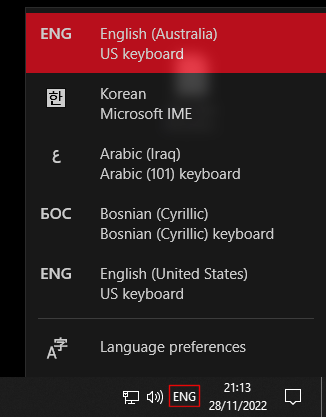


So open it and, sorry, do what?Please try focusing Everything and checking your keyboard input is set correctly as above.

Yes, I already did.Please try restarting Everything.

OK, I just did. Shown in status bar for seconds. Sorry, whatfor?If the issue persists, please disable system key names:
No, it doesn't. Nothing seemed to happen.Does this show the system change keyboard input dialog?


Yes, OK, but it doesn't.If get_key_name_text=1 works for you, keep it enabled.
So when whatever has changed and caused the problem changes back to the state before the old shortcuts would not work anymore (with get_key_name_text=0?, like it is now)?When get_key_name_text is disabled (get_key_name_text=0), Everything will not lookup keyboard key names from the system and just use internal English names for keys.
So actually I already should have restarted the computer, maybe then it works again.My guess is your keyboard driver.
Does this save the db and / or the settings? Why not click "Exit"? Obviously it does, still running. Will take some time.Copy and paste the following into your Everything search box:
/restart
Yes, /restart will save your settings and database to disk and restart Everything./restart
Does this save the db and / or the settings? Why not click "Exit"? Obviously it does, still running. Will take some time.