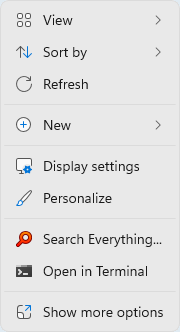
A Windows 11 modern context menu item for Everything.
Right-click a folder, or the background of a folder, and choose Search Everything... to open Everything with that location.
Download
https://www.voidtools.com/EverythingShellExtension-1.0.0.0.x64.msix
https://www.voidtools.com/EverythingShellExtension-1.0.0.0.src.zip
https://github.com/voidtools/everything_shell_extension
How it works
EverythingShell.dllIt is written in C and built without the C runtime.
The Windows 11 context menu only loads handlers registered by a package with identity, so the DLL is registered by an MSIX package (windows.fileExplorerContextMenus + windows.comServer surrogate server).
Folders and the folder background use desktop5:ItemType (Directory, Directory\Background).
Drives use desktop10:ItemType (Drive), which needs Windows 11 22H2 (build 22621) or later.
Everything.exe is found in the
ExePathHKEY_LOCAL_MACHINE\SOFTWARE\voidtools\EverythingIf that does not exist,
C:\Program Files\Everything\Everything.exeEverythingShellStub.exeThe package manifest requires an application with an executable, it does nothing and is never run.
Requirements
Windows 11 and Everything 1.5.
Install
Run the EverythingShellExtension.msix and click Install.
Click Close.
Uninstall
From the Start menu, search for:
add removeClick Add or remove programs.
Select Everything Shell Extension and click Uninstall.