Crash after scanning the hard drive.
-
dldc114
- Posts: 19
- Joined: Wed Sep 07, 2022 2:21 pm
Crash after scanning the hard drive.
I have a disk with a folder containing 1.1 million subfolders, and each subfolder contains 3 files. If I scan that disk, the scanning process will crash during the sorting phase after completion because these folders and files are generated by other software and cannot be reduced. Is there any way to solve this crashing issue? Thank you.
-
therube
- Posts: 5848
- Joined: Thu Sep 03, 2009 6:48 pm
Re: Crash after scanning the hard drive.
Version of Everything (& bit-ness)?
Are you indexing Properties?
I'd think it not to do with numbers (of files, directories) but rather with a shell extension.
See the types of information you may want to provide, Number of handles keeps increasing.
ShellExView - Shell Extensions Manager
Are you indexing Properties?
I'd think it not to do with numbers (of files, directories) but rather with a shell extension.
See the types of information you may want to provide, Number of handles keeps increasing.
ShellExView - Shell Extensions Manager
-
void
- Developer
- Posts: 20360
- Joined: Fri Oct 16, 2009 11:31 pm
Re: Crash after scanning the hard drive.
Please try unchecking all fast sort options under Tools -> Options -> Indexes.
Is a crash dialog shown?
Could you please send a mini crash dump:
Is a crash dialog shown?
Could you please send a mini crash dump:
- Please keep the crash dialog open.
- Download Process Explorer from Microsoft:
https://docs.microsoft.com/en-us/sysinternals/downloads/process-explorer - In Process Explorer, select Everything64.exe (If there is two, select the one using the most memory)
- Right click Everything.exe and under Create Dump, select Create Mini Dump.
- Choose a filename and click Save.
- Please upload this file in a bug report
-
dldc114
- Posts: 19
- Joined: Wed Sep 07, 2022 2:21 pm
Re: Crash after scanning the hard drive.
It is x64-bit. There is no crash dialog box, so there is no way to save the crash dump. Looking at the task manager, the memory usage is not much. Even after re-downloading and installing in a new directory, without any settings, it crashes during the scanning and sorting process. Here is the video recording.
Last edited by void on Sat Jan 04, 2025 12:09 am, edited 2 times in total.
Reason: removed video
Reason: removed video
-
void
- Developer
- Posts: 20360
- Joined: Fri Oct 16, 2009 11:31 pm
Re: Crash after scanning the hard drive.
Thank you for the video.
The video shows all indexing options are off and the settings are the defaults.
The video shows Everything disappearing when sorting filenames.
This is likely caused by stack corruption.
Are you excluding any files/folders under Tools -> Options -> Exclude?
Please try running Everything in debug mode:
From a command prompt, run:
Everything.exe -debug -verbose > out.txt
Please check out.txt after Everything crashes.
What are the last few lines?
The video shows all indexing options are off and the settings are the defaults.
The video shows Everything disappearing when sorting filenames.
This is likely caused by stack corruption.
Are you excluding any files/folders under Tools -> Options -> Exclude?
Please try running Everything in debug mode:
From a command prompt, run:
Everything.exe -debug -verbose > out.txt
Please check out.txt after Everything crashes.
What are the last few lines?
-
dldc114
- Posts: 19
- Joined: Wed Sep 07, 2022 2:21 pm
Re: Crash after scanning the hard drive.
This is all the debugging information.
Last edited by void on Sat Jan 04, 2025 10:11 pm, edited 1 time in total.
Reason: removed log.
Reason: removed log.
-
void
- Developer
- Posts: 20360
- Joined: Fri Oct 16, 2009 11:31 pm
Re: Crash after scanning the hard drive.
Thank you for the debug logs.
My investigation from the logs turned up with nothing useful..
Looks like the file system was repaired at some stage.
Maybe there's corruption in one of the NTFS files/folders.
This shouldn't cause Everything to die..
Could you please install windbg and launch Everything with a debugger attached:
My investigation from the logs turned up with nothing useful..
Looks like the file system was repaired at some stage.
Maybe there's corruption in one of the NTFS files/folders.
This shouldn't cause Everything to die..
Could you please install windbg and launch Everything with a debugger attached:
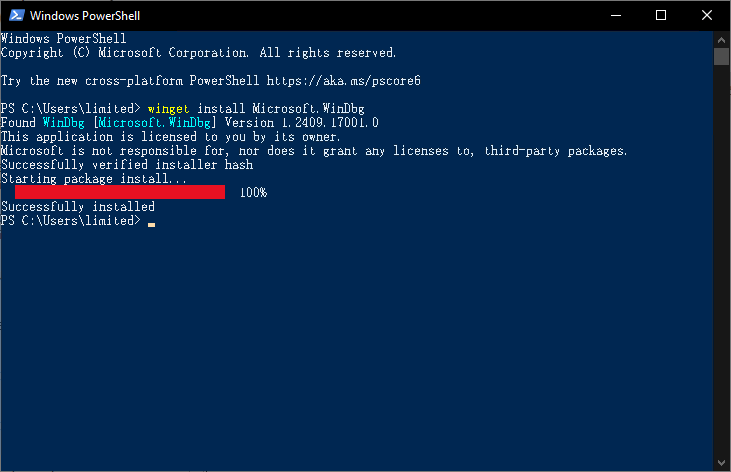
- From a powershell, please run:
winget install Microsoft.WinDbg
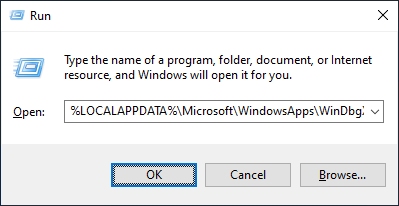
- Run:
%LOCALAPPDATA%\Microsoft\WindowsApps\WinDbgX.exe
- In WinDbg, from the File menu, click Launch executable.
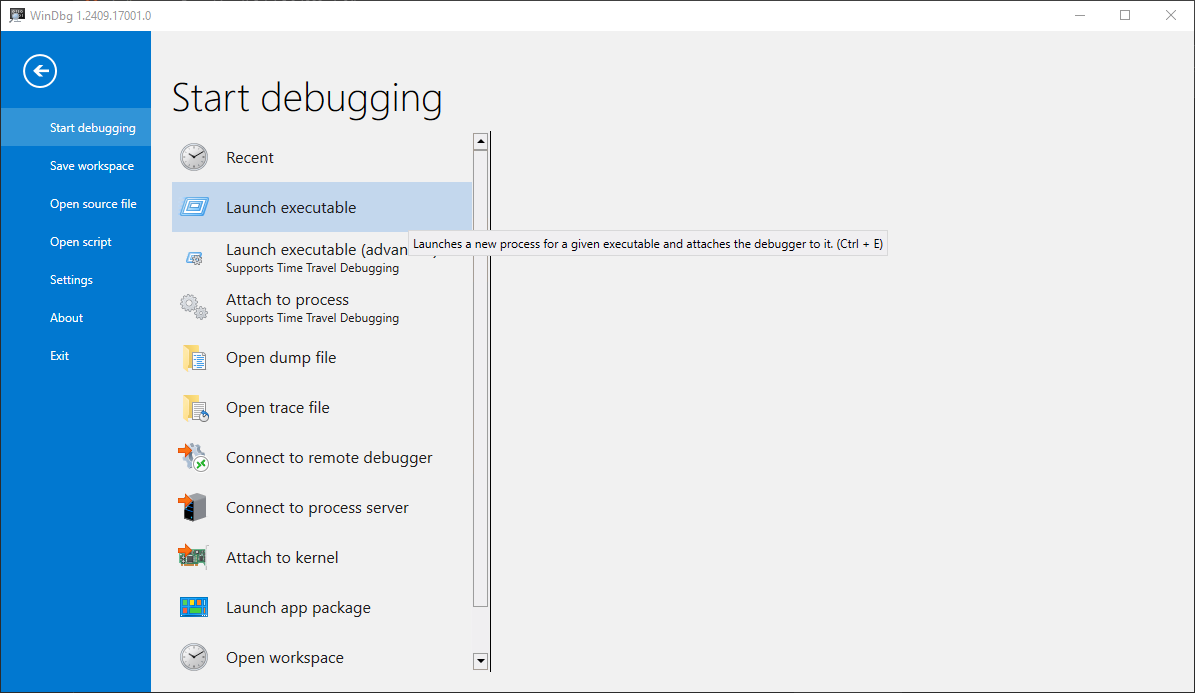
- Select
C:\Program Files\Everything 1.5a\Everything64.exe - Click The Home tab.
- Click the down arrow under Go and click Go Unhandled Exception.
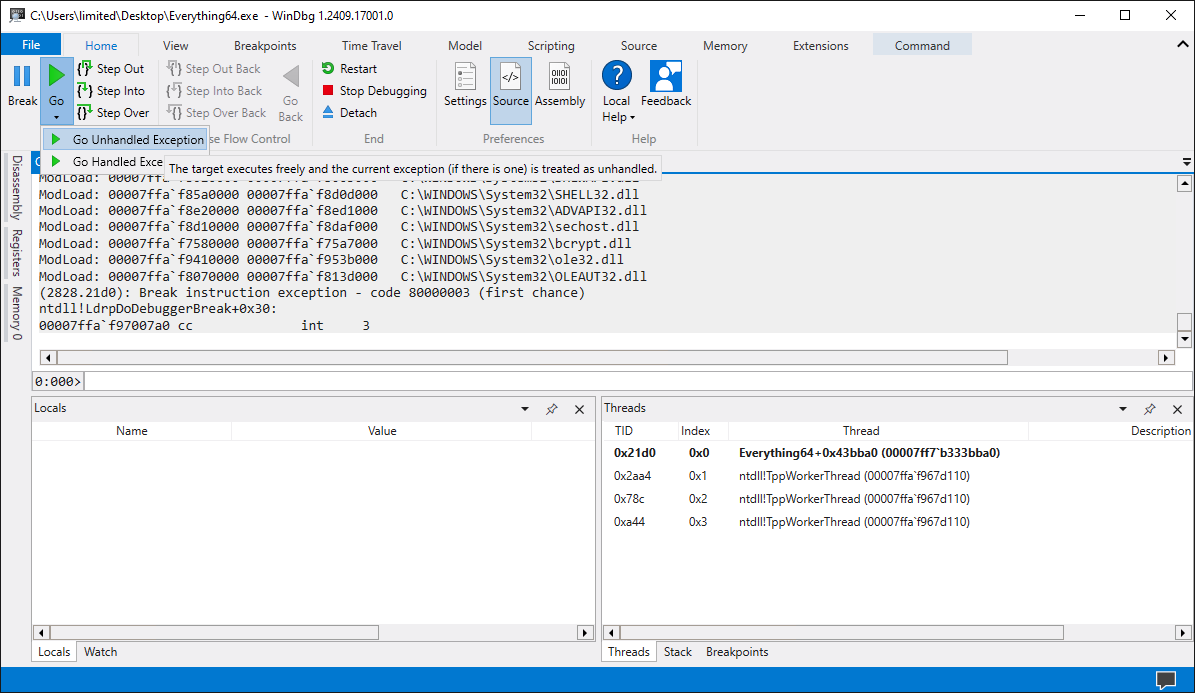
- Wait for Everything to crash.
- Download Process Explorer from Microsoft:
https://docs.microsoft.com/en-us/sysinternals/downloads/process-explorer - In Process Explorer, select Everything64.exe (If there is two, select the one using the most memory)
- Right click Everything.exe and under Create Dump, select Create Mini Dump.
- Choose a filename and click Save.
- Please upload this file in a bug report