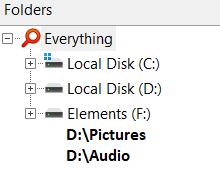
Discussion related to "Everything" 1.5.
vuslx
Posts: 24Joined: Tue Mar 08, 2022 6:50 am
Post by vuslx Sun Sep 18, 2022 8:25 am
"Folders" view section in 1.5 is wonderful.
But i would like to add bookmark in "Folder" section.
If not, that would be great.
void
Developer
Posts: 20208Joined: Fri Oct 16, 2009 11:31 pm
Post by void Sun Sep 18, 2022 8:33 am
A favourites folder for the folder sidebar is on my TODO list.
vuslx
Posts: 24Joined: Tue Mar 08, 2022 6:50 am
Post by vuslx Sun Sep 18, 2022 9:38 am
void wrote: Sun Sep 18, 2022 8:33 am
A favourites folder for the folder sidebar is on my TODO list.
You'll be able to pin D:\Pictures, D:\Audio etc... to the favourites folder.
Thanks for the suggestion.
I think, Everything will completely replace explorer.exe for me in the future.
wouter41
Posts: 2Joined: Sun Apr 12, 2026 11:42 pm
Post by wouter41 Sun Apr 12, 2026 11:47 pm
"Everything' is a new for me. I find it a pleasant and handy program.
void
Developer
Posts: 20208Joined: Fri Oct 16, 2009 11:31 pm
Post by void Mon Apr 13, 2026 12:21 am
Favorite folders will unlikely happen for Everything 1.5.
It's planned for a future version of Everything.
Thank you for the feedback.
For now, please try bookmarks:
In Everything , from the Bookmark menu, click Add to Bookmarks... .
Give the bookmark a name, for example Pictures
.
Change the Search to: /explore d:\pictures
Click OK.
wouter41
Posts: 2Joined: Sun Apr 12, 2026 11:42 pm
Post by wouter41 Mon Apr 13, 2026 7:49 am
Ah, it's the '/explore' before the path; that makes the difference!
void
Developer
Posts: 20208Joined: Fri Oct 16, 2009 11:31 pm
Post by void Mon Apr 13, 2026 8:08 am
To explore folders in Everything when opening a folder: