Even now, occasionally I fumble with the Everything syntax (there's a lot to remember) and I delete a bunch of recent entries by using the dropdown and then the delete key. However, I notice that this doesn't affect the History menu item (located in the toolbar at the top), listing the entries I just deleted.
Would you please change it so that deletions for recent queries repopulate the menu item?
Toolbar's History menu item doesn't reflect deletions
-
lifu
- Posts: 47
- Joined: Tue Jun 15, 2021 11:04 pm
-
therube
- Posts: 5844
- Joined: Thu Sep 03, 2009 6:48 pm
Re: Toolbar's History menu item doesn't reflect deletions
History (& the dropdown history-arrow too) are only effected if a search is "effected" by virtue of "visiting" the results list.
So if, in the Searchbar, you type
999, then 888, then 777 - never "effecting a search", History is not recorded.
If in the Searchbar, you type
999 <Enter> (or <Tab> or...), then 999 is added to History
666 <Enter>, then 666 is added to History
777, then simply change the search to 888, neither 777 nor 888 are added to History
There are various search_history_* (.ini) settings.
Unsure if anything there affects above?
So if, in the Searchbar, you type
999, then 888, then 777 - never "effecting a search", History is not recorded.
If in the Searchbar, you type
999 <Enter> (or <Tab> or...), then 999 is added to History
666 <Enter>, then 666 is added to History
777, then simply change the search to 888, neither 777 nor 888 are added to History
There are various search_history_* (.ini) settings.
Unsure if anything there affects above?
-
lifu
- Posts: 47
- Joined: Tue Jun 15, 2021 11:04 pm
Re: Toolbar's History menu item doesn't reflect deletions
therube wrote: Tue Sep 15, 2026 3:37 pm History (& the dropdown history-arrow too) are only effected if a search is "effected" by virtue of "visiting" the results list.
So if, in the Searchbar, you type
999, then 888, then 777 - never "effecting a search", History is not recorded.
If in the Searchbar, you type
999 <Enter> (or <Tab> or...), then 999 is added to History
666 <Enter>, then 666 is added to History
777, then simply change the search to 888, neither 777 nor 888 are added to History
There are various search_history_* (.ini) settings.
Unsure if anything there affects above?
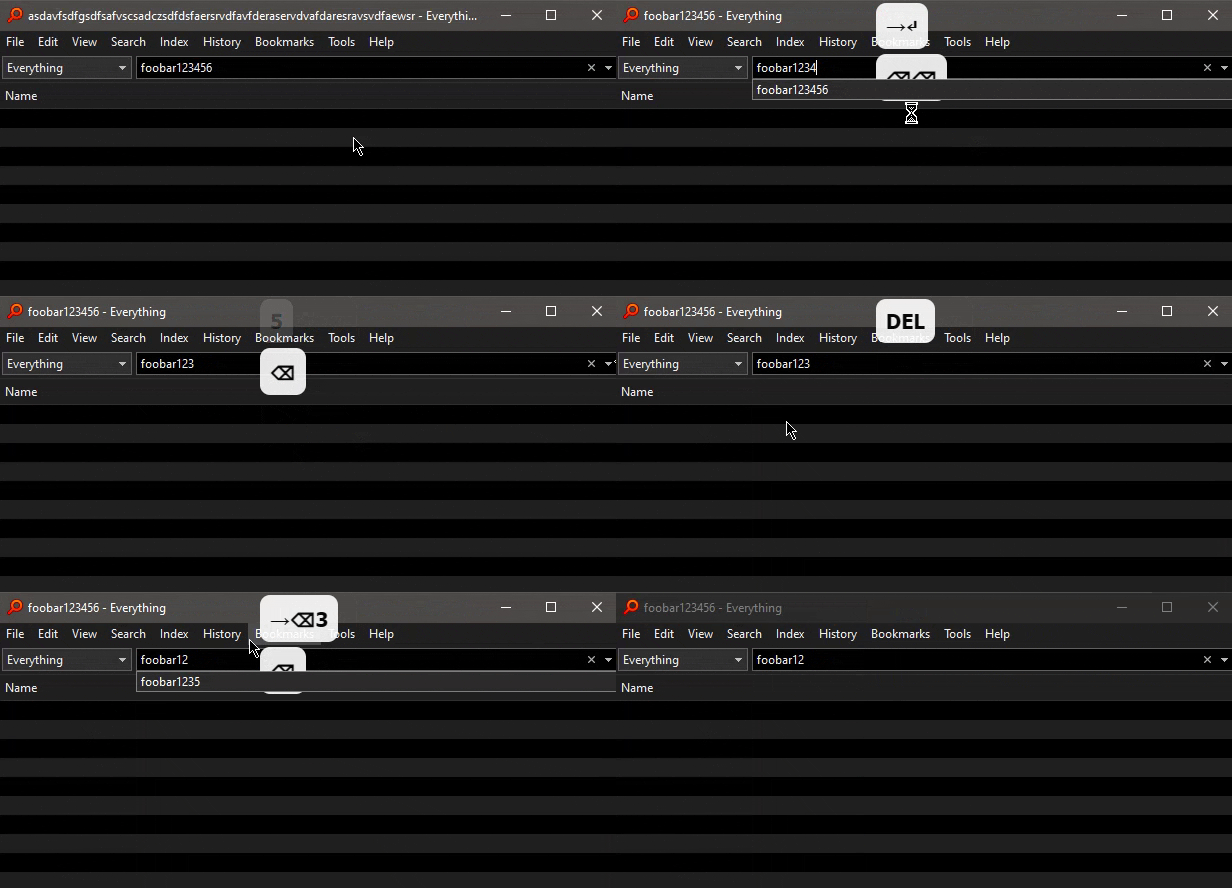
Notice how foobar123456 no longer autocompletes after I delete the entry (while a previous query, foobar1235, still comes up) and yet foobar123456 still appears as an entry in the History menu item.
-
Herkules97
- Posts: 291
- Joined: Tue Oct 08, 2019 6:42 am
Re: Toolbar's History menu item doesn't reflect deletions
Could it be setting you have on?
I think I've followed your exact steps and I get it in the dropdown as expected.
At least the first part, Idk if the next stuff is necessary.
I wrote Test17930 for this post ID, then deleted 930 and added 5 then deleted it without entering further and 17930 showed up.
I did it on 1411b and 1423b.
I think I've followed your exact steps and I get it in the dropdown as expected.
At least the first part, Idk if the next stuff is necessary.
I wrote Test17930 for this post ID, then deleted 930 and added 5 then deleted it without entering further and 17930 showed up.
I did it on 1411b and 1423b.
-
void
- Developer
- Posts: 20315
- Joined: Fri Oct 16, 2009 11:31 pm
Re: Toolbar's History menu item doesn't reflect deletions
The items listed under the History menu is "Navigation History"
Navigation history is completely separate to search history.
Navigation history items cannot be deleted like search history items.
Navigation history is cleared when you close your window.
A navigation history item is created when a search history item is created.
This is typically done when you press ENTER from the search box or perform an action on a result.
It's possible to go back to the navigation history item before foobar123456 (the long asdavf... one) by selecting it from the History menu or Alt + Left.
Perform a new search and press ENTER or perform an action on a result.
The new search will replace the foobar123456 navigation history item. (and anything after it)
The search suggestions from the search box come from your search history.
Navigation history is completely separate to search history.
Navigation history items cannot be deleted like search history items.
Navigation history is cleared when you close your window.
A navigation history item is created when a search history item is created.
This is typically done when you press ENTER from the search box or perform an action on a result.
It's possible to go back to the navigation history item before foobar123456 (the long asdavf... one) by selecting it from the History menu or Alt + Left.
Perform a new search and press ENTER or perform an action on a result.
The new search will replace the foobar123456 navigation history item. (and anything after it)
The search suggestions from the search box come from your search history.