ES - The command line interface for Everything

General discussion related to "Everything".
void
Developer
Posts: 19679
Joined: Fri Oct 16, 2009 11:31 pm

Re: ES - The command line interface for Everything

Post by void »

Updated -date-format documentation:

-date-format <format>
format can be one of the following:
  • 0 = (Use default) (default)
  • 1 = ISO-8601
  • 2 = FILETIME
  • 3 = ISO-8601(UTC)
  • 4 = User Locale
  • 5 = ISO-8601 (full-resolution)
  • 6 = ISO-8601 (UTC) (full-resolution)


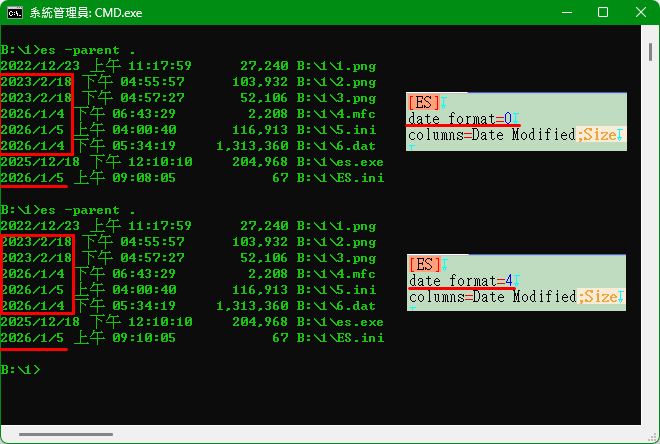
Please try
-date-format 4
and set your Short date format to yyyy/MM/dd under Settings -> Region and Language -> Formats.
happy666
Posts: 63
Joined: Tue Oct 07, 2025 10:35 pm

Re: ES - The command line interface for Everything

Post by happy666 »

Image
Image
void
Developer
Posts: 19679
Joined: Fri Oct 16, 2009 11:31 pm

Re: ES - The command line interface for Everything

Post by void »

ES with
-date-format 4
doesn't use the date formatting from Everything.

-date-format 4
uses the system date formatting under Settings -> Region and Language -> Formats -> Short Date.
happy666
Posts: 63
Joined: Tue Oct 07, 2025 10:35 pm

Re: ES - The command line interface for Everything

Post by happy666 »

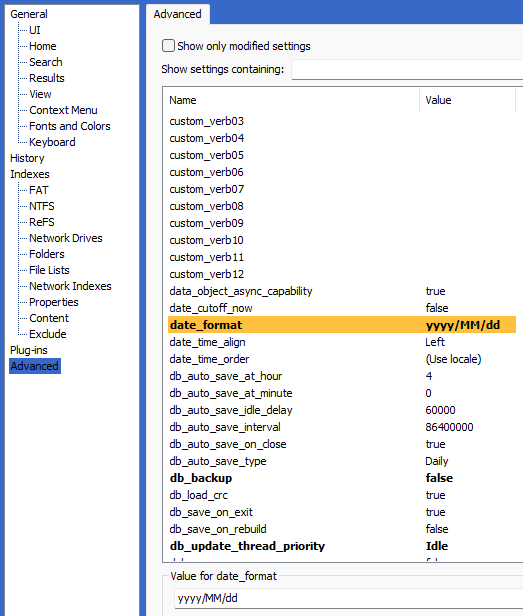
I can NOT find the "Settings -> Region and Language -> Formats -> Short Date."

Image]
void
Developer
Posts: 19679
Joined: Fri Oct 16, 2009 11:31 pm

Re: ES - The command line interface for Everything

Post by void »

From the Start menu, search for:
control panel

Click Control Panel.
Open Region.
Click the Formats tab.
Set the desired Short Date format.
happy666
Posts: 63
Joined: Tue Oct 07, 2025 10:35 pm

Re: ES - The command line interface for Everything

Post by happy666 »

It works and thank you.
NotNull
Posts: 5961
Joined: Wed May 24, 2017 9:22 pm

Re: ES - The command line interface for Everything

Post by NotNull »

The download page still has the 1.1.0.30 version (current = 1.1.0.36)
void
Developer
Posts: 19679
Joined: Fri Oct 16, 2009 11:31 pm

Re: ES - The command line interface for Everything

Post by void »

Thanks for letting me know.

I am aware, I haven't published the latest versions yet.
ES 1.1.0.36 is really still in beta and needs more testing.
emako
Posts: 2
Joined: Sat Aug 17, 2024 8:01 pm

Re: ES - The command line interface for Everything

Post by emako »

Hi!
Is 1.1.0.36 compatible with everything 1.5a?
void
Developer
Posts: 19679
Joined: Fri Oct 16, 2009 11:31 pm

Re: ES - The command line interface for Everything

Post by void »

Yes, but you will need to use
es -instance 1.5a
while Everything 1.5 is in alpha.

-or-

Disable the alpha instance under Tools -> Options -> Advanced -> alpha_instance
(please make sure Everything 1.4 is not installed before disabling)
err_24546
Posts: 79
Joined: Wed Oct 11, 2023 1:47 am

Re: ES - The command line interface for Everything

Post by err_24546 »

void how to access formulas and properties properly?
This works:

Code: Select all

.\es -json c:\some\file.png "a:=2*size:" "add-column:a;size"
Gives:
[{"filename":"C:\\some\\file.png","column_a":"2648","size":1324}]
But this one does not:
This works:

Code: Select all

.\es -json c:\some\file.png "a:=custom-property-1:" "add-column:a;custom-property-1"
Gives:
[{"filename":"C:\\some\\file.png","column_a":"","custom_property_1":"¶"}]
I was trying to get the hex value for my custom-property-1 value, since as you can see Everything can't decode it properly.
Define

Code: Select all

a:=Hex($custom-property-1:)
in the main window works but not in ES.
void
Developer
Posts: 19679
Joined: Fri Oct 16, 2009 11:31 pm

Re: ES - The command line interface for Everything

Post by void »

in the main window works but not in ES.
=> Re: Hex value for specific ADS
err_24546
Posts: 79
Joined: Wed Oct 11, 2023 1:47 am

Re: ES - The command line interface for Everything

Post by err_24546 »

I should mention first that ipc_allow_read_access is already enabled.

So property_alternate_data_stream_utf8 with HEX() still gives me the "Variable reference is not valid" error.

Even something like

Code: Select all

a:=GETPROPERTY($name:)
gives the same error.
To be clear, it is not that functions do not work, but references to other values. I guess something is breaking the parser (maybe it is related to PowerShell?).

And I assume that GETPROPERTY() does not use any indexed value but reads directly from disk, so it would be much slower, right?

Any other suggestion? Why I keep getting that error?

EDIT: Nevermind, is something related to PS, but regarding a:=HEX(GETPROPERTY($name:..":my-alternate-data-stream-name","binarycontent")), is slower than map that ADS to a custom property and use HEX() in that value?
void
Developer
Posts: 19679
Joined: Fri Oct 16, 2009 11:31 pm

Re: ES - The command line interface for Everything

Post by void »

Variable reference is not valid
This isn't an ES or Everything error message.
What is the exact error message shown?
To be clear, it is not that functions do not work, but references to other values. I guess something is breaking the parser (maybe it is related to PowerShell?).
Please try from a command prompt, powershell loves to mangle the command line.
Check the received ES request in Everything under Tools -> Debug -> Console.


EDIT: Nevermind, is something related to PS, but regarding a:=HEX(GETPROPERTY($name:..":my-alternate-data-stream-name","binarycontent")), is slower than map that ADS to a custom property and use HEX() in that value?
GETPROPERTY() will try to read index values first, then fall back to disk.
It's not possible to index alternate data streams in filenames, so this will always go to disk.

Index custom-property-1 and use $custom-property-1: in your formula for instant results.

Mapping custom-property-1 to zone.identifier and indexing custom-property-1 with the following es calls worked for me:

Code: Select all

es addcolumn:custom-property1
es addcolumn:a a:=$custom-property-1:
es addcolumn:a a:=HEX($custom-property-1:)
The following also work, but information is gathered from disk:

Code: Select all

es addcolumn:a a:=GETPROPERTY($name:..":zone.identifier","utf8content")
es addcolumn:a a:=HEX(GETPROPERTY($name:..":zone.identifier","utf8content"))
emako
Posts: 2
Joined: Sat Aug 17, 2024 8:01 pm

Re: ES - The command line interface for Everything

Post by emako »

void wrote: Sat Feb 21, 2026 10:13 pm Yes, but you will need to use
es -instance 1.5a
while Everything 1.5 is in alpha.

-or-

Disable the alpha instance under Tools -> Options -> Advanced -> alpha_instance
(please make sure Everything 1.4 is not installed before disabling)
Working great, thanks!!
I am making a package to use org-everything from Emacs. After polished, I could share if you think it's good for everything.
void
Developer
Posts: 19679
Joined: Fri Oct 16, 2009 11:31 pm

Re: ES - The command line interface for Everything

Post by void »

I am making a package to use org-everything from Emacs. After polished, I could share if you think it's good for everything.
Thanks for your work on bringing ES to Emacs.

Please feel free to post it here or make a post here.
therube
Posts: 5655
Joined: Thu Sep 03, 2009 6:48 pm

Re: ES - The command line interface for Everything

Post by therube »

-no-result-error

can you, & if so, how do you redirect the error message to nul?
for instance, Error 8: Everything IPC not found. Please make sure Everything is running.

es.ex2 SS.BAT -instance 15 -no-result-error
es.ex2 SS.BAT -instance 15 -no-result-error > nul
es.ex2 SS.BAT -instance 15 -no-result-error 2>&1 > nul
void
Developer
Posts: 19679
Joined: Fri Oct 16, 2009 11:31 pm

Re: ES - The command line interface for Everything

Post by void »

To redirect only stderr:

es.ex2 SS.BAT -instance 15 -no-result-error 2> nul


or, to redirect stdout and stderr:

es.ex2 SS.BAT -instance 15 -no-result-error > nul 2>&1

2>&1 needs to go at the end and means map stderr to stdout
therube
Posts: 5655
Joined: Thu Sep 03, 2009 6:48 pm

Re: ES - The command line interface for Everything

Post by therube »

ES 1.1.0.36


Return codes from ES:
...
9 No results found when used with -no-result-error


ES.exe searchforsomethingthatwillneverbefound.xyz -no-result-error


Should that be setting an %errorlevel% of 9?
Cause I'm getting a 0.

ES.exe searchforsomethingthatwillneverbefound.xyz -no-result-error && echo %errorlevel%


-


And actually, is it not being reset correctly?

> ES.exe -instance doesnotexist pagefile.sys
- Error 8: Everything IPC not found. Please make sure Everything is running.
> ES.exe pagefile.sys && echo %errorlevel%
- 8
> ES.exe pagefile.sys && echo %errorlevel%
- 0

The first ES, the instance name <doesnotexist> does not exist, so you get an Error 8.
The second ES, does complete successfully, finding c:/pagefile.sys, & yet %errorlevel% still shows 8, even though that is not the case.
The third ES, the very same as the second ES, now correctly shows the correct %errorlevel%.


Ah, it looks to be broken since 32a. (Current actual release is .30.)
therube
Posts: 5655
Joined: Thu Sep 03, 2009 6:48 pm

Re: ES - The command line interface for Everything

Post by therube »

-utf8-bom
(& not that i really know about such things)

But, should that be allowed anywhere, not only used by an -export-<...>, so even arbitrarily, or with redirected output?

ES.exe red blue -utf8-bom > xyz.txt


(It might be that the '& not that i really know about such things' that might thwart that idea.)
therube
Posts: 5655
Joined: Thu Sep 03, 2009 6:48 pm

Re: ES - The command line interface for Everything

Post by therube »

Some new(er) attributes; XPUM in particular.

Brief description (so I'm not really clear on them), What are File attributes in Windows Operating Systems.
shawnkhall
Posts: 8
Joined: Tue Feb 16, 2021 2:57 am

Re: ES - The command line interface for Everything

Post by shawnkhall »

therube wrote: Mon Apr 06, 2026 4:12 pm
ES.exe searchforsomethingthatwillneverbefound.xyz -no-result-error && echo %errorlevel%
Part of the problem is the "&&" here. "&&" is a conditional execution operator which means, "if that command succeeds, do this". You're probably intending to use "&" alone, which is not conditional.

ES.exe searchforsomethingthatwillneverbefound.xyz -no-result-error & echo %errorlevel%


That bug in your code means that at some point in your terminal errorlevel had been assigned with the value you're seeing in the output and it very well was likely the previous instance when it did succeed.
void
Developer
Posts: 19679
Joined: Fri Oct 16, 2009 11:31 pm

Re: ES - The command line interface for Everything

Post by void »

Thank you for the issue reports therube,

ES-1.1.0.37.x64.zip
ES-1.1.0.37.x86.zip
ES-1.1.0.37.ARM64.zip
ES-1.1.0.37.ARM.zip
ES-1.1.0.37.src.zip
https://github.com/voidtools/es

Tuesday 7 April 2026: Version 1.1.0.37
  • fixed an issue with -no-result-error when using ipc3.
  • fixed an issue with formatting dates with csv/tsv.
  • improved -utf8-bom when redirecting output.
  • added -argv option to use CommandLineToArgvW.
-no-result-error was not implemented for IPC3. (Everything 1.5)
-utf8-bom will now be applied when redirecting output to a file.
Use -argv as the first parameter when calling es from powershell 7.

To make argv the default mode, call:
es -argv -save-settings

-Please be aware that -argv will break trailing \" -for example: "c:\windows\"
therube
Posts: 5655
Joined: Thu Sep 03, 2009 6:48 pm

Re: ES - The command line interface for Everything

Post by therube »

"&&" is a conditional execution operator which means, "if that command succeeds, do this"
Correct.

But, as it was, with ES.exe 1.1.0.36, it was returning a 0, success, & because of that, && then (happened) to work.
(I didn't use && when testing, actually ran the ES.exe & then subsequently the echo %errorlevel%.
When posting here, I used &&, only cause it was more succinct.)

Now, with 1.1.0.37, with that same command-line, it returns a non-0, failure result, so the && is not appropriate, would not get run.
(The -no-result-error itself does display, Error 9: No results found.)

And with that, '&' alone, or a subsequent echo %errorlevel% does (now) return the expected errorlevel of 9.

ES.exe searchforsomethingthatwillneverbefound.xyz -no-result-error & echo %errorlevel%

or

Code: Select all

ES.exe searchforsomethingthatwillneverbefound.xyz -no-result-error
echo %errorlevel%
both give you:

Error 9: No results found. (from the -no-result-error)
9 (from %errorlevel%)
therube
Posts: 5655
Joined: Thu Sep 03, 2009 6:48 pm

Re: ES - The command line interface for Everything

Post by therube »

ES.exe can use an associated es.ini.

You can make "-instance-like" versions of ES, with associated .ini's, by placing ES.exe & es.ini in separate directories.

And if you name the .exe's differently, & if they are all in your %PATH%, you can call any of them, directly, & each will use their own specific .ini (& even though, in every case, the .ini itself is named, es.ini).


if %PATH% is ... bla bla bla;C:\BIN;C:\BIN2;C:\BIN\UNIX;C:\My Documents;...bla bla bla, & you have:
C:\BIN\ES.exe, C:\BIN\es.ini
C:\BIN2\ES2.exe, C:\BIN\BIN2\es.ini
C:\BIN\UNIX\ES3.exe, C:\BIN\UNIX\es.ini

With that, you can call ES or ES2 or ES3, & each will use their particular customized es.ini (found in the same directory as the associated .exe). That makes it "-instance-like".


(Unsure how or if %APPDATA%\voidtools\es\es.ini might play in [cause I don't use that]?)
void
Developer
Posts: 19679
Joined: Fri Oct 16, 2009 11:31 pm

Re: ES - The command line interface for Everything

Post by void »

ES will save to the same location as es.exe when there is already an es.ini in the same location as your es.exe and ES has write permission to this location.
Otherwise, ES will save to
%APPDATA%\voidtools\es\es.ini
.

Everything will load your settings from the following locations: (in load order)
es.ini in the same location as your es.exe
%APPDATA%\voidtools\es\es.ini
deafelf
Posts: 1
Joined: Mon May 04, 2026 2:22 pm

Re: ES - The command line interface for Everything

Post by deafelf »

Struggling to get es.exe ES-1.1.0.37.x64 to work with latest alpha Everything-1.5.0.1409a.x64-Setup.exe (set up as a service on Windows 10)

If I copy es.exe to c:\windows (so it can be found without having to add it to the PATH environment variable) then I open a PowerShell 7 terminal & do es.exe I get "Error 8: Everything IPC not found. Please make sure Everything is running." when the Everything GUI window is already open.

How can I resolve this? Thanks.
void
Developer
Posts: 19679
Joined: Fri Oct 16, 2009 11:31 pm

Re: ES - The command line interface for Everything

Post by void »

Everything 1.5 alpha runs in a 1.5a instance.

Please use
es -instance 1.5a


-or-

If you don't have Everything 1.4 installed, disable the 1.5a instance:
  • In Everything 1.5, from the Tools menu, click Options.
  • Click the Advanced tab on the left.
  • To the right of Show settings containing, search for:
    alpha
  • Select: alpha_instance
  • Set the value to: false
  • Click OK.
  • Exit Everything (File -> Exit)
  • Restart Everything.
Post Reply