ES - The command line interface for Everything

General discussion related to "Everything".
NotNull
Posts: 5961
Joined: Wed May 24, 2017 9:22 pm

Re: ES - The command line interface for Everything

Post by NotNull »

command1 | command2

Command 2 will be started in its own process. Color information is not passed through (Windows limitation).

Same goes for FOR /F "tokens=1* delims=" %i in ('command2') do ...
Command 2 will be run in its own process.


Instead use the Everything Search Syntax:

Code: Select all

es  -parent .  count:5  "disk"  size:^>10MB  -sort size
Note the "^" before ">" to escape the special meaning of > in CMD


And instaead of |more , use the built-in -pause:

Code: Select all

es  -parent .   count:5  -sort size  -pause
(all untested btw)


-n 5 vs. count:5

@void:
Suggestion to internally translate -n 5 to count:5 before passing the ES query to Everything.
happy666
Posts: 63
Joined: Tue Oct 07, 2025 10:35 pm

Re: ES - The command line interface for Everything

Post by happy666 »

NotNull wrote: Sat Nov 01, 2025 1:47 pm
command1 | command2

Command 2 will be started in its own process. Color information is not passed through (Windows limitation).

Same goes for FOR /F "tokens=1* delims=" %i in ('command2') do ...
Command 2 will be run in its own process.

Instead use the Everything Search Syntax:

Code: Select all

es  -parent .  count:5  "disk"  size:^>10MB  -sort size
Note the "^" before ">" to escape the special meaning of > in CMD

And instaead of |more , use the built-in -pause:

Code: Select all

es  -parent .   count:5  -sort size  -pause
(all untested btw)

-n 5 vs. count:5

@void:
Suggestion to internally translate -n 5 to count:5 before passing the ES query to Everything.
Thank you NotNull.
I have test and work well.

I hope ES can support CMD.exe For command with color output.
For command is powerfull.
But Color information is not passed through (Windows limitation).
void
Developer
Posts: 19679
Joined: Fri Oct 16, 2009 11:31 pm

Re: ES - The command line interface for Everything

Post by void »

Coloring can be passed with ANSI escapes.
I will consider an option to do this.
@void:
Suggestion to internally translate -n 5 to count:5 before passing the ES query to Everything.
will do for the next ES update.
-I will also add -viewport-offset: and -viewport-count: and update the help. (phase out -offset and -max-results)

Thanks for the suggestion.
happy666
Posts: 63
Joined: Tue Oct 07, 2025 10:35 pm

Re: ES - The command line interface for Everything

Post by happy666 »

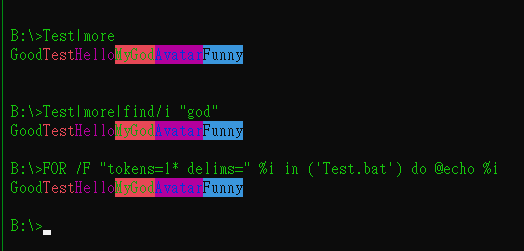
void wrote: Sat Nov 01, 2025 11:02 pm Coloring can be passed with ANSI escapes.
I will consider an option to do this.
Good news.

I test "|" and "For" in ANSI and work.

Image

By the way,

What is different -n and count ?
I try and got "THE SAME" result.

Code: Select all

G:\DOS>es -parent . -n 5 -sort size
2010/02/12 08:16:16          7,429,000    7.08 MB A        exe  G:\DOS\GHost_X64.exe
2010/03/26 09:55:26          5,874,056    5.60 MB A        exe  G:\DOS\GDisk_X64.exe
2010/02/12 08:18:56          3,980,680    3.79 MB A        exe  G:\DOS\GHost32.exe
2012/03/08 16:45:00          3,760,569    3.58 MB A        exe  G:\DOS\MiniShort.exe
2012/03/08 16:45:00          3,760,568    3.58 MB A        exe  G:\DOS\MiniLong.exe

G:\DOS>es -parent . count:5 -sort size
2010/02/12 08:16:16          7,429,000    7.08 MB A        exe  G:\DOS\GHost_X64.exe
2010/03/26 09:55:26          5,874,056    5.60 MB A        exe  G:\DOS\GDisk_X64.exe
2010/02/12 08:18:56          3,980,680    3.79 MB A        exe  G:\DOS\GHost32.exe
2012/03/08 16:45:00          3,760,569    3.58 MB A        exe  G:\DOS\MiniShort.exe
2012/03/08 16:45:00          3,760,568    3.58 MB A        exe  G:\DOS\MiniLong.exe
void
Developer
Posts: 19679
Joined: Fri Oct 16, 2009 11:31 pm

Re: ES - The command line interface for Everything

Post by void »

-n

Currently, limits the number of results client side.
That is Everything will find all files and ES will only show x results.
Think of this as a small viewport of the results.


count:

Limits the number of results server side.
Everything will only search for x results and return up-to x results.
happy666
Posts: 63
Joined: Tue Oct 07, 2025 10:35 pm

Re: ES - The command line interface for Everything

Post by happy666 »

void wrote: Sun Nov 02, 2025 8:11 am -n

Currently, limits the number of results client side.
That is Everything will find all files and ES will only show x results.
Think of this as a small viewport of the results.

count:

Limits the number of results server side.
Everything will only search for x results and return up-to x results.
Thank you for detail info.

I like -n becouse it is short.
happy666
Posts: 63
Joined: Tue Oct 07, 2025 10:35 pm

Re: ES - The command line interface for Everything

Post by happy666 »

Code: Select all

G:\DOS>es -parent . size:^>5MB
2010/03/26 09:55:26          5,874,056    5.60 MB A        exe  G:\DOS\GDisk_X64.exe
2010/02/12 08:16:16          7,429,000    7.08 MB A        exe  G:\DOS\GHost_X64.exe
2 items 12.6 MB

G:\DOS>es -parent . size:^>10GB
0 items
How to HIDE "0 items" ?
If "0 items" ONLY then do NOT show anything.
void
Developer
Posts: 19679
Joined: Fri Oct 16, 2009 11:31 pm

Re: ES - The command line interface for Everything

Post by void »

The footer is always shown when using -footer.
Even when there are 0 items.
verviers
Posts: 43
Joined: Tue Nov 01, 2022 7:48 am

Re: ES - The command line interface for Everything

Post by verviers »

Is it possible to get output to Windows clipboard directly?
void
Developer
Posts: 19679
Joined: Fri Oct 16, 2009 11:31 pm

Re: ES - The command line interface for Everything

Post by void »

-export-clipboard is on my TODO list.

For now, pipe output to the clipboard with:

Code: Select all

ES.exe foo | clip
verviers
Posts: 43
Joined: Tue Nov 01, 2022 7:48 am

Re: ES - The command line interface for Everything

Post by verviers »

void wrote: Fri Nov 21, 2025 10:00 pm ES.exe foo | clip
Fails to work in my case. :cry: WindowsServer2016
screen_2025.11.24.jpg
screen_2025.11.24.jpg (13.18 KiB) Viewed 217273 times
void
Developer
Posts: 19679
Joined: Fri Oct 16, 2009 11:31 pm

Re: ES - The command line interface for Everything

Post by void »

Please try :

Code: Select all

ES.exe foo | %SystemRoot%\System32\clip.exe
-it worked on my Windows Server 2016, maybe you have another clip.exe in your %path%
void
Developer
Posts: 19679
Joined: Fri Oct 16, 2009 11:31 pm

Re: ES - The command line interface for Everything

Post by void »

Everything 1.5.0.1401a adds the following:

Nice Audio Format for {********-767A-494D-B478-F29D25DC9037}
MIDI Audio Format for midi files.
MP3 Audio Format for mp3 files.
happy666
Posts: 63
Joined: Tue Oct 07, 2025 10:35 pm

Re: ES - The command line interface for Everything

Post by happy666 »

void wrote: Fri Nov 28, 2025 4:27 am Everything 1.5.0.1401a adds the following:

Nice Audio Format for {********-767A-494D-B478-F29D25DC9037}
MIDI Audio Format for midi files.
MP3 Audio Format for mp3 files.
Testing is OK and thank you.

Is it possible always capital English ?
Ex: MP3 MP4 MIDI ...
void
Developer
Posts: 19679
Joined: Fri Oct 16, 2009 11:31 pm

Re: ES - The command line interface for Everything

Post by void »

No, Everything will show the Audio Format as is from the property handler, which is typically a Windows property handler.

For audio formats that Everything knows, it will use capitals, eg: MIDI, MP3.
happy666
Posts: 63
Joined: Tue Oct 07, 2025 10:35 pm

Re: ES - The command line interface for Everything

Post by happy666 »

void wrote: Fri Nov 28, 2025 6:17 am No, Everything will show the Audio Format as is from the property handler, which is Typically a Windows property handler.

For audio formats that Everything knows, it will use capitals, eg: MIDI, MP3.
Thank you.
err_24546
Posts: 79
Joined: Wed Oct 11, 2023 1:47 am

Re: ES - The command line interface for Everything

Post by err_24546 »

Can `folder_append_path_separator` also be set through arguments?
void
Developer
Posts: 19679
Joined: Fri Oct 16, 2009 11:31 pm

Re: ES - The command line interface for Everything

Post by void »

Code: Select all

es folder: -folder-append-path-separator
es folder: -no-folder-append-path-separator
err_24546
Posts: 79
Joined: Wed Oct 11, 2023 1:47 am

Re: ES - The command line interface for Everything

Post by err_24546 »

When I use filelist: via ES like this:

Code: Select all

es -json -no-folder-append-path-separator -add-columns "child-file-count;child-folder-count;descendant-file-count;descendant-folder-count;child-count;descendant-count;sibling-folder-count;sibling-file-count;sibling-count;folder-depth;max-child-depth;extension-frequency;name-frequency" "filelist:"D:\Folder A";"D:\Folder B","D:\Folder C"" 
I don't get any result.
How would be the proper way?
void
Developer
Posts: 19679
Joined: Fri Oct 16, 2009 11:31 pm

Re: ES - The command line interface for Everything

Post by void »

No need to wrap filelist: in quotes:

Code: Select all

es -json -no-folder-append-path-separator -add-columns "child-file-count;child-folder-count;descendant-file-count;descendant-folder-count;child-count;descendant-count;sibling-folder-count;sibling-file-count;sibling-count;folder-depth;max-child-depth;extension-frequency;name-frequency" filelist:"D:\Folder A";"D:\Folder B";"D:\Folder C" 
err_24546
Posts: 79
Joined: Wed Oct 11, 2023 1:47 am

Re: ES - The command line interface for Everything

Post by err_24546 »

Also I get Error 7: Unable to send IPC message or bad IPC reply if I run something like :

Code: Select all

.\es -no-folder-append-path-separator "filelist:D:\Apps\7-Zip\7-zip.chm;D:\Apps\7-Zip\7-zip.dll;D:\Apps\7-Zip\7-zip32.dll;D:\Apps\7-Zip\7z.dll;D:\Apps\7-Zip\7z.exe;D:\Apps\7-Zip\7z.sfx;D:\Apps\7-Zip\7zCon.sfx;D:\Apps\7-Zip\7zFM.exe;D:\Apps\7-Zip\7zG.exe;D:\Apps\7-Zip\History.txt;D:\Apps\7-Zip\Lang;D:\Apps\7-Zip\License.txt;D:\Apps\7-Zip\Uninstall.exe;D:\Apps\7-Zip\descript.ion;D:\Apps\7-Zip\readme.txt" -add-columns "folder-depth"
void
Developer
Posts: 19679
Joined: Fri Oct 16, 2009 11:31 pm

Re: ES - The command line interface for Everything

Post by void »

quoting filelist: will not work.

Make sure ; is outside the quotes, or they are treated literally.

Code: Select all

.\es -no-folder-append-path-separator filelist:"D:\Apps\7-Zip\7-zip.chm";"D:\Apps\7-Zip\7-zip.dll";"D:\Apps\7-Zip\7-zip32.dll";"D:\Apps\7-Zip\7z.dll";"D:\Apps\7-Zip\7z.exe";"D:\Apps\7-Zip\7z.sfx";"D:\Apps\7-Zip\7zCon.sfx";"D:\Apps\7-Zip\7zFM.exe";"D:\Apps\7-Zip\7zG.exe";"D:\Apps\7-Zip\History.txt";"D:\Apps\7-Zip\Lang";"D:\Apps\7-Zip\License.txt";"D:\Apps\7-Zip\Uninstall.exe";"D:\Apps\7-Zip\descript.ion";"D:\Apps\7-Zip\readme.txt" -add-columns "folder-depth"
err_24546
Posts: 79
Joined: Wed Oct 11, 2023 1:47 am

Re: ES - The command line interface for Everything

Post by err_24546 »

Many thanks, Void. It's working now.

One more thing, is there currently a way to get, via ES (or another method):

* A list of all available properties, but showing the name used for search-columns, not the canonical name.
* A list of all available properties that are indexed (so asking for their values won't be slow).
void
Developer
Posts: 19679
Joined: Fri Oct 16, 2009 11:31 pm

Re: ES - The command line interface for Everything

Post by void »

* A list of all available properties, but showing the name used for search-columns, not the canonical name.
Everything -> Right click the result list column header and click Add Columns...

ES can list canonical names with:
es -list-properties

(not useful for your case)


* A list of all available properties that are indexed (so asking for their values won't be slow).
I will consider a command line option to show this information in ES.

For now, indexed properties are:
  • Name
  • Path
  • Any basic file information indexed under Everything -> Tools -> Options -> Indexes
  • Any properties indexed under Everything -> Tools -> Options -> Properties
  • date_recently_changed
  • run_count
  • date_run
  • filelist_name
  • name_length
  • full_path_length
  • name_length_in_utf8_bytes
  • full_path_length_in_utf8_bytes
  • child_count
  • child_folder_count
  • child_file_count
  • folder_depth
  • index_type
  • randomize
  • regex_match_0
  • regex_match_1
  • regex_match_2
  • regex_match_3
  • regex_match_4
  • regex_match_5
  • regex_match_6
  • regex_match_7
  • regex_match_8
  • regex_match_9
  • regex_matches
  • sibling_count
  • sibling_folder_count
  • sibling_file_count
  • index_number
  • out_of_date
  • date_indexed
  • name_frequency
  • size_frequency
  • extension_frequency
  • full_path
  • index_volume_label
  • filelist_full_path
  • stem
  • is_folder
  • stem_length
  • extension_length
  • path_part_length
  • parent_name
  • descendant_count
  • descendant_folder_count
  • descendant_file_count
  • opened_by
  • parent_path
  • index_online
  • column_0
  • column_1
  • column_2
  • column_3
  • column_4
  • column_5
  • column_6
  • column_7
  • column_8
  • column_9
  • column_a
  • column_b
  • column_c
  • column_d
  • column_e
  • column_f
  • root_name
  • max_child_depth
  • total_child_size
  • row
  • child_occurrence_count
  • descendant_occurrence_count
  • network_index_host
  • parent_size
  • root_size
err_24546
Posts: 79
Joined: Wed Oct 11, 2023 1:47 am

Re: ES - The command line interface for Everything

Post by err_24546 »

I will consider a command line option to show this information in ES
Thanks :D

Please also consider adding a way to get the actual names (modifiers?) for properties, mainly for programmatic access.

I noticed the canonical names are the same as these names except:
* All lowercases.
* Spaces converted to "-"

Are there any columns that don't follow that?
void
Developer
Posts: 19679
Joined: Fri Oct 16, 2009 11:31 pm

Re: ES - The command line interface for Everything

Post by void »

I noticed the canonical names are the same as these names except:
* All lowercases.
* Spaces converted to "-"
Correct.


Are there any columns that don't follow that?
Only Path.
For Path, use
path-part:


path:
is reserved for matching the full path and name.
err_24546
Posts: 79
Joined: Wed Oct 11, 2023 1:47 am

Re: ES - The command line interface for Everything

Post by err_24546 »

Hi Void.
What's the size limit for the query you can pass through es.exe?
I noticed that if I send a really large one, I get Error 7, but I'm not sure if it's because of the size or something else.
Or maybe the limit is in the response.
void
Developer
Posts: 19679
Joined: Fri Oct 16, 2009 11:31 pm

Re: ES - The command line interface for Everything

Post by void »

There's no limitations, only available memory.

What's the error message and what's the query?
err_24546
Posts: 79
Joined: Wed Oct 11, 2023 1:47 am

Re: ES - The command line interface for Everything

Post by err_24546 »

Thanks.
Actually, I was testing all the values you can get by passing all the columns with a single file. Several files but one at a time.

Code: Select all

.\es -json -no-folder-append-path-separator -date-format 1 -size-format 1 -no-digit-grouping -add-columns "35mm_focal_length;album;album_artist;alignment_requirement;allocation_size;alternate_data_stream_ansi;alternate_data_stream_count;alternate_data_stream_hex;alternate_data_stream_names;alternate_data_stream_text_plain;alternate_data_stream_utf_16;alternate_data_stream_utf_16be;alternate_data_stream_utf_8;altitude;aperture;artist;aspect_ratio;attributes;audio_bit_rate;audio_bits_per_sample;audio_channels;audio_format;audio_sample_rate;audio_track_count;author_url;authors;available_free_disk_size;beats_per_minute;binary_type;bit_depth;brightness;byte_offset_for_partition_alignment;byte_offset_for_sector_alignment;byte_order_mark;camera_maker;camera_model;camera_serial_number;category;character_count;character_encoding;cluster_size;color_representation;column_0;column_1;column_3;column_4;column_5;column_6;column_7;column_8;column_9;column_a;column_b;column_c;column_d;column_e;column_f;comment;company;composer;compressed_bits_per_pixel;compressed_size;compression;compression_chunk_shift;compression_cluster_shift;compression_format;compression_unit_shift;computer;conductor;container_file_count;container_filenames;content_created;content_provider;content_status;content_type;contrast;copyright;crc_32;crc_64;custom_property_0;custom_property_1;custom_property_3;custom_property_4;custom_property_5;custom_property_6;custom_property_7;custom_property_8;custom_property_9;date_accessed;date_accessed_date;date_accessed_time;date_acquired;date_changed;date_created;date_created_date;date_created_time;date_deleted;date_indexed;date_modified;date_modified_date;date_modified_time;date_printed;date_received;date_recently_changed;date_released;date_run;date_saved;date_sent;date_taken;delete_pending;description;digital_signature_name;digital_signature_timestamp;digital_zoom;dimensions;director;display_name;display_path_and_name;document_content_type;effective_physical_bytes_per_sector_for_atomicity;encoded_by;encryption_status;end_of_file;exif_version;exposure_bias;exposure_program;exposure_time;extension;extension_frequency;extension_length;file_id;file_signature;file_storage_info_flags;file_system;file_system_flags;filename;first_128_bytes;first_16_bytes;first_2_bytes;first_256_bytes;first_32_bytes;first_4_bytes;first_512_bytes;first_64_bytes;first_8_bytes;first_byte;flash_energy;flash_maker;flash_mode;flash_model;focal_length;folder_depth;frame_count;frame_rate;free_disk_size;full_path_length;full_path_length_in_utf8_bytes;f_stop;genre;group_description;hard_link_count;hard_link_filenames;height;horizontal_resolution;host_url;image_id;index_number;index_type;initial_key;is_folder;iso_speed;kind;language;last_128_bytes;last_16_bytes;last_2_bytes;last_256_bytes;last_32_bytes;last_4_bytes;last_512_bytes;last_64_bytes;last_8_bytes;last_author;last_byte;latitude;length;lens_maker;lens_model;light_source;line_count;links_dirty;logical_bytes_per_sector;long_name;long_path_and_name;longitude;maker_note;manager;max_aperture;maximum_component_length;md5;md5sum_md5;md5sum_pass;media_created;metering_mode;mood;name_frequency;name_length;name_length_in_utf_8_bytes;network_index_host;note_count;offline_availability;offline_status;online;opened_by;opens_with;orientation;original_filename;original_location;out_of_date;owner;page_count;paragraph_count;parent_file_id;parent_name;parent_path;parent_size;parental_rating;parental_rating_reason;parse_name;parse_path_and_name;part_of_a_compilation;part_of_set;path_and_name_length;path_and_name_length_in_utf_8_bytes;path_length;people;perceived_type;period;photometric_interpretation;physical_bytes_per_sector_for_atomicity;physical_bytes_per_sector_for_performance;plain_text_line_count;presentation_format;producer;product_name;product_version;promotion_url;protected;publisher;quicktime_metadata;randomize;rating;referrer_url;regular_expression_match_0;regular_expression_match_1;regular_expression_match_2;regular_expression_match_3;regular_expression_match_4;regular_expression_match_5;regular_expression_match_6;regular_expression_match_7;regular_expression_match_8;regular_expression_match_9;regular_expression_matches_1_9;related_sound_file;reparse_tag;reparse_target;resolution_unit;revision_number;root_name;root_size;run_count;saturation;scale;sector_size;sfv_crc_32;sfv_pass;sha_1;sha1sum_pass;sha1sum_sha_1;sha_256;sha256sum_pass;sha256sum_sha_256;sha_384;sha_512;sha512sum_pass;sha512sum_sha_512;shared_with;sharpness;shell_attributes;short_name;short_path_and_name;shortcut_target;shutter_speed;sibling_count;sibling_file_count;sibling_folder_count;size;size_frequency;size_on_disk;slide_count;software;status;stem;stem_length;subject;subject_distance;subtitle;subtitle_track_count;tags;target_machine;template;title;total_alternate_data_stream_size;total_alternate_data_stream_size_on_disk;total_bit_rate;total_disk_size;total_editing_time;total_size;total_size_on_disk;track;trademarks;transcoded_for_sync;type;url;used_disk_size;valid_utf_8;version;version_number;vertical_resolution;video_bit_rate;video_format;video_track_count;volume_label;volume_name;volume_path;volume_serial_number;vorbis_comment;white_balance;width;word_count;writer;year;zone_id" "c:\test\file.png"
Throws:

Code: Select all

Error 7: Unable to send IPC message or bad IPC reply.
If I start reducing the columns, at some point I get a response, which is why I thought there was some kind of limit.
err_24546
Posts: 79
Joined: Wed Oct 11, 2023 1:47 am

Re: ES - The command line interface for Everything

Post by err_24546 »

Another thing I've noticed is that some columns break the JSON parsing because they return hexadecimal values. Is there any way to get those values inside double quotes or maybe already converted?
void
Developer
Posts: 19679
Joined: Fri Oct 16, 2009 11:31 pm

Re: ES - The command line interface for Everything

Post by void »

It's a bug in ES.

ES is sending a malformed request whens there's over 255 requested properties.

I will have a fix soon.


Funny I thought JSON supported 0x hex prefix, it doesn't.. I will convert these values to decimal in the next update.

Thank you for the issue reports.
err_24546
Posts: 79
Joined: Wed Oct 11, 2023 1:47 am

Re: ES - The command line interface for Everything

Post by err_24546 »

Many thanks void.

Sorry for the inconvenience.

Btw, what format are the time-only and date-only columns in? Because they aren't affected by `-date-format` and I don't understand how their decimal value relates to a date format. Do we need to add some value to them, perhaps?
err_24546
Posts: 79
Joined: Wed Oct 11, 2023 1:47 am

Re: ES - The command line interface for Everything

Post by err_24546 »

void wrote: Sat Nov 29, 2025 3:19 am quoting filelist: will not work.

Make sure ; is outside the quotes, or they are treated literally.

Code: Select all

.\es -no-folder-append-path-separator filelist:"D:\Apps\7-Zip\7-zip.chm";"D:\Apps\7-Zip\7-zip.dll";"D:\Apps\7-Zip\7-zip32.dll";"D:\Apps\7-Zip\7z.dll";"D:\Apps\7-Zip\7z.exe";"D:\Apps\7-Zip\7z.sfx";"D:\Apps\7-Zip\7zCon.sfx";"D:\Apps\7-Zip\7zFM.exe";"D:\Apps\7-Zip\7zG.exe";"D:\Apps\7-Zip\History.txt";"D:\Apps\7-Zip\Lang";"D:\Apps\7-Zip\License.txt";"D:\Apps\7-Zip\Uninstall.exe";"D:\Apps\7-Zip\descript.ion";"D:\Apps\7-Zip\readme.txt" -add-columns "folder-depth"
I'm still not sure what's wrong here. Sometimes I get values normally, and other times I get Error 7: Unable to send IPC message or bad IPC reply.

For example, what's exactly wrong with this query? Everytime I get the Error 7 thing with this one.

I'm following your advice about filelist:

Code: Select all

es -json -cp 65001 -no-folder-append-path-separator -date-format 1 -size-format 1 -no-digit-grouping -add-columns "max_child_depth" -- filelist:"D:\Apps\Ditto\Addins";"D:\Apps\Ditto\Ditto.db";"D:\Apps\Ditto\Ditto.exe";"D:\Apps\Ditto\ICU_Loader.dll";"D:\Apps\Ditto\Language";"D:\Apps\Ditto\Themes";"D:\Apps\Ditto\mfc140u.dll";"D:\Apps\Ditto\msvcp140.dll";"D:\Apps\Ditto\unins000.dat";"D:\Apps\Ditto\unins000.exe";"D:\Apps\Ditto\vcruntime140.dll";"D:\Apps\Ditto\vcruntime140_1.dll"  
I've also tried using "-q" instead of "--", and tried no switches at all, but still got no results.
void
Developer
Posts: 19679
Joined: Fri Oct 16, 2009 11:31 pm

Re: ES - The command line interface for Everything

Post by void »

Btw, what format are the time-only and date-only columns in?
Windows FILETIME.

"Contains a 64-bit value representing the number of 100-nanosecond intervals since January 1, 1601 (UTC)."


Because they aren't affected by `-date-format`
-date-format <x> should set the desired formatting.
(where x can be: 0=(Use default) 1=ISO-8601 2=FILETIME 3=ISO-8601(UTC) 4=User Locale)
What output format are you using? -json ?

-json -date-format 1
shows ISO-8601 in local time.


I'm still not sure what's wrong here. Sometimes I get values normally, and other times I get Error 7: Unable to send IPC message or bad IPC reply.
If the query is larger than 255 characters you will see this error.
It's the same issue as above. (ES client side)
I will have a fix soon.
err_24546
Posts: 79
Joined: Wed Oct 11, 2023 1:47 am

Re: ES - The command line interface for Everything

Post by err_24546 »

I will have a fix soon.
Thanks.


What output format are you using? -json ?
Yes. Actually I was talking about date-only and time-only columns. E.g. date-created-time;date-created-date

Using :

Code: Select all

es -json -cp 65001 -no-folder-append-path-separator -date-format 1 -add-columns "date-created-time;date-created-date;date-created" -- filelist:"D:\Apps\Everything\Everything.exe"
I get:

Code: Select all

[{"filename":"D:\\Apps\\Everything\\Everything.exe","date_created_time":66052236,"date_created_date":842729,"date_created":"2025-10-09T18:20:52"}]
And

Code: Select all

es -json -cp 65001 -no-folder-append-path-separator -date-format 0 -add-columns "date-created-time;date-created-date;date-created" -- filelist:"D:\Apps\Everything\Everything.exe"

Code: Select all

[{"filename":"D:\\Apps\\Everything\\Everything.exe","date_created_time":66052236,"date_created_date":842729,"date_created":134045220522362819}]
You'll see that in both examples they have the same value, and I don't know how to convert it to date-only or time-only.
void
Developer
Posts: 19679
Joined: Fri Oct 16, 2009 11:31 pm

Re: ES - The command line interface for Everything

Post by void »

These are just the raw internal values Everything uses for date/time.


Everything Date Value:

The encoded year/month/day.
date-value = year * (32 × 13) + month * 32 + day

day = date-value % 32
month = (date-value / 32) % 13
year = date-value / (32 * 13)


Everything Time Value:

The number of milliseconds since midnight.
time-value = (Hour * 3600000) + (Minute * 60000) + (Second * 1000) + Milliseconds

Hour = time-value / 3600000
Minute = (time-value % 3600000) / 60000
Second = (time-value % 60000) / 1000
Milliseconds = time-value % 1000


I highly recommend using Date Created instead of Date Created Date + Date Created Time.
I have put on my TODO list to support -date-format
err_24546
Posts: 79
Joined: Wed Oct 11, 2023 1:47 am

Re: ES - The command line interface for Everything

Post by err_24546 »

void, how should -offset work?

I was expecting to get results in batches of 250, increasing the offset by 250 after each call. But with -offset 0 and -offset 250, or any other number, I always get the same listed results.

Code: Select all

es -json -cp 65001 -offset 250 -no-folder-append-path-separator -date-format 1 -n 250 -size-format 1 -no-digit-grouping -add-columns "max_child_depth;date_indexed;date_recently_changed;date_run" -- parent:"c:\my path"
void
Developer
Posts: 19679
Joined: Fri Oct 16, 2009 11:31 pm

Re: ES - The command line interface for Everything

Post by void »

Thanks for the issue report err_24546,

I am aware of this issue already.
-offset isn't working with ipc3 yet.

It will be fixed in the next ES update.

The next ES update will make -n <num> apply a count: filter.
If you want a small window of results, I recommend using -viewport-offset x and -viewport-count y in the next ES update.
err_24546
Posts: 79
Joined: Wed Oct 11, 2023 1:47 am

Re: ES - The command line interface for Everything

Post by err_24546 »

Many thanks.
Does the offset function actually help reduce processing times by effectively reducing the number of files to be processed?
E.g. if a query returns 1000 results, where I'm requesting values for slow columns, does the use of offset and count (to limit to 250 results) actually cause EV to only process the required number, or does it only affect the number of results returned.
Will ES always process ALL 1000 values or only 250, when using offset and count?
Is there a way to emulate offset in the main program for testing?
void
Developer
Posts: 19679
Joined: Fri Oct 16, 2009 11:31 pm

Re: ES - The command line interface for Everything

Post by void »

No,
-offset
/
-max-results
/
-viewport-offset
/
-viewport-count
will not reduce the number of files to be processed.

count:
will reduce the number of files to be processed.

For example:
-viewport-count:250
will process all 1000 files/folders and only return 250.
count:250
will only process 250 files/folders.


-offset
/
-max-results
/
-viewport-offset
/
-viewport-count

Will reduce the size of the results to be sent over IPC.
Using a smaller window of results will slightly improve performance.


Is there a way to emulate offset in the main program for testing?
The viewport offset is the vertical scrollbar position.
The viewport count is the window height / height of an item.

count:
can be used in your search to reduce the number of files to be processed.


-n
will be the same as
count:
in ES 1.1.0.35+ (it's currently -max-results)
err_24546
Posts: 79
Joined: Wed Oct 11, 2023 1:47 am

Re: ES - The command line interface for Everything

Post by err_24546 »

Let me explain better, I think I did it wrong.
Suppose I search in a path where there are 1000 files, and I want to get some columns via ES whose values are time-consuming.
So I plan to split the work into e.g. 4, so I don't have to wait for everything to finish all, only 250 at a time.
If I use `-offset 0` and `count:250` the first time, that means Everything will process the first 250 files.
Then I increase `-offset` to `250` : that means Everything will process the next 250 files, and so on right?
void
Developer
Posts: 19679
Joined: Fri Oct 16, 2009 11:31 pm

Re: ES - The command line interface for Everything

Post by void »

There's no such option in Everything / ES.

Everything always has to process count: files. (or all files if count: is not specified)

So you could do:
ES -offset 0 -max-results 250 count:250
ES -offset 250 -max-results 250 count:500
ES -offset 500 -max-results 250 count:750
ES -offset 750 -max-results 250 count:1000

The first call would be the fastest, the second call slower, the third call slower again, and finally the last call would be the slowest.
Overall, this would be slower than just calling:
ES count:1000


I'm looking into ways to keep properties cached, it will likely be an ES server between ES and Everything.
So you could do something like:
ES -offset 0 -max-results 250 count:1000
ES -offset 250 -max-results 250 count:1000
ES -offset 500 -max-results 250 count:1000
ES -offset 750 -max-results 250 count:1000

The first call would take ages, then the next calls would be instant.


Everything will also return results as they are processed.

ES count:1000

Might show the first 100 files, then gather more data and show the next 100 and so on.
The number of files will vary.
When the IPC pipe buffer is filled it gets sent off to ES.
The pipe buffer is 64KB.
err_24546
Posts: 79
Joined: Wed Oct 11, 2023 1:47 am

Re: ES - The command line interface for Everything

Post by err_24546 »

Hi, void.
Are there any values that ES can't access?

I tried with:

Code: Select all

es -json -cp 65001 -no-folder-append-path-separator -date-format 1 -size-format 1  -no-digit-grouping -add-columns "size-frequency" "C:\my path\"

Size-frequency is always null, even though Everything shows a value for all those items (in the GUI version). The same seems to be true for name-frequency and extension-frequency, as far as I can tell.
void
Developer
Posts: 19679
Joined: Fri Oct 16, 2009 11:31 pm

Re: ES - The command line interface for Everything

Post by void »

ES can access any column value.

Size frequency only works if you sort by size frequency.

Code: Select all

es -json -cp 65001 -no-folder-append-path-separator -date-format 1 -size-format 1  -no-digit-grouping -add-columns "size-frequency" "C:\my path\" -sort "size-frequency"
And size frequency only works on the whole index, not the current results.
err_24546
Posts: 79
Joined: Wed Oct 11, 2023 1:47 am

Re: ES - The command line interface for Everything

Post by err_24546 »

Thanks.
So which other properties need -sort to return values? Is there a list somewhere?
void
Developer
Posts: 19679
Joined: Fri Oct 16, 2009 11:31 pm

Re: ES - The command line interface for Everything

Post by void »

Just name frequency, size frequency and extension frequency.
void
Developer
Posts: 19679
Joined: Fri Oct 16, 2009 11:31 pm

Re: ES - The command line interface for Everything

Post by void »

ES-1.1.0.35.x64.zip
ES-1.1.0.35.x86.zip
ES-1.1.0.35.ARM64.zip
ES-1.1.0.35.ARM.zip
ES-1.1.0.35.src.zip
https://github.com/voidtools/es

Thursday 11 December 2025: Version 1.1.0.35
  • fixed an issue with -offset not working with ipc3.
  • fixed an issue with exporting hex values as JSON.
  • fixed an issue with large ipc3 requests.
  • fixed a crash when exporting to JSON.
  • fixed an issue with -watch returning the wrong change id.
  • improved aspect-ratio formatting.
  • improved waiting for a pipe connection.
  • improved loading of columns from es.ini
  • improved handling of errors when loading es.ini
  • improved -n by applying a count: filter.
  • added -redirect-stdout out.txt and -redirect-stderr error.txt
  • added date/time formatting to date-modified-date and date-modified-time properties.
matandra
Posts: 8
Joined: Tue Dec 16, 2025 2:19 pm

Re: ES - The command line interface for Everything

Post by matandra »

I am using a german system with Windows 11, Everything 1.5.0.1403a and ES 1.1.0.35.
When using -date-format 0 or 4 i get dd/mm/yyyy which is not the german localization setting.
I have verified that ES reads the localization settings, but it always uses "/" as separator instead of ".".

The size is displayed with digit grouping (1.234.567) as defined under regional settings. Overriding with option -no-digit-grouping does not cause any change, but using -locale-grouping 0 works.
What is the function of -no-digit-grouping?
void
Developer
Posts: 19679
Joined: Fri Oct 16, 2009 11:31 pm

Re: ES - The command line interface for Everything

Post by void »

Thank you for bringing these issues to my attention.

ES-1.1.0.36.x64.zip
ES-1.1.0.36.x86.zip
ES-1.1.0.36.ARM64.zip
ES-1.1.0.36.ARM.zip
ES-1.1.0.36.src.zip
https://github.com/voidtools/es

Thursday 18 December 2025: Version 1.1.0.36
  • fixed an issue with -no-digit-grouping not being applied.
  • added GetDateFormat/GetTimeFormat for locale date/time formatting.
ES should now use the correct date separator.
ES should now apply -no-digit-grouping, which overrides -locale-grouping.
happy666
Posts: 63
Joined: Tue Oct 07, 2025 10:35 pm

Re: ES - The command line interface for Everything

Post by happy666 »

-date-format <format>
format can be one of the following:
0 = (Use default) (default)
1 = ISO-8601
2 = FILETIME
3 = ISO-8601(UTC)
4 = User Locale

I have try 0 to 4.

I hope the date from 2026/1/4 to 2026/01/04
Post Reply