Subject: Please simplify exclusion and search filters in Everything 1.5
Message:
Hello,
I really love how fast Everything is — but version 1.5 has become the most tedious, complicated, time-consuming way to search files ever.
All I wanted to do was exclude one artist’s name from results. I tried using regex, but as soon as I want to type any normal, non-regex quick query (after a space, for example), it no longer works.
I’m honestly exhausted from having to constantly figure out complex syntax, regex patterns, folder filters, and special operators — when all I want is to quickly find files and exclude or include some simple words.
Please, could you consider adding a simple “exclude” option (like -name or not: that works consistently), or a toggle to disable regex mode temporarily without breaking everything else?
Everything is amazing in speed — but the query logic is becoming overcomplicated for real-world use.
Thank you for your work and for listening to user feedback!
Not work
regex:^.*Dj(?!小).*$ electro .mp3 ALI 17
ALI 17 - foldername
electro - Genre part filename
.mp3 extension
Please simplify exclusion and search filters in Everything 1.5
-
Debugger
- Posts: 726
- Joined: Thu Jan 26, 2017 11:56 am
-
void
- Developer
- Posts: 20360
- Joined: Fri Oct 16, 2009 11:31 pm
Re: Please simplify exclusion and search filters in Everything 1.5
! = NOTPlease, could you consider adding a simple “exclude” option (like -name or not: that works consistently)
For example, to exclude results containing ABC, include the following in your search:
!ABC
Search Syntax
Use the regex: search modifier.or a toggle to disable regex mode temporarily without breaking everything else?
regex:
Please try the Advanced Search from the Search menu.
Set 'all these words' to: electro .mp3 ALI 17
Set 'none of these words' to a list of words you want to exclude.
Set Matches this regular expression to: ^.*Dj(?!小).*$
-
Debugger
- Posts: 726
- Joined: Thu Jan 26, 2017 11:56 am
Re: Please simplify exclusion and search filters in Everything 1.5
How to quickly set a date range without typing, I don't want to bother with constantly entering dates and other characters!!!
Example:
26.10.25 to 01.11.25
Example:
26.10.25 to 01.11.25
-
void
- Developer
- Posts: 20360
- Joined: Fri Oct 16, 2009 11:31 pm
Re: Please simplify exclusion and search filters in Everything 1.5
Right click the Search box -> Advanced Search
Set a Date Modified range.
Click OK.
Set a Date Modified range.
Click OK.
-
Debugger
- Posts: 726
- Joined: Thu Jan 26, 2017 11:56 am
Re: Please simplify exclusion and search filters in Everything 1.5
Advanced search
Not the option to select a calendar! Or a date.
Not the option to select a calendar! Or a date.
-
void
- Developer
- Posts: 20360
- Joined: Fri Oct 16, 2009 11:31 pm
Re: Please simplify exclusion and search filters in Everything 1.5
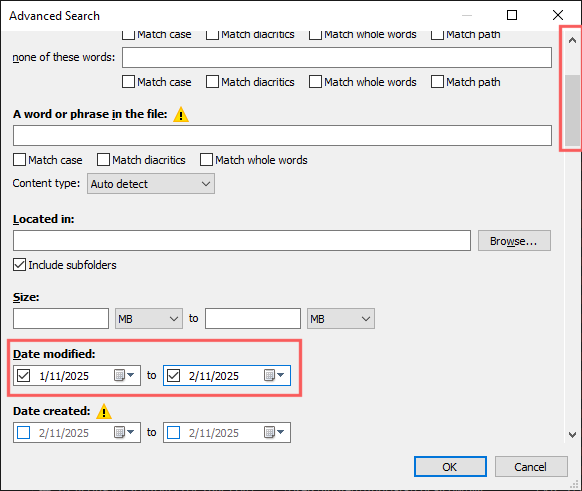
Please take note of the scrollbar on the right.
Scroll down a little to Date Modified.