Can ES pre-define some arguments ?
For example:
es -parent .\ -sha1
set ES_Pre-Define_Var=-parent .\ -sha1
OR
ES_Pre-Define_Var=-parent .\ -sha1 in ES.INI
I can run short command to es.
ES - The command line interface for Everything
-
happy666
- Posts: 63
- Joined: Tue Oct 07, 2025 10:35 pm
-
void
- Developer
- Posts: 20246
- Joined: Fri Oct 16, 2009 11:31 pm
Re: ES - The command line interface for Everything
there's no option to do this in ES.
I will consider such an option.
For now, create a bat file:
esp.bat
and call esp
I will consider such an option.
For now, create a bat file:
esp.bat
Code: Select all
es -parent .\ -sha1 %*
-
happy666
- Posts: 63
- Joined: Tue Oct 07, 2025 10:35 pm
Re: ES - The command line interface for Everything
Can ES show TWO kinds of size ?
For example:
2021/04/01 16:05:50 890,744,266 D B:\Test
I want to show below
2021/04/01 16:05:50 890,744,266(849.48 MB) D B:\Test
For example:
2021/04/01 16:05:50 890,744,266 D B:\Test
I want to show below
2021/04/01 16:05:50 890,744,266(849.48 MB) D B:\Test
-
happy666
- Posts: 63
- Joined: Tue Oct 07, 2025 10:35 pm
Re: ES - The command line interface for Everything
B:\Test\Test1>es -parent .
2025/01/28 04:44:59 335,742 A
2025/01/28 04:44:19 892 A
2025/01/28 04:45:08 200,528 A
2025/10/13 05:48:17 332 A
2025/01/28 04:44:43 2,159,124,408 A
5 items 2.01 GB --> with total size
B:\Test\Test2>es -parent
2025/10/13 05:56:31 435,059 D
2025/10/12 04:38:26 216,929 A
2025/10/12 04:38:09 744 A
2025/10/12 04:38:38 217,386 A
2025/10/12 04:37:52 2,596,161,438 A
5 items 2.41 GB --> with total size
B:\Test>es -parent .
2025/10/13 05:33:06 2,159,661,902 D
2025/03/26 08:01:15 2,631,259,687 D
2025/05/07 16:52:41 2,498,330,184 D
2025/06/05 03:45:14 1,778,810,852 D
2025/10/12 04:38:45 2,596,596,497 D
5 items --> without total size
Suggestion :
ES list Directory ONLY with total size.
2025/01/28 04:44:59 335,742 A
2025/01/28 04:44:19 892 A
2025/01/28 04:45:08 200,528 A
2025/10/13 05:48:17 332 A
2025/01/28 04:44:43 2,159,124,408 A
5 items 2.01 GB --> with total size
B:\Test\Test2>es -parent
2025/10/13 05:56:31 435,059 D
2025/10/12 04:38:26 216,929 A
2025/10/12 04:38:09 744 A
2025/10/12 04:38:38 217,386 A
2025/10/12 04:37:52 2,596,161,438 A
5 items 2.41 GB --> with total size
B:\Test>es -parent .
2025/10/13 05:33:06 2,159,661,902 D
2025/03/26 08:01:15 2,631,259,687 D
2025/05/07 16:52:41 2,498,330,184 D
2025/06/05 03:45:14 1,778,810,852 D
2025/10/12 04:38:45 2,596,596,497 D
5 items --> without total size
Suggestion :
ES list Directory ONLY with total size.
-
void
- Developer
- Posts: 20246
- Joined: Fri Oct 16, 2009 11:31 pm
Re: ES - The command line interface for Everything
Not really, but kind-of yes...Can ES show TWO kinds of size ?
Everything only has one size property, but the Windows Property System system.size property also exists and will display as you want..
Please try:
es -size -system.sizeSample output:
B:\Test 890,744,266 849.48 MBsystem.size isn't indexed and will be slow.
I will consider a formatting option to display size-in-bytes (auto-size)
es doesn't include folder sizes in the total size because this might count files and subfolders multiple times.ES list Directory ONLY with total size.
For -parent this isn't possible.
I will consider an option to do this when using -parent.
For now, es will only list the total file size.
-The GUI also does the same.
-
happy666
- Posts: 63
- Joined: Tue Oct 07, 2025 10:35 pm
Re: ES - The command line interface for Everything
B:\Test>es -parent . -crc32 -md5 -sha1 -sha256 -sha512
2025/10/13 14:33:59 9,076 A txt B334FD03 BFE52049CCFD2CCCA1AEC63DCEAE0459 ...... B:\Test\1.txt
2012/07/18 15:31:11 23,072 A exe 1CB8594E 6BA03BA3E6CFB74F5444831A1CA6BA8B ...... B:\Test\123.exe
2023/01/03 22:38:33 4,286 A ico 28DF3399 C65BE7C702C7DF2EEA7DF1CA57C9ADD8 ...... B:\Test\456.ico
3 items 35.5 KB
How to change SIX colors ?
CRC32
MD5
SHA1
SHA256
SHA512
3 items 35.5 KB
2024/10/25 11:23:20 A mp4 192,744,578 183 MB B:\Test\2\1.mp4
2024/10/29 11:38:05 A mp4 217,053,716 206 MB B:\Test\2\2.mp4
2024/11/01 12:48:01 A mp4 214,420,826 204 MB B:\Test\2\3.mp4
192,744,578(183.82 MB)
217,053,716(206.99 MB)
214,420,826(204.49 MB)
Suggestion:
Rounding
183 MB show 184 MB
206 MB show 207 MB
OR
Show
183.82 MB
206.99 MB
204.49 MB
123.45 GB
123.45 TB
MS Windows often use TWO decimal places.
2025/10/13 14:33:59 9,076 A txt B334FD03 BFE52049CCFD2CCCA1AEC63DCEAE0459 ...... B:\Test\1.txt
2012/07/18 15:31:11 23,072 A exe 1CB8594E 6BA03BA3E6CFB74F5444831A1CA6BA8B ...... B:\Test\123.exe
2023/01/03 22:38:33 4,286 A ico 28DF3399 C65BE7C702C7DF2EEA7DF1CA57C9ADD8 ...... B:\Test\456.ico
3 items 35.5 KB
How to change SIX colors ?
CRC32
MD5
SHA1
SHA256
SHA512
3 items 35.5 KB
B:\Test\2>es -parent . -size -system.sizevoid wrote: Mon Oct 13, 2025 12:09 am Not really, but kind-of yes...
Everything only has one size property, but the Windows Property System system.size property also exists and will display as you want..
Please try:
es -size -system.size
Sample output:
B:\Test 890,744,266 849.48 MB
system.size isn't indexed and will be slow.
I will consider a formatting option to display size-in-bytes (auto-size)
2024/10/25 11:23:20 A mp4 192,744,578 183 MB B:\Test\2\1.mp4
2024/10/29 11:38:05 A mp4 217,053,716 206 MB B:\Test\2\2.mp4
2024/11/01 12:48:01 A mp4 214,420,826 204 MB B:\Test\2\3.mp4
192,744,578(183.82 MB)
217,053,716(206.99 MB)
214,420,826(204.49 MB)
Suggestion:
Rounding
183 MB show 184 MB
206 MB show 207 MB
OR
Show
183.82 MB
206.99 MB
204.49 MB
123.45 GB
123.45 TB
MS Windows often use TWO decimal places.
-
void
- Developer
- Posts: 20246
- Joined: Fri Oct 16, 2009 11:31 pm
Re: ES - The command line interface for Everything
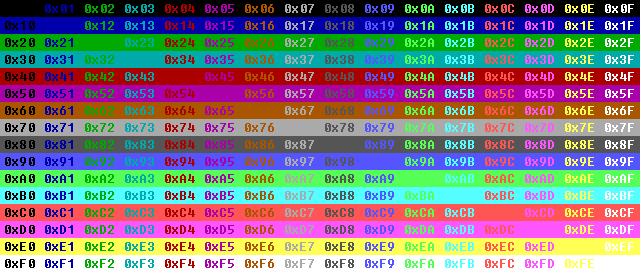
Include the following in your es call:How to change SIX colors ?
-crc32-color 0x0a -md5-color 0x0b -sha1-color 0x0c -sha256-color 0x0d -sha512-color 0x0eBasically:
-<property-name>-color <color-code>Optionally use -save-settings to save the colors.
The footer color cannot be changed.
I will consider an option to do this.
Color codes:
I cannot change the Windows Property System system.size property formatting.Suggestion:
Rounding
This is formatted by the system.
I don't recommend using system.size, just use the Everything size property and format it with -size-format
-size-format 0This will auto format the size (B/KB/MB/GB) based on the size using 3 digits.
-
happy666
- Posts: 63
- Joined: Tue Oct 07, 2025 10:35 pm
Re: ES - The command line interface for Everything
Nice colors and thank you.void wrote: Mon Oct 13, 2025 7:34 am Include the following in your es call:
-crc32-color 0x0a -md5-color 0x0b -sha1-color 0x0c -sha256-color 0x0d -sha512-color 0x0e
Basically:-<property-name>-color <color-code>
Optionally use -save-settings to save the colors.
The footer color cannot be changed.
I will consider an option to do this.
But Everything only has one size property.void wrote: Mon Oct 13, 2025 7:34 am I cannot change the Windows Property System system.size property formatting.
This is formatted by the system.
I don't recommend using system.size, just use the Everything size property and format it with -size-format
-size-format 0
This will auto format the size (B/KB/MB/GB) based on the size using 3 digits.
I can NOT show TWO kinds of size.
Now,
es -parent . -size -system.size
It is OK.
--------------------------------------------------
Add 4 ?
4 = 1 + 3
-size-format <format>
format can be one of the following:
0 = Auto
1 = Bytes (default)
2 = KB
3 = MB
4 = Bytes(MB)
-
void
- Developer
- Posts: 20246
- Joined: Fri Oct 16, 2009 11:31 pm
Re: ES - The command line interface for Everything
That's what I'm thinking.Add 4 ?
4 = Bytes(MB)
I had something similar to this in the GUI but found it unreadable / too busy.
I will experiment..
-
happy666
- Posts: 63
- Joined: Tue Oct 07, 2025 10:35 pm
Re: ES - The command line interface for Everything
I have one idea,void wrote: Mon Oct 13, 2025 8:57 am
That's what I'm thinking.
I had something similar to this in the GUI but found it unreadable / too busy.
I will experiment..
Everything detect CPU idle then process the Bytes convert to MB(indexed),
If converting finish then show Bytes + MB else show Bytes Only.
-
happy666
- Posts: 63
- Joined: Tue Oct 07, 2025 10:35 pm
Re: ES - The command line interface for Everything
It is hard to say.
See picture fore more details.
By the way,
Do you know any tools can save color texts to HTML or RTF(Rich Text Format) ?
It likes screen snap but save to TEXT format.
Or
ES can output color texts to HTML or RTF(Rich Text Format).
See picture fore more details.
By the way,
Do you know any tools can save color texts to HTML or RTF(Rich Text Format) ?
It likes screen snap but save to TEXT format.
Or
ES can output color texts to HTML or RTF(Rich Text Format).
You do not have the required permissions to view the files attached to this post.
-
void
- Developer
- Posts: 20246
- Joined: Fri Oct 16, 2009 11:31 pm
Re: ES - The command line interface for Everything
I have put on my TODO list to add support for custom labels.
Thank you for the suggestion.
Thank you for the suggestion.
-
happy666
- Posts: 63
- Joined: Tue Oct 07, 2025 10:35 pm
Re: ES - The command line interface for Everything
B:\Test>es -parent . -size -system.size
2025/10/14 09:55:25 D 204,178 B:\Test\2
2025/10/13 18:17:48 D 27,358 B:\Test\3
2025/10/13 14:33:59 A txt 9,076 8.86 KB B:\Test\1.txt
2012/07/18 15:31:11 A exe 23,072 22.5 KB B:\Test\123.exe
2023/01/03 22:38:33 A ico 4,286 4.18 KB B:\Test\456.ico
2024/10/25 11:23:20 A mp4 192,744,578 183 MB B:\Test\1.HD1080p.mp4
2024/10/29 11:38:05 A mp4 217,053,716 206 MB B:\Test\2.HD1080p.mp4
2024/11/01 12:48:01 A mp4 214,420,826 204 MB B:\Test\3.HD1080p.mp4
2025/10/12 01:17:07 A bat 254 254 個位元組 B:\Test\EDIR1.bat
2025/10/11 12:28:28 A exe 201,896 197 KB B:\Test\es.exe
2025/10/14 09:54:03 A ini 1,177 1.14 KB B:\Test\ES.ini
Suggestion:
Bytes <1024 show B
254 個位元組 --> 254 B
2025/10/14 09:55:25 D 204,178 B:\Test\2
2025/10/13 18:17:48 D 27,358 B:\Test\3
2025/10/13 14:33:59 A txt 9,076 8.86 KB B:\Test\1.txt
2012/07/18 15:31:11 A exe 23,072 22.5 KB B:\Test\123.exe
2023/01/03 22:38:33 A ico 4,286 4.18 KB B:\Test\456.ico
2024/10/25 11:23:20 A mp4 192,744,578 183 MB B:\Test\1.HD1080p.mp4
2024/10/29 11:38:05 A mp4 217,053,716 206 MB B:\Test\2.HD1080p.mp4
2024/11/01 12:48:01 A mp4 214,420,826 204 MB B:\Test\3.HD1080p.mp4
2025/10/12 01:17:07 A bat 254 254 個位元組 B:\Test\EDIR1.bat
2025/10/11 12:28:28 A exe 201,896 197 KB B:\Test\es.exe
2025/10/14 09:54:03 A ini 1,177 1.14 KB B:\Test\ES.ini
Suggestion:
Bytes <1024 show B
254 個位元組 --> 254 B
-
void
- Developer
- Posts: 20246
- Joined: Fri Oct 16, 2009 11:31 pm
Re: ES - The command line interface for Everything
I cannot control the formatting of system.size.
-
happy666
- Posts: 63
- Joined: Tue Oct 07, 2025 10:35 pm
Re: ES - The command line interface for Everything
Return codes:
ES_ERROR_SUCCESS 0 // no known error, search successful.
ES_ERROR_REGISTER_WINDOW_CLASS 1 // failed to register window class
ES_ERROR_CREATE_WINDOW 2 // failed to create listening window.
ES_ERROR_OUT_OF_MEMORY 3 // out of memory
ES_ERROR_EXPECTED_SWITCH_PARAMETER 4 // expected an additional command line option with the specified switch
ES_ERROR_CREATE_FILE 5 // failed to create export output file
ES_ERROR_UNKNOWN_SWITCH 6 // unknown switch.
ES_ERROR_SEND_MESSAGE 7 // failed to send Everything IPC a query.
ES_ERROR_IPC 8 // NO Everything IPC window - make sure the Everything search client is running.
ES_ERROR_NO_RESULTS 9 // No results found. Only set if -no-result-error is used
----------------------------------------------------------
Test.bat
@echo off
es -instance 1.5a -get-everything-version>nul
if %errorlevel% GTR 0 echo No Everything.
B:\>Test.bat
Error 4: Unknown column: system.size
No Everything.
I use >nul
But Everything show "Error 4: Unknown column: system.size"
I do NOT want to see the "Error 4: Unknown column: system.size".
ES_ERROR_SUCCESS 0 // no known error, search successful.
ES_ERROR_REGISTER_WINDOW_CLASS 1 // failed to register window class
ES_ERROR_CREATE_WINDOW 2 // failed to create listening window.
ES_ERROR_OUT_OF_MEMORY 3 // out of memory
ES_ERROR_EXPECTED_SWITCH_PARAMETER 4 // expected an additional command line option with the specified switch
ES_ERROR_CREATE_FILE 5 // failed to create export output file
ES_ERROR_UNKNOWN_SWITCH 6 // unknown switch.
ES_ERROR_SEND_MESSAGE 7 // failed to send Everything IPC a query.
ES_ERROR_IPC 8 // NO Everything IPC window - make sure the Everything search client is running.
ES_ERROR_NO_RESULTS 9 // No results found. Only set if -no-result-error is used
----------------------------------------------------------
Test.bat
@echo off
es -instance 1.5a -get-everything-version>nul
if %errorlevel% GTR 0 echo No Everything.
B:\>Test.bat
Error 4: Unknown column: system.size
No Everything.
I use >nul
But Everything show "Error 4: Unknown column: system.size"
I do NOT want to see the "Error 4: Unknown column: system.size".
-
void
- Developer
- Posts: 20246
- Joined: Fri Oct 16, 2009 11:31 pm
Re: ES - The command line interface for Everything
I have put on my TODO list to delay loading of columns from your es.ini
that way -get-everything-version will never try to load columns.
Error 4: Unknown column: system.size is written to stderr.
Redirect stderr with:
that way -get-everything-version will never try to load columns.
Error 4: Unknown column: system.size is written to stderr.
Redirect stderr with:
es -instance 1.5a -get-everything-version>nul 2>nul-
happy666
- Posts: 63
- Joined: Tue Oct 07, 2025 10:35 pm
Re: ES - The command line interface for Everything
It works and thank you.void wrote: Tue Oct 14, 2025 4:24 am I have put on my TODO list to delay loading of columns from your es.ini
that way -get-everything-version will never try to load columns.
Error 4: Unknown column: system.size is written to stderr.
Redirect stderr with:
es -instance 1.5a -get-everything-version>nul 2>nul
-
happy666
- Posts: 63
- Joined: Tue Oct 07, 2025 10:35 pm
Re: ES - The command line interface for Everything
B:\>es -parent .
2025/10/15 15:48:57 338,288,098 D B:\123
2025/10/15 16:15:52 0 D B:\1111
B:\123>es -parent .
2025/10/15 15:47:58 31,457,280 30.0 MB A rar B:\123\1.part01.rar
2025/10/15 15:48:00 31,457,280 30.0 MB A rar B:\123\1.part02.rar
The Directory does NOT show system.size
2025/10/15 15:48:57 338,288,098 D B:\123
2025/10/15 16:15:52 0 D B:\1111
B:\123>es -parent .
2025/10/15 15:47:58 31,457,280 30.0 MB A rar B:\123\1.part01.rar
2025/10/15 15:48:00 31,457,280 30.0 MB A rar B:\123\1.part02.rar
The Directory does NOT show system.size
-
void
- Developer
- Posts: 20246
- Joined: Fri Oct 16, 2009 11:31 pm
Re: ES - The command line interface for Everything
Correct.
The Windows Property System "System.size" property does not support folders.
The Windows Property System "System.size" property does not support folders.
-
happy666
- Posts: 63
- Joined: Tue Oct 07, 2025 10:35 pm
Re: ES - The command line interface for Everything
ES can show the directory 338,288,098 bytes from size.void wrote: Wed Oct 15, 2025 11:04 pm Correct.
The Windows Property System "System.size" property does not support folders.
If ES does NOT support folder then calculate 338,288,098 bytes to 322.62 MB and overwrite the System.size=322.62 MB and show System.size=322.62 MB.
Is this OK ?
-
void
- Developer
- Posts: 20246
- Joined: Fri Oct 16, 2009 11:31 pm
Re: ES - The command line interface for Everything
Not possible.
Size is an Everything property.
Size is gathered and formatted by Everything/ES.
System.size is a Windows Property System property.
System.size is gathered and formatted by the OS.
Size is an Everything property.
Size is gathered and formatted by Everything/ES.
System.size is a Windows Property System property.
System.size is gathered and formatted by the OS.
-
happy666
- Posts: 63
- Joined: Tue Oct 07, 2025 10:35 pm
Re: ES - The command line interface for Everything
I mean,void wrote: Thu Oct 16, 2025 2:42 am Not possible.
Size is an Everything property.
Size is gathered and formatted by Everything/ES.
System.size is a Windows Property System property.
System.size is gathered and formatted by the OS.
If System.size=NULL just show 322.62 MB from size.
Do not care System.size.
Is this OK ?
-
void
- Developer
- Posts: 20246
- Joined: Fri Oct 16, 2009 11:31 pm
Re: ES - The command line interface for Everything
ES doesn't know what System.size is.
It could be called system.abc123
System.size is formatted by the OS.
It could be called system.abc123
System.size is formatted by the OS.
-
happy666
- Posts: 63
- Joined: Tue Oct 07, 2025 10:35 pm
Re: ES - The command line interface for Everything
If System.size=nil then do something .....void wrote: Thu Oct 16, 2025 2:49 am ES doesn't know what System.size is.
It could be called system.abc123
System.size is formatted by the OS.
Is this OK ?
-
void
- Developer
- Posts: 20246
- Joined: Fri Oct 16, 2009 11:31 pm
Re: ES - The command line interface for Everything
ES is not going to do custom formatting on system.size.
I have on my TODO list to add more formatting options to the size property.
I have on my TODO list to add more formatting options to the size property.
-
happy666
- Posts: 63
- Joined: Tue Oct 07, 2025 10:35 pm
Re: ES - The command line interface for Everything
format sizes as KB or auto size (Bytes, KB, MB etc... depending on size), include the following in your es call:void wrote: Thu Oct 16, 2025 2:58 am ES is not going to do custom formatting on system.size.
I have on my TODO list to add more formatting options to the size property.
-size-format <format>
Where format can be one of the following values:
0 = Auto (Bytes, KB, MB etc... depending on size)
1 = Bytes
2 = KB
3 = MB
4 = Bytes + MB
4 = Bytes + MB ?
-
void
- Developer
- Posts: 20246
- Joined: Fri Oct 16, 2009 11:31 pm
Re: ES - The command line interface for Everything
Yes, something like that.
-
happy666
- Posts: 63
- Joined: Tue Oct 07, 2025 10:35 pm
Re: ES - The command line interface for Everything
Nice format.
I hope size always show Bytes + MB.
If size < 1 MB show Bytes + KB.
If size > 1 MB show Bytes + MB.
I can forget System.size.
-
happy666
- Posts: 63
- Joined: Tue Oct 07, 2025 10:35 pm
Re: ES - The command line interface for Everything
Where format can be one of the following values:
0 = Auto (Bytes, KB, MB etc... depending on size)
1 = Bytes
2 = KB
3 = MB
4 = Bytes + MB
4 = Bytes + MB ?
I have a suggestion with different colors.
Bytes : Color 1.
KB : Color 2.
MB : Color 3.
GB : Color 4.
TB : Color 5.
TB is enough now.
0 = Auto (Bytes, KB, MB etc... depending on size)
1 = Bytes
2 = KB
3 = MB
4 = Bytes + MB
4 = Bytes + MB ?
I have a suggestion with different colors.
Bytes : Color 1.
KB : Color 2.
MB : Color 3.
GB : Color 4.
TB : Color 5.
TB is enough now.
-
happy666
- Posts: 63
- Joined: Tue Oct 07, 2025 10:35 pm
Re: ES - The command line interface for Everything
The column_colors in ES.ini
Can Everything(GUI) use column_colors in ES.ini ?
Can Everything(GUI) use column_colors in ES.ini ?
-
therube
- Posts: 5822
- Joined: Thu Sep 03, 2009 6:48 pm
Re: ES - The command line interface for Everything
That kind of only works if you're using1400: reverted show help when there's no arguments.
instance=cause without that, you need to use
-instance 1.5aat which time, you are then using arguments (so help is not shown - but instead, all files are listed)
 .
.-
happy666
- Posts: 63
- Joined: Tue Oct 07, 2025 10:35 pm
Re: ES - The command line interface for Everything
B:\>es -get-everything-version
1.5.0.1399
Everything Shows 1.5.0.1399a
Suggestion:
ES shows the same as Everything.
1.5.0.1399
Everything Shows 1.5.0.1399a
Suggestion:
ES shows the same as Everything.
-
void
- Developer
- Posts: 20246
- Joined: Fri Oct 16, 2009 11:31 pm
Re: ES - The command line interface for Everything
There's an empty_search_help option in the es.iniThat kind of only works if you're using
instance=
in ES.INI (or similar),
cause without that, you need to use
-instance 1.5a
(or similar) on the command line,
at which time, you are then using arguments (so help is not shown - but instead, all files are listed)
es seems to be missing a -empty_search_help switch, I have added it for the next update.
I want ES to behave like DIR.
DIR without params, dumps the current folder.
ES without params, dumps the whole index.
Some ideas for improvements..
If output is to the console, just show header + a page of results + ... + the last page of results + footer.
If output is to the console, just show a summary?
If output is to the console, show a tip at the bottom to press Ctrl + C to abort.
I find it important for ES without params to make a connection to Everything.
I will consider color filters.I have a suggestion with different colors.
Thank you for the suggestion.
No.Can Everything(GUI) use column_colors in ES.ini ?
The GUI has column_colors
I will consider doing this.B:\>es -get-everything-version
1.5.0.1399
Everything Shows 1.5.0.1399a
Suggestion:
ES shows the same as Everything.
For now, the idea is this output should be parseable.
Thank you for the suggestions.
-
happy666
- Posts: 63
- Joined: Tue Oct 07, 2025 10:35 pm
Re: ES - The command line interface for Everything
"Audio Format" Error :
{4F707573-767A-494D-B478-F29D25DC9037}
B:\>es -add-columns "Audio Format" Audio_Error.mp4
2025/10/21 00:55:47 171,190 167 KB A mp4 {4F707573-767A-494D-B478-F29D25DC9037} B:\TEST\Audio_Error.mp4
1 item 167 KB
ES and Everything have the same issue.
I use MediaInfo is OK.
https://mediaarea.net/en/MediaInfo
MediaInfo shows Audio Opus.
I have sent Audio_Error.mp4 to you(Bug Report).
{4F707573-767A-494D-B478-F29D25DC9037}
B:\>es -add-columns "Audio Format" Audio_Error.mp4
2025/10/21 00:55:47 171,190 167 KB A mp4 {4F707573-767A-494D-B478-F29D25DC9037} B:\TEST\Audio_Error.mp4
1 item 167 KB
ES and Everything have the same issue.
I use MediaInfo is OK.
https://mediaarea.net/en/MediaInfo
MediaInfo shows Audio Opus.
I have sent Audio_Error.mp4 to you(Bug Report).
-
void
- Developer
- Posts: 20246
- Joined: Fri Oct 16, 2009 11:31 pm
Re: ES - The command line interface for Everything
Thank you for the issue report.
Everything gathers the Audio Format from the Windows Property System system.audio.format property.
The system returns the audio format: {4F707573-767A-494D-B478-F29D25DC9037} for this mp4 file.
Everything will add nice-formatting support for {********-767A-494D-B478-F29D25DC9037} in the next alpha update (where ******** is a fourCC)
( {4F707573-767A-494D-B478-F29D25DC9037} => Opus )
On a side note, I have found an issue with ES when you save a Windows Property System property in your es.ini, es will die with a fatal error if the instance specified in the es.ini is not running. -the next es update will keep running without that property.
Everything gathers the Audio Format from the Windows Property System system.audio.format property.
The system returns the audio format: {4F707573-767A-494D-B478-F29D25DC9037} for this mp4 file.
Everything will add nice-formatting support for {********-767A-494D-B478-F29D25DC9037} in the next alpha update (where ******** is a fourCC)
( {4F707573-767A-494D-B478-F29D25DC9037} => Opus )
On a side note, I have found an issue with ES when you save a Windows Property System property in your es.ini, es will die with a fatal error if the instance specified in the es.ini is not running. -the next es update will keep running without that property.
-
happy666
- Posts: 63
- Joined: Tue Oct 07, 2025 10:35 pm
Re: ES - The command line interface for Everything
Thank you.void wrote: Tue Oct 21, 2025 4:30 am Thank you for the issue report.
Everything gathers the Audio Format from the Windows Property System system.audio.format property.
The system returns the audio format: {4F707573-767A-494D-B478-F29D25DC9037} for this mp4 file.
Everything will add nice-formatting support for {********-767A-494D-B478-F29D25DC9037} in the next alpha update (where * is a fourCC)
( {4F707573-767A-494D-B478-F29D25DC9037} => Opus )
On a side note, I have found an issue with ES when you save a Windows Property System property in your es.ini, es will die with a fatal error if the instance specified in the es.ini is not running. -the next es update will keep running without that property.
--------------------------------------------
About "Audio Format" for MIDI.
ES shows " "(Empty Text).
Suggestion:
ES shows "MIDI".
--------------------------------------------
About "Audio Format" for MP3.
ES shows "MPEG Audio".
"MPEG Audio" is NOT clear.
Suggestion:
ES shows "MPEG Audio Layer 3" or "MP3".
"MP3" is short and more better.
-
void
- Developer
- Posts: 20246
- Joined: Fri Oct 16, 2009 11:31 pm
Re: ES - The command line interface for Everything
Done for the next Everything update.ES shows "MIDI".
The next Everything update will show MP3.ES shows "MPEG Audio Layer 3" or "MP3".
Thank you for the suggestions.
-
happy666
- Posts: 63
- Joined: Tue Oct 07, 2025 10:35 pm
Re: ES - The command line interface for Everything
ES shows "Audio bitrate" = "0 kbps"
B:\1>es -add-columns "Audio bitrate" 2007-Iphone.mp4
2021/03/31 09:11:08 15,926,746 15.1 MB A mp4 0 kbps B:\1\2007-Iphone.mp4
1 item 15.1 MB
https://www.gyan.dev/ffmpeg/builds/
B:\1>ffprobe -hide_banner -show_format 2007-Iphone.mp4
Stream #0:1[0x2](und): Audio: aac (LC) (mp4a / 0x6134706D), 44100 Hz, stereo, fltp, 125 kb/s (default)
Download Test sample:
https://github.com/user-attachments/fil ... Iphone.zip
B:\1>es -add-columns "Audio bitrate" 2007-Iphone.mp4
2021/03/31 09:11:08 15,926,746 15.1 MB A mp4 0 kbps B:\1\2007-Iphone.mp4
1 item 15.1 MB
https://www.gyan.dev/ffmpeg/builds/
B:\1>ffprobe -hide_banner -show_format 2007-Iphone.mp4
Stream #0:1[0x2](und): Audio: aac (LC) (mp4a / 0x6134706D), 44100 Hz, stereo, fltp, 125 kb/s (default)
Download Test sample:
https://github.com/user-attachments/fil ... Iphone.zip
-
therube
- Posts: 5822
- Joined: Thu Sep 03, 2009 6:48 pm
Re: ES - The command line interface for Everything
If you extract the audio from the clip, then it (the bitrate of the output .aac file) is seen - but not in that source .mp4, for some reason?
Actually, I think the issue is the source file itself.
MediaInfo does not show bitrates at all - not for audio nor video.
Though if I "copy" the source, via ffmpeg, then the output file does show both audio & video bitrates in MediaInfo & also in Everything/ES.
(Running a file through an ffmpeg [lossless] "copy" operation, has a habit of correcting "irregularities".)
.
(MediaInfo output). Source on left, "copied" on right:
.
ffmpeg.exe -i 2007-Iphone.mp4 -c copy -vn 2007-I.aacCode: Select all
C:\out>es.exe -add-columns "audio bitrate"  2007-I.aac
  131 kbps C:\out\2007-I.aac
MediaInfo does not show bitrates at all - not for audio nor video.
Though if I "copy" the source, via ffmpeg, then the output file does show both audio & video bitrates in MediaInfo & also in Everything/ES.
for %%i in (%mask%*) do ffmpeg -i "%%i" -c copy out."%%i" && echo out.%%i && pauseCode: Select all
C:\out>es -add-columns "audio bitrate"  2007-I*
  131 kbps C:\out\2007-I.aac
           C:\out\2007-Iphone.mp4
           C:\out\2007-Iphone.zip
  125 kbps C:\out\out.2007-Iphone.mp4
(Running a file through an ffmpeg [lossless] "copy" operation, has a habit of correcting "irregularities".)
.
(MediaInfo output). Source on left, "copied" on right:
.
You do not have the required permissions to view the files attached to this post.
-
therube
- Posts: 5822
- Joined: Thu Sep 03, 2009 6:48 pm
Re: ES - The command line interface for Everything
Is that part of the ES.exe output?1 item 15.1 MB
If so, how did you do that?
-
happy666
- Posts: 63
- Joined: Tue Oct 07, 2025 10:35 pm
Re: ES - The command line interface for Everything
I know.therube wrote: Wed Oct 29, 2025 3:33 pm If you extract the audio from the clip, then it (the bitrate of the output .aac file) is seen - but not in that source .mp4, for some reason?
Actually, I think the issue is the source file itself.
MediaInfo does not show bitrates at all - not for audio nor video.
Though if I "copy" the source, via ffmpeg, then the output file does show both audio & video bitrates in MediaInfo & also in Everything/ES.
MediaInfo can show full info,the option "Full parsing" MUST be ENABLED.
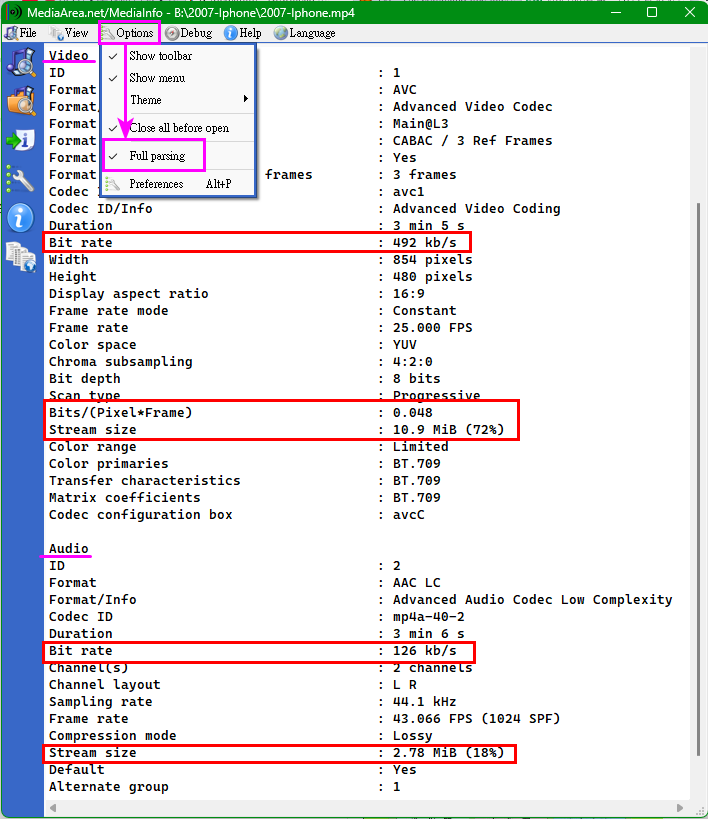
You can use -system.size.therube wrote: Wed Oct 29, 2025 3:33 pm 1 item 15.1 MB
Is that part of the ES.exe output?
If so, how did you do that?
es -system.size 2007-Iphone.mp4
-
therube
- Posts: 5822
- Joined: Thu Sep 03, 2009 6:48 pm
Re: ES - The command line interface for Everything
> Full parsing
Neat, thanks.
(And I'll note that's also different from the -full switch.)
And how did you do the part of the output?
-get-result-count gives a count (but then does not show the actual items).
So it must be something from the Everything end, then... $o, $result-count:, but how do you output that?
Neat, thanks.
(And I'll note that's also different from the -full switch.)
And how did you do the
1 item-get-result-count gives a count (but then does not show the actual items).
So it must be something from the Everything end, then... $o, $result-count:, but how do you output that?
-
happy666
- Posts: 63
- Joined: Tue Oct 07, 2025 10:35 pm
Re: ES - The command line interface for Everything
MediaInfo Command Line :therube wrote: Wed Oct 29, 2025 7:40 pm Neat, thanks.
(And I'll note that's also different from the -full switch.)
You MUST use --ParseSpeed=1
Example:
mediainfo --ParseSpeed=1 2007-Iphone.mp4
ES uses -footer.therube wrote: Wed Oct 29, 2025 7:40 pm And how did you do thepart of the output?1 item
-get-result-count gives a count (but then does not show the actual items).
So it must be something from the Everything end, then... $o, $result-count:, but how do you output that?
Example:
B:\2007-Iphone>es -parent . -footer 2007-Iphone.mp4
B:\2007-Iphone\2007-Iphone.mp4
1 item 15.1 MB
B:\2007-Iphone>es -parent . 2007-Iphone.mp4
B:\2007-Iphone\2007-Iphone.mp4
-
void
- Developer
- Posts: 20246
- Joined: Fri Oct 16, 2009 11:31 pm
Re: ES - The command line interface for Everything
The mp4 header is missing information for that file.
ES/Everything will gather the duration/bitrate from the OS.
If the OS doesn't find the duration/bitrate, Everything will pull this information from the mp4 header.
The duration is set to 0 in the header, which is likely causing the OS to return a 0 bitrate.
ES/Everything will gather the duration/bitrate from the OS.
If the OS doesn't find the duration/bitrate, Everything will pull this information from the mp4 header.
The duration is set to 0 in the header, which is likely causing the OS to return a 0 bitrate.
-
happy666
- Posts: 63
- Joined: Tue Oct 07, 2025 10:35 pm
Re: ES - The command line interface for Everything
Maybe ES can do something.void wrote: Wed Oct 29, 2025 9:45 pm The mp4 header is missing information for that file.
ES/Everything will gather the duration/bitrate from the OS.
If the OS doesn't find the duration/bitrate, Everything will pull this information from the mp4 header.
The duration is set to 0 in the header, which is likely causing the OS to return a 0 bitrate.
If get 0 in the header then .....
-
void
- Developer
- Posts: 20246
- Joined: Fri Oct 16, 2009 11:31 pm
Re: ES - The command line interface for Everything
There's nothing ES/Everything can do, as far as ES/Everything is concerned, the file is corrupt.
-
therube
- Posts: 5822
- Joined: Thu Sep 03, 2009 6:48 pm
Re: ES - The command line interface for Everything
distinct: overrides a sort.
Is there an easy way around that?
---
 .
.
Is there an easy way around that?
Code: Select all
C:\DEV\LOCATE\HOME>es ncmain -footer -size /o-s distinct:
             0 C:\000\TMP\SEA\EVERYTHING SLOW\nc.exe ncmain.txt
       233,522 C:\000\NC\NCMAIN.EXE
        13,371 C:\000\TMP\TT2015\BIN.ZIP\X\NCMAIN.EXE.7z
             0 C:\000\TMP\SEA\EVERYTHING SLOW\ncmainisthebomb.exe
4 items 241 KB
---
Thank you, that's going into my batch filesES uses -footer
.-
happy666
- Posts: 63
- Joined: Tue Oct 07, 2025 10:35 pm
Re: ES - The command line interface for Everything
Remove distinct:therube wrote: Thu Oct 30, 2025 3:03 pm distinct: overrides a sort.
Is there an easy way around that?
Code: Select all
C:\DEV\LOCATE\HOME>es ncmain -footer -size /o-s distinct:
             0 C:\000\TMP\SEA\EVERYTHING SLOW\nc.exe ncmain.txt
       233,522 C:\000\NC\NCMAIN.EXE
        13,371 C:\000\TMP\TT2015\BIN.ZIP\X\NCMAIN.EXE.7z
             0 C:\000\TMP\SEA\EVERYTHING SLOW\ncmainisthebomb.exe
4 items 241 KB
I do NOT know the "distinct:".
Example:
Code: Select all
B:\1>es -parent . -footer -size /o-s
     1,916,244 B:\1\GHost.exe
       201,896 B:\1\ES.exe
       120,926 B:\1\EMM386.EXE
        80,496 B:\1\HE.EXE
        54,645 B:\1\COMMAND.COM
        40,774 B:\1\IO.SYS
        38,138 B:\1\MSDOS.SYS
        37,681 B:\1\MOUSE.COM
        29,336 B:\1\FDISK.EXE
        29,136 B:\1\HIMEM.SYS
        25,361 B:\1\MSCDEX.EXE
        22,974 B:\1\FORMAT.COM
        18,698 B:\1\BTCCDROM.SYS
        16,930 B:\1\XCOPY.EXE
        12,241 B:\1\CHKDSK.EXE
        11,208 B:\1\ATTRIB.EXE
        10,774 B:\1\APPEND.EXE
         9,432 B:\1\SYS.COM
         5,873 B:\1\RAMDRIVE.SYS
         5,861 B:\1\DOSKEY.COM
         2,545 B:\1\MORE_COM
         2,545 B:\1\MORE.COM
            24 B:\1\ES.ini
23 items 2.56 MB

B:\1>es -parent . -footer -size /o-s distinct:
        10,774 B:\1\APPEND.EXE
        11,208 B:\1\ATTRIB.EXE
        18,698 B:\1\BTCCDROM.SYS
        12,241 B:\1\CHKDSK.EXE
        54,645 B:\1\COMMAND.COM
         5,861 B:\1\DOSKEY.COM
       120,926 B:\1\EMM386.EXE
       201,896 B:\1\ES.exe
            24 B:\1\ES.ini
        29,336 B:\1\FDISK.EXE
        22,974 B:\1\FORMAT.COM
     1,916,244 B:\1\GHost.exe
        80,496 B:\1\HE.EXE
        29,136 B:\1\HIMEM.SYS
        40,774 B:\1\IO.SYS
         2,545 B:\1\MORE.COM
         2,545 B:\1\MORE_COM
        37,681 B:\1\MOUSE.COM
        25,361 B:\1\MSCDEX.EXE
        38,138 B:\1\MSDOS.SYS
         5,873 B:\1\RAMDRIVE.SYS
         9,432 B:\1\SYS.COM
        16,930 B:\1\XCOPY.EXE
23 items 2.56 MB
-
void
- Developer
- Posts: 20246
- Joined: Fri Oct 16, 2009 11:31 pm
Re: ES - The command line interface for Everything
distinct: will override /odistinct: overrides a sort.
Is there an easy way around that?
Specify the desired sort with sort:
For example:
es ncmain -footer -size distinct: sort:size-
happy666
- Posts: 63
- Joined: Tue Oct 07, 2025 10:35 pm
Re: ES - The command line interface for Everything
Question 1:
Top 5:
es -parent . -sort size -n 5
How can i to list size > N Byes ?
Example: I want to list size > 10 MB(Or 10,485,760 Bytes) ONLY.
Question 2:
"es -parent . -sort size -n 5" --> with text color output.
es -parent . -sort size -n 5|find/i "Disk" --> without text color output.
es -parent . -sort size -n 5|more --> without text color output.
FOR /F "tokens=1* delims=" %i in ('es -parent . -sort size -n 5') do @echo %i --> without text color output.
How can i to keep text color output ?
Top 5:
es -parent . -sort size -n 5
How can i to list size > N Byes ?
Example: I want to list size > 10 MB(Or 10,485,760 Bytes) ONLY.
Question 2:
Code: Select all
G:\DOS>es -parent . -sort size -n 5
2010/02/12 08:16:16          7,429,000    7.08 MB A        exe  G:\DOS\GHost_X64.exe
2010/03/26 09:55:26          5,874,056    5.60 MB A        exe  G:\DOS\GDisk_X64.exe
2010/02/12 08:18:56          3,980,680    3.79 MB A        exe  G:\DOS\GHost32.exe
2012/03/08 16:45:00          3,760,569    3.58 MB A        exe  G:\DOS\MiniShort.exe
2012/03/08 16:45:00          3,760,568    3.58 MB A        exe  G:\DOS\MiniLong.exe
220 items 149 MB

G:\DOS>es -parent . -sort size -n 5|find/i "Disk"
2010/03/26 09:55:26 5,874,056 5.60 MB A exe G:\DOS\GDisk_X64.exees -parent . -sort size -n 5|find/i "Disk" --> without text color output.
es -parent . -sort size -n 5|more --> without text color output.
FOR /F "tokens=1* delims=" %i in ('es -parent . -sort size -n 5') do @echo %i --> without text color output.
How can i to keep text color output ?