Hello,
could you please compile me:
-Command-line Interface ES (v1-1-0-27)
as:
-win32 arm64 (for Windows 11 and 10 arm64OS)
and:
-win32 arm32 (for unlocked Windows RT 8-1 and 8-0 arm32OS)
?
I can do all the testing if it is needed.
Thanks.
ES - The command line interface for Everything
-
moderate
- Posts: 6
- Joined: Sat May 24, 2025 9:24 am
-
void
- Developer
- Posts: 20238
- Joined: Fri Oct 16, 2009 11:31 pm
Re: ES - The command line interface for Everything
ES-1.1.0.30.x64.zip
ES-1.1.0.30.x86.zip
ES-1.1.0.30.ARM64.zip
ES-1.1.0.30.ARM.zip
ES-1.1.0.30.src.zip
https://github.com/voidtools/es
Added ARM builds.
Thanks for testing.
ES-1.1.0.30.x86.zip
ES-1.1.0.30.ARM64.zip
ES-1.1.0.30.ARM.zip
ES-1.1.0.30.src.zip
- added new code signing certificate: voidtools PTY LTD
https://github.com/voidtools/es
Added ARM builds.
Thanks for testing.
-
void
- Developer
- Posts: 20238
- Joined: Fri Oct 16, 2009 11:31 pm
Re: ES - The command line interface for Everything
ES-1.1.0.31a.x64.zip
ES-1.1.0.31a.x86.zip
ES-1.1.0.31a.ARM64.zip
ES-1.1.0.31a.ARM.zip
ES-1.1.0.31a.src.zip
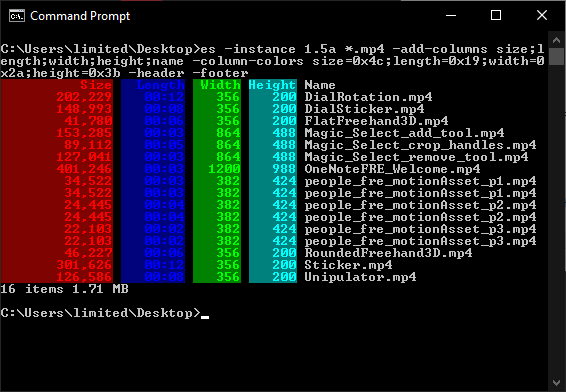
ES can now query Everything 1.5 properties.
ES can now query your Everything Index Journal.
Journal options
-j, -journal [filename filter]
Show index journal changes.
Any journal option below also shows journal changes.
Wildcards are supported in the filename filter.
The whole final case-insensitive filename is matched.
Use a path separator to match full paths and names.
-get-journal-id
Return the current journal ID.
-get-journal-pos
Return the current journal ID and next change ID.
-action-filter <semicolon (;) delimited list of actions>
Show only changes with the specified actions:
folder-create;folder-delete;folder-rename;folder-move;folder-modify;
file-create;file-delete;file-rename;file-move;file-modify
-watch
Return when a match is found and display the journal position.
-from-journal-pos <journal-id> <change-id>
-from-journal-id <journal-id>
-from-change-id <change-id>
Show changes from the specified journal-id and change-id.
-from-date <date>
Show changes starting from the specified ISO-8601 date.
-from-yesterday
Show changes starting from the beginning of yesterday.
-from-today
Show changes starting from the beginning of today.
-from-now
Show changes starting from the current time.
-to-journal-pos <journal-id> <change-id>
-to-journal-id <journal-id>
-to-change-id <change-id>
Show changes until the specified journal-id and change-id (exclusive).
-to-date <date>
Show changes until the specified ISO-8601 date (exclusive).
-to-today
Show changes until the start of today (exclusive).
-to-tomorrow
Show changes until the start of tomorrow (exclusive).
-to-now
Show changes until the current time (exclusive).
-after-journal-pos <journal-id> <change-id>
Show changes after the specified journal-id and change-id.
-changed-today
Show changes from the start of today until the start of tomorrow.
Same as -from-today -to-tomorrow
-changed-yesterday
Show changes from the start of yesterday until the start of today.
Same as -from-yesterday -to-today
To export changes made today, call:
(runs until midnight)
To export changes made yesterday, call:
To watch for a change to a specific file, call:
(returns when myprog.exe changes)
The following columns are supported in the journal mode:
Journal options require Everything 1.5.0.1397a or later.
To view results as json, include the following in your es call:
To export results to a json file, include the following in your es call:
To show a property header when displaying results, include the following in your es call:
To show a footer with the number of items and total size, include the following in your es call:
es will now use your locale to format numbers.
To set the number grouping, include the following in your es call:
where grouping can be one of the following:
es will now use your locale for the grouping separator.
To specify the grouping separator, include the following in your es call:
For example:
es will now use your locale for the decimal point character.
To specify the decimal point character, include the following in your es call:
For example:
es will now use your locale for the leading zero.
To specify if numbers should use a leading zero, include the following in your es call:
For example:
es will now use your locale for the negative number formatting.
To specify the negative number formatting, include the following in your es call:
Format can be one of the following values:
To format sizes as KB or auto size (Bytes, KB, MB etc... depending on size), include the following in your es call:
Where format can be one of the following values:
es can now have separate date formats for display and exporting.
To set the export date format, include the following in your es call:
Where format can be one of the following values:
-sort <property>, -sort-<property> will now support all Everything properties.
For example, to sort by length, include the following in your es call:
Any Everything 1.5 property can now be shown with -<property>
For example, to show the length, width and height column, include the following in your es call:
The following syntax is also supported:
The Everything syntax is also supported:
Colors can now be set for any Everything 1.5 column.
For example, to set the length column to pink text on a dark pink background, include the following in your es call:
The following syntax is also supported:
Column widths can now be set for any Everything 1.5 column.
For example, to set the length column width to 5 characters, include the following in your es call:
es will now use ipc3 by default.
If ipc3 is not available, es will fallback to ipc2.
If ipc2 support is not available, es will fallback to ipc1.
To disable ipc3 support, include the following in your es call:
ipc3 is Everything 1.5.
ipc2 is Everything 1.4.
ipc1 is Everything 1.3.
To list all available properties, call es with:
es will now add a trailing path separator to folders when exporting.
To disable the trailing path separator, include the following in your es call:
es can now interpret the rest of the command line as literal with or or
can now be used to disable switch parsing.
Double quotes are still processed.
es will now accept -switch=value syntax.
For example:
es will now shrink columns after an overflow.
This will help keep columns aligned.
-<property>-width was accidentally removed. (eg: -size-width 9)
It will be re-added in the next update.
Added Windows Property system properties support.
For example:
Everything 1.5.0.1397a adds an option to allow IPC more access to unindexed information and formulas.
To allow ES to use formulas:
Settings are now stored in %APPDATA%\voidtools\es\es.ini
ES-1.1.0.31a.x86.zip
ES-1.1.0.31a.ARM64.zip
ES-1.1.0.31a.ARM.zip
ES-1.1.0.31a.src.zip
- added Everything 1.5 IPC3/SDK3 support.
- added support for all Everything 1.5 properties.
- added Journal support.
- added json export option.
- added -header and -footer options.
- added number formatting options.
- added size formatting options.
ES can now query Everything 1.5 properties.
Code: Select all
es -instance 1.5a *.mp4 -add-columns size;length;width;height;name -column-colors size=0x4c;length=0x19;width=0x2a;height=0x3b -header -footer
ES can now query your Everything Index Journal.
Journal options
-j, -journal [filename filter]
Show index journal changes.
Any journal option below also shows journal changes.
Wildcards are supported in the filename filter.
The whole final case-insensitive filename is matched.
Use a path separator to match full paths and names.
-get-journal-id
Return the current journal ID.
-get-journal-pos
Return the current journal ID and next change ID.
-action-filter <semicolon (;) delimited list of actions>
Show only changes with the specified actions:
folder-create;folder-delete;folder-rename;folder-move;folder-modify;
file-create;file-delete;file-rename;file-move;file-modify
-watch
Return when a match is found and display the journal position.
-from-journal-pos <journal-id> <change-id>
-from-journal-id <journal-id>
-from-change-id <change-id>
Show changes from the specified journal-id and change-id.
-from-date <date>
Show changes starting from the specified ISO-8601 date.
-from-yesterday
Show changes starting from the beginning of yesterday.
-from-today
Show changes starting from the beginning of today.
-from-now
Show changes starting from the current time.
-to-journal-pos <journal-id> <change-id>
-to-journal-id <journal-id>
-to-change-id <change-id>
Show changes until the specified journal-id and change-id (exclusive).
-to-date <date>
Show changes until the specified ISO-8601 date (exclusive).
-to-today
Show changes until the start of today (exclusive).
-to-tomorrow
Show changes until the start of tomorrow (exclusive).
-to-now
Show changes until the current time (exclusive).
-after-journal-pos <journal-id> <change-id>
Show changes after the specified journal-id and change-id.
-changed-today
Show changes from the start of today until the start of tomorrow.
Same as -from-today -to-tomorrow
-changed-yesterday
Show changes from the start of yesterday until the start of today.
Same as -from-yesterday -to-today
To export changes made today, call:
es -changed-today -export-csv out.csv(runs until midnight)
To export changes made yesterday, call:
es -changed-yesterday -export-csv out.csvTo watch for a change to a specific file, call:
es -watch "myprog.exe"(returns when myprog.exe changes)
The following columns are supported in the journal mode:
- Journal ID
- Change ID
- Action
- Date Changed
- Source Date Changed
- Parent Date Modified
- Filename
- New Parent Date Modified
- New Filename
- Size
- Date Created
- Date Modified
- Date Accessed
- Attributes
Journal options require Everything 1.5.0.1397a or later.
To view results as json, include the following in your es call:
-jsonTo export results to a json file, include the following in your es call:
-export-json out.jsonTo show a property header when displaying results, include the following in your es call:
-headerTo show a footer with the number of items and total size, include the following in your es call:
-footeres will now use your locale to format numbers.
To set the number grouping, include the following in your es call:
-locale-grouping <grouping>where grouping can be one of the following:
- 32
- 3
- 2
- 0
es.exe -locale-grouping 3es will now use your locale for the grouping separator.
To specify the grouping separator, include the following in your es call:
-locale-thousand <thousand-separator>For example:
es.exe -locale-thousand ","es will now use your locale for the decimal point character.
To specify the decimal point character, include the following in your es call:
-locale-decimal <decimal-point-character>For example:
es.exe -locale-decimal "."es will now use your locale for the leading zero.
To specify if numbers should use a leading zero, include the following in your es call:
-locale-lzero <1|0>For example:
es.exe -locale-lzero 1es will now use your locale for the negative number formatting.
To specify the negative number formatting, include the following in your es call:
-locale-negnumber <format>Format can be one of the following values:
- 0 Left parenthesis, number, right parenthesis. Example: (1.1)
- 1 Negative sign, number. Example: -1.1 (default)
- 2 Negative sign, space, number. Example: - 1.1
- 3 Number, negative sign. Example: 1.1-
- 4 Number, space, negative sign. Example: 1.1 -
es.exe -locale-negnumber 1To format sizes as KB or auto size (Bytes, KB, MB etc... depending on size), include the following in your es call:
-size-format <format>Where format can be one of the following values:
- 0 = Auto (Bytes, KB, MB etc... depending on size)
- 1 = Bytes
- 2 = KB
- 3 = MB
es can now have separate date formats for display and exporting.
To set the export date format, include the following in your es call:
-export-date-format <format>Where format can be one of the following values:
- 0 = (Use default)
- 1 = ISO-8601
- 2 = FILETIME
- 3 = ISO-8601 in UTC
-export-date-format 1-sort <property>, -sort-<property> will now support all Everything properties.
For example, to sort by length, include the following in your es call:
-sort lengthAny Everything 1.5 property can now be shown with -<property>
For example, to show the length, width and height column, include the following in your es call:
-width -height -lengthThe following syntax is also supported:
-add-columns width;height;lengthThe Everything syntax is also supported:
add-columns:width;height;lengthColors can now be set for any Everything 1.5 column.
For example, to set the length column to pink text on a dark pink background, include the following in your es call:
-length-color 0x5dThe following syntax is also supported:
-add-column-colors length=0x5d;width=0x4c;height=0x3aColumn widths can now be set for any Everything 1.5 column.
For example, to set the length column width to 5 characters, include the following in your es call:
-add-column-widths length=5es will now use ipc3 by default.
If ipc3 is not available, es will fallback to ipc2.
If ipc2 support is not available, es will fallback to ipc1.
To disable ipc3 support, include the following in your es call:
-no-ipc3ipc3 is Everything 1.5.
ipc2 is Everything 1.4.
ipc1 is Everything 1.3.
To list all available properties, call es with:
es -list-propertieses will now add a trailing path separator to folders when exporting.
To disable the trailing path separator, include the following in your es call:
-no-folder-append-path-separatores can now interpret the rest of the command line as literal with
-q*-search*-s*--Double quotes are still processed.
es will now accept -switch=value syntax.
For example:
-instance=1.5aes will now shrink columns after an overflow.
This will help keep columns aligned.
-<property>-width was accidentally removed. (eg: -size-width 9)
It will be re-added in the next update.
Added Windows Property system properties support.
For example:
es.exe c:\windows\* -system.sizeEverything 1.5.0.1397a adds an option to allow IPC more access to unindexed information and formulas.
To allow ES to use formulas:
- From the Start menu, search for:
regedit - Right click Registry Editor and click Run as administrator.
- In the Registry Editor, navigate to:
HKLM\Software\Policies\voidtools\Everything
(Please create this key if it doesn't exist) - In the right pane, right click and click New -> dword value.
- Set the value name to:
ipc_allow_read_access - Set the value data to:
1 - Restart Everything (File -> Exit)
Settings are now stored in %APPDATA%\voidtools\es\es.ini
-
brandySnake
- Posts: 41
- Joined: Fri Sep 24, 2021 3:00 pm
Re: ES - The command line interface for Everything
Thanks for updating the es.exe.
I tested the behavior of the new `-json` option.
I checked the results and it seems that the output is separated by a line break for each record.
Is this intentional?
Is this an attempt to get around some kind of limitation on CLI output?
I tested the behavior of the new `-json` option.
I checked the results and it seems that the output is separated by a line break for each record.
Is this intentional?
Is this an attempt to get around some kind of limitation on CLI output?
-
void
- Developer
- Posts: 20238
- Joined: Fri Oct 16, 2009 11:31 pm
Re: ES - The command line interface for Everything
Yes.Is this intentional?
It makes it easier to read.
The output should still be valid json.
There's no limitation.Is this an attempt to get around some kind of limitation on CLI output?
Are you have trouble parsing the output?
-Do I need add a -no-newline option?
edit: you can do this already, create an es.ini in the same location as your es.exe
Set your es.ini to:
Code: Select all
[ES]
newline_type=3
-
brandySnake
- Posts: 41
- Joined: Fri Sep 24, 2021 3:00 pm
Re: ES - The command line interface for Everything
Thank you for your reply.
I see. It's a display trick.
Also, the es.ini you suggested (2 lines) didn't work for some reason.
Furthermore, in this version (ES-1.1.0.31a), it seems that specifying -date-format or -size-format doesn't work when -json is specified.
I see. It's a display trick.
Also, the es.ini you suggested (2 lines) didn't work for some reason.
Furthermore, in this version (ES-1.1.0.31a), it seems that specifying -date-format or -size-format doesn't work when -json is specified.
-
void
- Developer
- Posts: 20238
- Joined: Fri Oct 16, 2009 11:31 pm
Re: ES - The command line interface for Everything
Thanks for the feedback brandySnake,
[es] => [ES]
The next es update will support both [es] and [ES] sections.
For now, please try -export-date-format when using -json
Please try the following es.ini instead:Also, the es.ini you suggested (2 lines) didn't work for some reason.
Code: Select all
[ES]
newline_type=3
The next es update will support both [es] and [ES] sections.
I will simplify -date-format in the next es update.Furthermore, in this version (ES-1.1.0.31a), it seems that specifying -date-format or -size-format doesn't work when -json is specified.
For now, please try -export-date-format when using -json
-
brandySnake
- Posts: 41
- Joined: Fri Sep 24, 2021 3:00 pm
Re: ES - The command line interface for Everything
It worked![es] => [ES]
This also worked! Thanks!For now, please try -export-date-format when using -json
Also, I'm not sure if you're already aware of this or if it was intentional, but there seem to be some other behavioral differences depending on whether or not the -json option is specified.
For example, if -json is not specified, no trailing separator is added even if you don't specify -no-folder-append-path-separator (maintaining behavior equivalent to the previous version).
-
void
- Developer
- Posts: 20238
- Joined: Fri Oct 16, 2009 11:31 pm
Re: ES - The command line interface for Everything
Like Everything, ES will now add a trailing backslash to folders when outputting with an export format. (such as json)
The basic display output will not append a trailing backslash by default.
To set the default:
Add the following line to the end of your es.ini:
where x can be one of the following:
The basic display output will not append a trailing backslash by default.
To set the default:
Add the following line to the end of your es.ini:
Code: Select all
folder_append_path_separator=x
- -1 = disabled.
- 0 = use default.
- 1 = enabled.
-
brandySnake
- Posts: 41
- Joined: Fri Sep 24, 2021 3:00 pm
Re: ES - The command line interface for Everything
I see. So JSON is treated as an export format.Like Everything, ES will now add a trailing backslash to folders when outputting with an export format. (such as json)
thanks!
-
void
- Developer
- Posts: 20238
- Joined: Fri Oct 16, 2009 11:31 pm
Re: ES - The command line interface for Everything
ES-1.1.0.32a.x64.zip
ES-1.1.0.32a.x86.zip
ES-1.1.0.32a.ARM64.zip
ES-1.1.0.32a.ARM.zip
ES-1.1.0.32a.src.zip
ES-1.1.0.32a.x86.zip
ES-1.1.0.32a.ARM64.zip
ES-1.1.0.32a.ARM.zip
ES-1.1.0.32a.src.zip
- fixed an issue with a lowercase [es] section not working in es.ini
- fixed an issue with background colors carrying over to the next line.
- fixed an issue with -<property-name>-width not working.
- fixed an issue with -pause when there is no results.
- improved -date-format and removed -export-date-format
- added -no-new-line switch
-
brandySnake
- Posts: 41
- Joined: Fri Sep 24, 2021 3:00 pm
Re: ES - The command line interface for Everything
thank you as always.
I'm using a custom name (e.g., "MyTags") set to custom_property_0.
In both of the following commands, the field name in the output is custom_property_0.
Shouldn't the field name in the latter output be "MyTags"?
I'm using a custom name (e.g., "MyTags") set to custom_property_0.
In both of the following commands, the field name in the output is custom_property_0.
Shouldn't the field name in the latter output be "MyTags"?
es -instance 1.5a -header -add-columns custom_property_0 -- query_word
Note: The result is the same even if you replace -header with -json.es -instance 1.5a -header -add-columns MyTags -- query_word
-
void
- Developer
- Posts: 20238
- Joined: Fri Oct 16, 2009 11:31 pm
Re: ES - The command line interface for Everything
ES is unaware of the custom_property_0 name.
I have put on my TODO list: request the correct display name for custom_property_0..custom_property_9
For now, ES will use custom_property_0
For export formats, ES will always use custom_property_0.
I have put on my TODO list: request the correct display name for custom_property_0..custom_property_9
For now, ES will use custom_property_0
For export formats, ES will always use custom_property_0.
-
brandySnake
- Posts: 41
- Joined: Fri Sep 24, 2021 3:00 pm
Re: ES - The command line interface for Everything
Thank you for confirming the behavior and adding this to my to-do list.void wrote: Fri Sep 12, 2025 10:03 pm ES is unaware of the custom_property_0 name.
I have put on my TODO list: request the correct display name for custom_property_0..custom_property_9
I'm looking forward to the es.exe update.
-
void
- Developer
- Posts: 20238
- Joined: Fri Oct 16, 2009 11:31 pm
Re: ES - The command line interface for Everything
ES-1.1.0.33.x64.zip
ES-1.1.0.33.x86.zip
ES-1.1.0.33.ARM64.zip
ES-1.1.0.33.ARM.zip
ES-1.1.0.33.src.zip
ES-1.1.0.33.x86.zip
ES-1.1.0.33.ARM64.zip
ES-1.1.0.33.ARM.zip
ES-1.1.0.33.src.zip
- cleaned up /a dir style commands, had P for sparse, which no longer exists.
- show help when there's no arguments, no export type and output to console. -added -no-help-on-no-args option.
- run count 0xffffffff is a valid value and should be displayed.
- fixed an issue with DIR /ah style attributes.
- fixed a long timeout delay when using Everything 1.4.
- fixed an issue with -timeout not waiting for the db to load.
- ES will now use the localized property name for custom property 0..9 when printing to the console.
-
happy666
- Posts: 63
- Joined: Tue Oct 07, 2025 10:35 pm
Re: ES - The command line interface for Everything
Suggestion : SHA1 and SHA256 :
See picture for more details.
https://imgtu.com/upload/t6l9tvb3/file_4a47a0
See picture for more details.
https://imgtu.com/upload/t6l9tvb3/file_4a47a0
-
happy666
- Posts: 63
- Joined: Tue Oct 07, 2025 10:35 pm
Re: ES - The command line interface for Everything
Everything is running.
B:\>es -instance 1.5a *.mp4 -add-columns size;length;width;height;name -column-colors size=0x4c;length=0x19;width=0x2a;height=0x3b -header -footer
Error 8: Everything IPC not found. Please make sure Everything is running.
B:\>es -instance 1.5.0.1399a *.mp4 -add-columns size;length;width;height;name -column-colors size=0x4c;length=0x19;width=0x2a;height=0x3b -header -footer
Error 8: Everything IPC not found. Please make sure Everything is running.
B:\>es -instance 1.5a *.mp4 -add-columns size;length;width;height;name -column-colors size=0x4c;length=0x19;width=0x2a;height=0x3b -header -footer
Error 8: Everything IPC not found. Please make sure Everything is running.
B:\>es -instance 1.5.0.1399a *.mp4 -add-columns size;length;width;height;name -column-colors size=0x4c;length=0x19;width=0x2a;height=0x3b -header -footer
Error 8: Everything IPC not found. Please make sure Everything is running.
-
horst.epp
- Posts: 1662
- Joined: Fri Apr 04, 2014 3:24 pm
Re: ES - The command line interface for Everything
Possible errors:happy666 wrote: Wed Oct 08, 2025 2:08 pm Everything is running.
B:\>es -instance 1.5a *.mp4 -add-columns size;length;width;height;name -column-colors size=0x4c;length=0x19;width=0x2a;height=0x3b -header -footer
Error 8: Everything IPC not found. Please make sure Everything is running.
B:\>es -instance 1.5.0.1399a *.mp4 -add-columns size;length;width;height;name -column-colors size=0x4c;length=0x19;width=0x2a;height=0x3b -header -footer
Error 8: Everything IPC not found. Please make sure Everything is running.
1. You have set the Alpha instance to false in your Everything 1.5 config.
2. You have installed the Lite version of Everything, which doesn't support any IPC communication.
-
happy666
- Posts: 63
- Joined: Tue Oct 07, 2025 10:35 pm
Re: ES - The command line interface for Everything
To horst.epp:
>1. You have set the Alpha instance to false in your Everything 1.5 config.
Yes,you are right.
I set alpha_instace=true
It works.
I set alpha_instace=false
It does NOT work.
Why ?
>1. You have set the Alpha instance to false in your Everything 1.5 config.
Yes,you are right.
I set alpha_instace=true
It works.
I set alpha_instace=false
It does NOT work.
Why ?
-
happy666
- Posts: 63
- Joined: Tue Oct 07, 2025 10:35 pm
Re: ES - The command line interface for Everything
Everything show Aspect Ratio 16:9 on Video file.
ES show Aspect Ratio 1.777 on Video file.
It is more better to show 16:9.
ES show Aspect Ratio 1.777 on Video file.
It is more better to show 16:9.
-
therube
- Posts: 5819
- Joined: Thu Sep 03, 2009 6:48 pm
Re: ES - The command line interface for Everything
@happy666
re: picture
Do you have an ES.ini file (is that a thing?)?
Your output is not default.
-
Instances.
Instances need not necessarily be named "1.5a".
will show you the Instance: name being used (as may the GUI itself).
alpha_instace is not 'true', 'false', rather 1 or 0.
More, Replacing my Everything 1.4 installation with the test version?
-
16:9 vs. 1.777
I'll suspect that the colon (:) is an "awkward" character when dealing with command-line?
re: picture
Do you have an ES.ini file (is that a thing?)?
Your output is not default.
Code: Select all
C:\out\recylererer\X>es.exe %cd% *.bat -crc32 -sha1
79987044 F1364D0C50441249E2EFD2DA005F03DAEE94ACF9 C:\out\recylererer\X\getts.bat
5AEAC4B5 D3E4FF1DF436B8DE1AABAD9DD585E7CDFB446E77 C:\out\recylererer\X\done\getURL.bat
C63E58D5 4D8F9AD4ECB3064B955B0614C5E0ABC8FB8FB067 C:\out\recylererer\X\hashvideo - Copy - Copy.BAT
2EB4035C 2576EF01764B7A03963A16FBDAF0397FB440A019 C:\out\recylererer\X\hashvideo - Copy.BAT
AF63B029 F86D755CF2BFCB7C05A08EABA58DBDCA1FEE54AD C:\out\recylererer\X\hashvideo.BAT
Instances.
Instances need not necessarily be named "1.5a".
Help | Troubleshootingalpha_instace is not 'true', 'false', rather 1 or 0.
More, Replacing my Everything 1.4 installation with the test version?
-
16:9 vs. 1.777
I'll suspect that the colon (:) is an "awkward" character when dealing with command-line?
-
happy666
- Posts: 63
- Joined: Tue Oct 07, 2025 10:35 pm
Re: ES - The command line interface for Everything
To therube :
>16:9 vs. 1.777
>I'll suspect that the colon (:) is an "awkward" character when dealing with command-line?
No.
C:\>echo 16:9
16:9
>Do you have an ES.ini file (is that a thing?)?
>Your output is not default.
Yes,i have the ES.ini
I checked ES.ini
[ES]
columns=9,7,11,0
I change columns=9,7,11,6 and OK.
How can i get detail information about ES.ini ?
>16:9 vs. 1.777
>I'll suspect that the colon (:) is an "awkward" character when dealing with command-line?
No.
C:\>echo 16:9
16:9
>Do you have an ES.ini file (is that a thing?)?
>Your output is not default.
Yes,i have the ES.ini
I checked ES.ini
[ES]
columns=9,7,11,0
I change columns=9,7,11,6 and OK.
How can i get detail information about ES.ini ?
-
void
- Developer
- Posts: 20238
- Joined: Fri Oct 16, 2009 11:31 pm
Re: ES - The command line interface for Everything
I have put on my TODO list to add 16:9 aspect ratio formatting like Everything.
Thank you for the suggestion.
Most es.ini settings are documented here:
https://github.com/voidtools/ES/blob/0e0a714a010e1f490fd870055bd78a1c8d8a2fc2/src/es.c#L288
In ES-1.1.0.31a and later you can use the following es.ini column syntax:
Thank you for the suggestion.
Most es.ini settings are documented here:
https://github.com/voidtools/ES/blob/0e0a714a010e1f490fd870055bd78a1c8d8a2fc2/src/es.c#L288
In ES-1.1.0.31a and later you can use the following es.ini column syntax:
Code: Select all
columns=date-modified;size;attributes;extension
-
happy666
- Posts: 63
- Joined: Tue Oct 07, 2025 10:35 pm
Re: ES - The command line interface for Everything
To void:
>I have put on my TODO list to add 16:9 aspect ratio formatting like Everything.
Thank you.
Command :
es --clear-settings
es --save-settings
It will get a DEFAULT es.ini
[ES]
...
instance=
...
columns=
column_colors=
column_widths=
No any detail information.
I suggest to add document for those items.
>columns=date-modified;size;attributes;extension
I change columns=9,7,11,6 and OK.
I try to change extension
columns=9,7,11,0
columns=9,7,11,1
columns=9,7,11,2
columns=9,7,11,3
columns=9,7,11,4
columns=9,7,11,5
columns=9,7,11,6
columns=9,7,11,7
columns=9,7,11,8
columns=9,7,11,9
The extension has more options ?
>I have put on my TODO list to add 16:9 aspect ratio formatting like Everything.
Thank you.
Command :
es --clear-settings
es --save-settings
It will get a DEFAULT es.ini
[ES]
...
instance=
...
columns=
column_colors=
column_widths=
No any detail information.
I suggest to add document for those items.
>columns=date-modified;size;attributes;extension
I change columns=9,7,11,6 and OK.
I try to change extension
columns=9,7,11,0
columns=9,7,11,1
columns=9,7,11,2
columns=9,7,11,3
columns=9,7,11,4
columns=9,7,11,5
columns=9,7,11,6
columns=9,7,11,7
columns=9,7,11,8
columns=9,7,11,9
The extension has more options ?
-
void
- Developer
- Posts: 20238
- Joined: Fri Oct 16, 2009 11:31 pm
Re: ES - The command line interface for Everything
This is expected.es --clear-settings
es --save-settings
It will get a DEFAULT es.ini
--clear-settings will clear your settings.
An easy way to set these values is to use the corresponding switch to set the value.instance=
...
columns=
column_colors=
column_widths=
No any detail information.
I suggest to add document for those items.
For example:
es -instance "1.5a" -save-settingsThis will store
instance=1.5aFor example:
es -column-colors size=0x4c;length=0x19;width=0x2a;height=0x3b -save-settingsThis will store
column_colors=Size=76;Width=42;Height=59;Length=25I am not expecting users to edit their es.ini directly.
However, I will consider adding some documentation.
I am not sure what you mean.The extension has more options ?
Does columns have more options? -Yes, you can specify any property name. eg: columns=9,7,11,sha256
There's only one extension property.
-
happy666
- Posts: 63
- Joined: Tue Oct 07, 2025 10:35 pm
Re: ES - The command line interface for Everything
I know Export Options,but it is not good.
I suggest add -export-stdout <out.txt>
ES.INI
highlight=1
B:\123>es -path .
2025/10/10 12:38:50 979 A txt B:\123\1.txt
2025/01/15 16:26:00 7,621,504 A exe B:\123\1111111111111111.exe
2025/01/23 15:35:03 4,286 A ico B:\123\22222222222222222222222.ico
2023/09/05 09:03:26 749,154 A db B:\123\3333333333333333333333333333333.db
B:\123>es -path . >Test.txt
B:\123>type Test.txt
2025/10/10 12:38:50 979 A txt *B:\123\*1.t
2025/01/15 16:26:00 7,621,504 A exe *B:\123\*1111111111111111.e
2025/01/23 15:35:03 4,286 A ico *B:\123\*22222222222222222222222.i
2023/09/05 09:03:26 749,154 A db *B:\123\*3333333333333333333333333333333.
File Name:
1.txt --> 1.t
1111111111111111.exe --> 1111111111111111.e
22222222222222222222222.ico --> 22222222222222222222222.i
3333333333333333333333333333333.db --> 3333333333333333333333333333333.
I hope get Test.txt the same as "es -path ." command.
I suggest add -export-stdout <out.txt>
ES.INI
highlight=1
B:\123>es -path .
2025/10/10 12:38:50 979 A txt B:\123\1.txt
2025/01/15 16:26:00 7,621,504 A exe B:\123\1111111111111111.exe
2025/01/23 15:35:03 4,286 A ico B:\123\22222222222222222222222.ico
2023/09/05 09:03:26 749,154 A db B:\123\3333333333333333333333333333333.db
B:\123>es -path . >Test.txt
B:\123>type Test.txt
2025/10/10 12:38:50 979 A txt *B:\123\*1.t
2025/01/15 16:26:00 7,621,504 A exe *B:\123\*1111111111111111.e
2025/01/23 15:35:03 4,286 A ico *B:\123\*22222222222222222222222.i
2023/09/05 09:03:26 749,154 A db *B:\123\*3333333333333333333333333333333.
File Name:
1.txt --> 1.t
1111111111111111.exe --> 1111111111111111.e
22222222222222222222222.ico --> 22222222222222222222222.i
3333333333333333333333333333333.db --> 3333333333333333333333333333333.
I hope get Test.txt the same as "es -path ." command.
-
happy666
- Posts: 63
- Joined: Tue Oct 07, 2025 10:35 pm
Re: ES - The command line interface for Everything
Windows 11 23H2 Login Administrator
Everything 1.5.0.1399a
es -version 1.1.0.33
SHA256 ES.exe Everything.exe
2025/09/26 15:20:20 199,848 A exe E43A58EAA671D33CE6A86111EA0632BDE331586FDEA0F66BCA3EADA39E2495C7 ES.exe
2025/09/08 14:17:50 4,873,896 A exe CDB4598DA1CBDE80A69FE2DB35AB1EF891BCEC219BB2CDB456449B4C6C4F13FA Everything.exe
Everything is running.
Menu --> Help --> Troubleshooting Information --> Instance: 1.5a
Menu --> Tools --> Options --> Advanced --> alpha_instance --> true
B:\>es -instance 1.5a *.mp4 -add-columns size;length;width;height;name -column-colors size=0x4c;length=0x19;width=0x2a;height=0x3b -header -footer
Error 8: Everything IPC not found. Please make sure Everything is running.
Everything 1.5.0.1399a
es -version 1.1.0.33
SHA256 ES.exe Everything.exe
2025/09/26 15:20:20 199,848 A exe E43A58EAA671D33CE6A86111EA0632BDE331586FDEA0F66BCA3EADA39E2495C7 ES.exe
2025/09/08 14:17:50 4,873,896 A exe CDB4598DA1CBDE80A69FE2DB35AB1EF891BCEC219BB2CDB456449B4C6C4F13FA Everything.exe
Everything is running.
Menu --> Help --> Troubleshooting Information --> Instance: 1.5a
Menu --> Tools --> Options --> Advanced --> alpha_instance --> true
B:\>es -instance 1.5a *.mp4 -add-columns size;length;width;height;name -column-colors size=0x4c;length=0x19;width=0x2a;height=0x3b -header -footer
Error 8: Everything IPC not found. Please make sure Everything is running.
-
void
- Developer
- Posts: 20238
- Joined: Fri Oct 16, 2009 11:31 pm
Re: ES - The command line interface for Everything
Thanks for testing ES happy666,
This is a bug when highlighting and redirecting output to a file.
I will post a fix soon.
I am unable to reproduce the issue my end.
Does the following call work:
Please try restarting Everything (if you have made any changes to advanced settings)
Please try:I know Export Options,but it is not good.
I suggest add -export-stdout <out.txt>
es -export-txt out.txtGood catch.1.txt --> 1.t
This is a bug when highlighting and redirecting output to a file.
I will post a fix soon.
I'm not sure what's happening here.Error 8: Everything IPC not found. Please make sure Everything is running.
I am unable to reproduce the issue my end.
Does the following call work:
es -instance 1.5a -get-everything-versionPlease try restarting Everything (if you have made any changes to advanced settings)
-
happy666
- Posts: 63
- Joined: Tue Oct 07, 2025 10:35 pm
Re: ES - The command line interface for Everything
To void:
>es -export-txt out.txt
I have try ALL file formats,but i do NOT like.
I like StdOut > out.txt
-export-csv <out.csv>
-export-efu <out.efu>
-export-json <out.json>
-export-m3u <out.m3u>
-export-m3u8 <out.m3u8>
-export-tsv <out.txt>
-export-txt <out.txt>
>Good catch.
>This is a bug when highlighting and redirecting output to a file.
>I will post a fix soon.
If you can remove "*" chars is more better.
>es -instance 1.5a -get-everything-version
B:\123>es -instance 1.5a -get-everything-version
Error 8: Everything IPC not found. Please make sure Everything is running.
>Please try restarting Everything (if you have made any changes to advanced settings)
Yes,i always restarting Everything.
By the way,
I posted "by happy666 » Wed Oct 08, 2025 10:53 pm", ES can run.
I do not know what happening.
>es -export-txt out.txt
I have try ALL file formats,but i do NOT like.
I like StdOut > out.txt
-export-csv <out.csv>
-export-efu <out.efu>
-export-json <out.json>
-export-m3u <out.m3u>
-export-m3u8 <out.m3u8>
-export-tsv <out.txt>
-export-txt <out.txt>
>Good catch.
>This is a bug when highlighting and redirecting output to a file.
>I will post a fix soon.
If you can remove "*" chars is more better.
>es -instance 1.5a -get-everything-version
B:\123>es -instance 1.5a -get-everything-version
Error 8: Everything IPC not found. Please make sure Everything is running.
>Please try restarting Everything (if you have made any changes to advanced settings)
Yes,i always restarting Everything.
By the way,
I posted "by happy666 » Wed Oct 08, 2025 10:53 pm", ES can run.
I do not know what happening.
-
void
- Developer
- Posts: 20238
- Joined: Fri Oct 16, 2009 11:31 pm
Re: ES - The command line interface for Everything
That's fine.I have try ALL file formats,but i do NOT like.
All export options disable formatting.
Use
es > out.txtYes, the highlighting character * will be removed.If you can remove "*" chars is more better.
Very odd, could you please send your Everything -> Help -> Troubleshooting information in a bug reportError 8: Everything IPC not found. Please make sure Everything is running.
-
happy666
- Posts: 63
- Joined: Tue Oct 07, 2025 10:35 pm
Re: ES - The command line interface for Everything
To void:
>Yes, the highlighting character * will be removed.
Thank you.
>Very odd, could you please send your Everything -> Help -> Troubleshooting information in a bug report
I have sent.
>Yes, the highlighting character * will be removed.
Thank you.
>Very odd, could you please send your Everything -> Help -> Troubleshooting information in a bug report
I have sent.
-
void
- Developer
- Posts: 20238
- Joined: Fri Oct 16, 2009 11:31 pm
Re: ES - The command line interface for Everything
Thank you for the troubleshooting information.
Your Everything 1.5 settings worked my end with
I see you are running Everything as administrator.
es should still work.
However, please try es from an admin console to see if there's a communication issue.
Could you please send your es.ini in a bug report
Your Everything 1.5 settings worked my end with
es -instance 1.5aI see you are running Everything as administrator.
es should still work.
However, please try es from an admin console to see if there's a communication issue.
Could you please send your es.ini in a bug report
-
happy666
- Posts: 63
- Joined: Tue Oct 07, 2025 10:35 pm
Re: ES - The command line interface for Everything
I login in administrator,so it always administrator.void wrote: Fri Oct 10, 2025 8:37 am I see you are running Everything as administrator.
es should still work.
However, please try es from an admin console to see if there's a communication issue.
Could you please send your es.ini in a bug report
I have sent.
-
happy666
- Posts: 63
- Joined: Tue Oct 07, 2025 10:35 pm
Re: ES - The command line interface for Everything
Very odd, Now,
B:\123>es -instance "1.5a" -get-everything-version
1.5.0.1399
B:\123>es -path . -sha256
Error 8: Everything IPC not found. Please make sure Everything is running.
Very odd
1.
OK : es -instance "1.5a" -get-everything-version
NG : es -path . -sha256
2.
NG : es -instance "1.5a" -get-everything-version
OK : es -path . -sha256
3.
Why ES can NOT ALL OK ?
OK : es -instance "1.5a" -get-everything-version
OK : es -path . -sha256
Everything GUI : Stable.
ES CUI : Unstable.
By the way,
Suggestion:
If Everything process EXIST,
"es -instance 1.5a -get-everything-version" short to "es -get-everything-version".
B:\123>es -instance "1.5a" -get-everything-version
1.5.0.1399
B:\123>es -path . -sha256
Error 8: Everything IPC not found. Please make sure Everything is running.
Very odd
1.
OK : es -instance "1.5a" -get-everything-version
NG : es -path . -sha256
2.
NG : es -instance "1.5a" -get-everything-version
OK : es -path . -sha256
3.
Why ES can NOT ALL OK ?
OK : es -instance "1.5a" -get-everything-version
OK : es -path . -sha256
Everything GUI : Stable.
ES CUI : Unstable.
By the way,
Suggestion:
If Everything process EXIST,
"es -instance 1.5a -get-everything-version" short to "es -get-everything-version".
-
therube
- Posts: 5819
- Joined: Thu Sep 03, 2009 6:48 pm
Re: ES - The command line interface for Everything
Surprised that with highlight=1, that redirection, >, does not automatically turn off highlight (such that you don't get the *'s).ES.INI
highlight=1
(Not too clear in discussion above, but I gather that will happen in future version.)
I thought you hadIf Everything process EXIST,
"es -instance 1.5a -get-everything-version" short to "es -get-everything-version"
instance=1.5a-instance 1.5aOn chance that running As Admin is playing in, are you able to set up a standard user account & test in there - without Everything running "as admin"?NG :
Might something ? (antivirus or who knows what) be (intermittently) interfering with ES (talking to Everything)?
-
happy666
- Posts: 63
- Joined: Tue Oct 07, 2025 10:35 pm
Re: ES - The command line interface for Everything
void said:therube wrote: Fri Oct 10, 2025 7:10 pm Surprised that with highlight=1, that redirection, >, does not automatically turn off highlight (such that you don't get the *'s).
(Not too clear in discussion above, but I gather that will happen in future version.)
the highlighting character * will be removed.
This is a bug when highlighting and redirecting output to a file.
I will post a fix soon
No.therube wrote: Fri Oct 10, 2025 7:10 pm I thought you hadin ES.ini, in which case you need not (necessarily) useinstance=1.5aon the command line?-instance 1.5a
[ES]
instance=
I mean ES automatic detect Everything process exist.
I login in administrator,so it always administrator.therube wrote: Fri Oct 10, 2025 7:10 pm On chance that running As Admin is playing in, are you able to set up a standard user account & test in there - without Everything running "as admin"?
Might something ? (antivirus or who knows what) be (intermittently) interfering with ES (talking to Everything)?
I put my all tools in K:\DOS and antivirus except "ALL Files and ALL Directorys" in K:\DOS.
-
therube
- Posts: 5819
- Joined: Thu Sep 03, 2009 6:48 pm
Re: ES - The command line interface for Everything
FWIW, my SS.BAT (which searches the current directory tree).
Note on the line, , I omitted the colon (:), searchK: - yet, it still works.
(Oh, & on end, my -instance is "15", not "1.5a".)
Code: Select all
:: SS.BAT SjB 02-25-2024 .. 2001
:: Search Current Directory

@echo off

:: check for K: drive, a non-indexed (to Everything) drive

for %%i in (%cd%) do set VOLUME=%%~di
if %VOLUME%==K: (goto searchK:)
:: 01-21-2025, eh i have more then "just" K-drive ;-)
if %VOLUME%==O: (goto searchK:)
if %VOLUME%==P: (goto searchK:)


:: check for Everything not running [or if in Sandboxie] (in which case ES would not find anything, Error 8 or 9)

es.ex2 SS.BAT -instance 15 -no-result-error > nul
if %errorlevel% NEQ 0 goto searchK


:: (if NOT K:, AND, Everything is runningm then) search CWD using Everything Search

es.ex2 -pause -sort name -highlight -path . %1 %2 %3 -instance 15
goto end:


:: search K: drive, using DIR

:searchK
@cmd /c @dir /a /b /p /o:n /s *%1* %2 %3

:end


:: \bin\old\SS_old.bat *%1*
if %errorlevel% NEQ 0 goto searchK(Oh, & on end, my -instance is "15", not "1.5a".)
-
happy666
- Posts: 63
- Joined: Tue Oct 07, 2025 10:35 pm
Re: ES - The command line interface for Everything
My question is :therube wrote: Fri Oct 10, 2025 7:45 pm FWIW, my SS.BAT (which searches the current directory tree).Note on the line,Code: Select all
:: SS.BAT SjB 02-25-2024 .. 2001 :: Search Current Directory @echo off :: check for K: drive, a non-indexed (to Everything) drive for %%i in (%cd%) do set VOLUME=%%~di if %VOLUME%==K: (goto searchK:) :: 01-21-2025, eh i have more then "just" K-drive ;-) if %VOLUME%==O: (goto searchK:) if %VOLUME%==P: (goto searchK:) :: check for Everything not running [or if in Sandboxie] (in which case ES would not find anything, Error 8 or 9) es.ex2 SS.BAT -instance 15 -no-result-error > nul if %errorlevel% NEQ 0 goto searchK :: (if NOT K:, AND, Everything is runningm then) search CWD using Everything Search es.ex2 -pause -sort name -highlight -path . %1 %2 %3 -instance 15 goto end: :: search K: drive, using DIR :searchK @cmd /c @dir /a /b /p /o:n /s *%1* %2 %3 :end :: \bin\old\SS_old.bat *%1*, I omitted the colon (:), searchK: - yet, it still works.if %errorlevel% NEQ 0 goto searchK
(Oh, & on end, my -instance is "15", not "1.5a".)
Everything GUI : Stable.
ES CUI : Unstable.
See my post " by happy666 » Fri Oct 10, 2025 5:06 pm".
-
void
- Developer
- Posts: 20238
- Joined: Fri Oct 16, 2009 11:31 pm
Re: ES - The command line interface for Everything
ES-1.1.0.34.x64.zip
ES-1.1.0.34.x86.zip
ES-1.1.0.34.ARM64.zip
ES-1.1.0.34.ARM.zip
ES-1.1.0.34.src.zip
Check the debug console in Everything 1.5 (Tools -> Debug -> Console)
See if the issue persists with ES 1.1.0.34.
-If the issue does persist, please try ES in debug mode with
ES-1.1.0.34.x86.zip
ES-1.1.0.34.ARM64.zip
ES-1.1.0.34.ARM.zip
ES-1.1.0.34.src.zip
- fixed an issue with output being truncated when highlighting and redirecting output to a file.
- improved connecting to the ipc3 pipe server when it is busy.
- added aspect ratio formatting like Everything. -added -aspect-ratio-format
- added a debug mode. -debug
- reverted show help when there's no arguments.
I suspect the Everything pipe server is getting hammered.ES CUI : Unstable.
Check the debug console in Everything 1.5 (Tools -> Debug -> Console)
See if the issue persists with ES 1.1.0.34.
-If the issue does persist, please try ES in debug mode with
es -instance 1.5 -debug-
happy666
- Posts: 63
- Joined: Tue Oct 07, 2025 10:35 pm
Re: ES - The command line interface for Everything
OK.void wrote: Sat Oct 11, 2025 2:05 am fixed an issue with output being truncated when highlighting and redirecting output to a file.
1920 1080 16:9void wrote: Sat Oct 11, 2025 2:05 am added aspect ratio formatting like Everything. -added -aspect-ratio-format
1280 720 16:9
OK : Everything show 16:9
OK : ES show 16:9
1920 804 2.388:1
OK : Everything show 2.388:1
NG : ES show 2.388
NG.void wrote: Sat Oct 11, 2025 2:05 am improved connecting to the ipc3 pipe server when it is busy.
added a debug mode. -debug
I suspect the Everything pipe server is getting hammered.
Check the debug console in Everything 1.5 (Tools -> Debug -> Console)
See if the issue persists with ES 1.1.0.34.
-If the issue does persist, please try ES in debug mode with
es -instance 1.5 -debug
B:\>es -path . *.*
Error 8: Everything IPC not found. Please make sure Everything is running.
B:\>es -instance 1.5 -debug
FindWindow failed 3
Connect pipe \\.\PIPE\Everything IPC (1.5) CreateFile failed 2
Error 8: Everything IPC not found. Please make sure Everything is running.
B:\>es -version
1.1.0.34
B:\>es -instance 1.5a -get-everything-version
1.5.0.1399
B:\>es -instance 1.5a -path . *.mp4 -add-columns size;length;width;height;name -column-colors size=0x4c;length=0x19;width=0x2a;height=0x3b -header -footer
It works.
I have sent detail files to Bug Report.
Everything Debug Console
es -instance 1.5 -debug
-
happy666
- Posts: 63
- Joined: Tue Oct 07, 2025 10:35 pm
Re: ES - The command line interface for Everything
I set alpha_instace=true
B:\>es -instance 1.5a -debug
It works.
B:\>es -instance 1.5a -get-everything-version
1.5.0.1399
B:\>es -instance 1.5a -path .\ *.mp4 -add-columns "size;width;height;Aspect Ratio;Frame Rate;length;Video Bit Rate;Video Format;Audio Format;Audio Bit Rate;name" -footer
It works.
B:\>es -path . *.*
Error 8: Everything IPC not found. Please make sure Everything is running.
-----------------------------------------------------------------------------
I set alpha_instace=false
B:\>es -instance 1.5a -debug
FindWindow failed 3
Connect pipe \\.\PIPE\Everything IPC (1.5) CreateFile failed 2
Error 8: Everything IPC not found. Please make sure Everything is running.
B:\>es -instance 1.5a -get-everything-version
Error 8: Everything IPC not found. Please make sure Everything is running.
B:\>es -instance 1.5a -path .\ *.mp4 -add-columns "size;width;height;Aspect Ratio;Frame Rate;length;Video Bit Rate;Video Format;Audio Format;Audio Bit Rate;name" -footer
Error 8: Everything IPC not found. Please make sure Everything is running.
B:\>es -path . *.*
It works.
-----------------------------------------------------------------------------
Is this normal ?
By the way,
Run Everything and set alpha_instance=true
Exit Everything
Run Everything
Run ES for some commands.
Run Everything and set alpha_instance=false
Exit Everything
Run Everything
Run ES for some commands.
No any good solution ?
B:\>es -instance 1.5a -debug
It works.
B:\>es -instance 1.5a -get-everything-version
1.5.0.1399
B:\>es -instance 1.5a -path .\ *.mp4 -add-columns "size;width;height;Aspect Ratio;Frame Rate;length;Video Bit Rate;Video Format;Audio Format;Audio Bit Rate;name" -footer
It works.
B:\>es -path . *.*
Error 8: Everything IPC not found. Please make sure Everything is running.
-----------------------------------------------------------------------------
I set alpha_instace=false
B:\>es -instance 1.5a -debug
FindWindow failed 3
Connect pipe \\.\PIPE\Everything IPC (1.5) CreateFile failed 2
Error 8: Everything IPC not found. Please make sure Everything is running.
B:\>es -instance 1.5a -get-everything-version
Error 8: Everything IPC not found. Please make sure Everything is running.
B:\>es -instance 1.5a -path .\ *.mp4 -add-columns "size;width;height;Aspect Ratio;Frame Rate;length;Video Bit Rate;Video Format;Audio Format;Audio Bit Rate;name" -footer
Error 8: Everything IPC not found. Please make sure Everything is running.
B:\>es -path . *.*
It works.
-----------------------------------------------------------------------------
Is this normal ?
By the way,
Run Everything and set alpha_instance=true
Exit Everything
Run Everything
Run ES for some commands.
Run Everything and set alpha_instance=false
Exit Everything
Run Everything
Run ES for some commands.
No any good solution ?
Last edited by happy666 on Sat Oct 11, 2025 6:33 am, edited 2 times in total.
-
void
- Developer
- Posts: 20238
- Joined: Fri Oct 16, 2009 11:31 pm
Re: ES - The command line interface for Everything
Thanks for testing 1.1.0.34 and for the debug info happy666,
This will be fixed in the next update.
Don't forget the in
Do you still see failed connections? -please try running the same ES command over and over.
If some ES instances don't connect, please check the task manager for any handle leaks:
In the Task Manager, click the details tab.
From the View menu, click Select columns.
Check Handles, threads, user objects and GDI objects.
Click OK.
Please try sorting by these columns and check if there's any processes using more than 5000 handles, 500 threads, 5000 user objects, 5000 GDI objects.
From your Everything log, I don't see any IPC requests.
-They will start with and be in Magenta color.
I completely forgot the :1 suffix when there's no nice aspect ratio.NG : ES show 2.388
This will be fixed in the next update.
Please make sure you useI set alpha_instace=true
B:\>es -instance 1.5 -debug
FindWindow failed 3
Connect pipe \\.\PIPE\Everything IPC (1.5) CreateFile failed 2
Error 8: Everything IPC not found. Please make sure Everything is running.
-instance 1.5aDon't forget the
a1.5aDo you still see failed connections? -please try running the same ES command over and over.
If some ES instances don't connect, please check the task manager for any handle leaks:
In the Task Manager, click the details tab.
From the View menu, click Select columns.
Check Handles, threads, user objects and GDI objects.
Click OK.
Please try sorting by these columns and check if there's any processes using more than 5000 handles, 500 threads, 5000 user objects, 5000 GDI objects.
From your Everything log, I don't see any IPC requests.
-They will start with
IPC-
happy666
- Posts: 63
- Joined: Tue Oct 07, 2025 10:35 pm
Re: ES - The command line interface for Everything
Thank you.void wrote: Sat Oct 11, 2025 6:03 am I completely forgot the :1 suffix when there's no nice aspect ratio.
This will be fixed in the next update.
I set alpha_instace=truevoid wrote: Sat Oct 11, 2025 6:03 am Please make sure you use-instance 1.5a
Don't forget theina1.5a
B:\>es -instance 1.5a -debug
It works.
Task Manager for Everything:void wrote: Sat Oct 11, 2025 6:03 am Do you still see failed connections? -please try running the same ES command over and over.
If some ES instances don't connect, please check the task manager for any handle leaks:
In the Task Manager, click the details tab.
From the View menu, click Select columns.
Check Handles, threads, user objects and GDI objects.
Click OK.
Please try sorting by these columns and check if there's any processes using more than 5000 handles, 500 threads, 5000 user objects, 5000 GDI objects.
Handles=539, threads=8, user objects=28, GDI objects=75.
--------------------------------------------------
I have one question about ES without "-instance 1.5a" argument.
Everything set alpha_instace=true
B:\>es -path . *.*
Error 8: Everything IPC not found. Please make sure Everything is running.
Why can NOT work ?
ES just read(access) Everything-1.5a.db ONLY.
ES does NOT need to read(access) Everything property.
-
void
- Developer
- Posts: 20238
- Joined: Fri Oct 16, 2009 11:31 pm
Re: ES - The command line interface for Everything
The alpha instance just exists so you can run Everything 1.4 and Everything 1.5a side by side, while Everything 1.5 is in alpha.
Once Everything 1.5 is in beta the alpha instance will be removed.
If you don't have Everything 1.4 installed, just disable the alpha_instance
Tools -> Options -> Advanced -> alpha_instance=false
and forget about the -instance 1.5a argument.
Once Everything 1.5 is in beta the alpha instance will be removed.
If you don't have Everything 1.4 installed, just disable the alpha_instance
Tools -> Options -> Advanced -> alpha_instance=false
and forget about the -instance 1.5a argument.
-
happy666
- Posts: 63
- Joined: Tue Oct 07, 2025 10:35 pm
Re: ES - The command line interface for Everything
I have Everything 1.4 but i have updated to 1.5void wrote: Sat Oct 11, 2025 7:15 am The alpha instance just exists so you can run Everything 1.4 and Everything 1.5a side by side, while Everything 1.5 is in alpha.
Once Everything 1.5 is in beta the alpha instance will be removed.
If you don't have Everything 1.4 installed, just disable the alpha_instance
Tools -> Options -> Advanced -> alpha_instance=false
and forget about the -instance 1.5a argument.
The KEY question is :
If alpha_instance=false
B:\>es -instance 1.5a -path .\ *.mp4 -add-columns "size;width;height;Aspect Ratio;Frame Rate;length;Video Bit Rate;Video Format;Audio Format;Audio Bit Rate;name" -footer
Error 8: Everything IPC not found. Please make sure Everything is running.
I need OFTEN to swith Everything setting
alpha_instance=false
alpha_instance=true
Run Everything and set alpha_instance=true
Exit Everything
Run Everything
Run ES for some commands.
Run Everything and set alpha_instance=false
Exit Everything
Run Everything
Run ES for some commands.
No any good solution ?
-
void
- Developer
- Posts: 20238
- Joined: Fri Oct 16, 2009 11:31 pm
Re: ES - The command line interface for Everything
There can only be one instance of Everything. (this goes for Everything 1.4 and 1.5a)
alpha_instance=false will not work if you have Everything 1.4 installed.
You'll run into all sorts of conflicts.
Either Everything 1.4 will run or 1.5a will run, but never both at the same time.
If you disable the alpha_instance you don't need to specify
If you call es without -instance 1.5a and with alpha_instance=false, es might talk to Everything 1.4 or Everything 1.5a -whatever is currently running.
So either:
A) uninstall Everything 1.4 and disable the alpha_instance.
-or-
B) keep alpha_instance enabled and use
alpha_instance=false will not work if you have Everything 1.4 installed.
You'll run into all sorts of conflicts.
Either Everything 1.4 will run or 1.5a will run, but never both at the same time.
If you disable the alpha_instance you don't need to specify
-instance 1.5aIf you call es without -instance 1.5a and with alpha_instance=false, es might talk to Everything 1.4 or Everything 1.5a -whatever is currently running.
So either:
A) uninstall Everything 1.4 and disable the alpha_instance.
-or-
B) keep alpha_instance enabled and use
es -instance 1.5a-
void
- Developer
- Posts: 20238
- Joined: Fri Oct 16, 2009 11:31 pm
Re: ES - The command line interface for Everything
Some of your columns and switches will only work with Everything 1.5a.I need OFTEN to swith Everything setting
They will be ignored if es is talking to Everything 1.4.
-
happy666
- Posts: 63
- Joined: Tue Oct 07, 2025 10:35 pm
Re: ES - The command line interface for Everything
Now,i use Everything 1.5a ONLY.void wrote: Sat Oct 11, 2025 7:30 am
Some of your columns and switches will only work with Everything 1.5a.
They will be ignored if es is talking to Everything 1.4.
There can only be one instance of Everything. (this goes for Everything 1.4 and 1.5a)
alpha_instance=false will not work if you have Everything 1.4 installed.
You'll run into all sorts of conflicts.
Either Everything 1.4 will run or 1.5a will run, but never both at the same time.
If you disable the alpha_instance you don't need to specify-instance 1.5a
If you call es without -instance 1.5a and with alpha_instance=false, es might talk to Everything 1.4 or Everything 1.5a -whatever is currently running.
So either:
A) uninstall Everything 1.4 and disable the alpha_instance.
-or-
B) keep alpha_instance enabled and usees -instance 1.5a
No more use Everything 1.4.
alpha_instance=true
B:\>es -instance 1.5a -path .\ *.mp4 -add-columns "size;width;height;Aspect Ratio;Frame Rate;length;Video Bit Rate;Video Format;Audio Format;Audio Bit Rate;name" -footer
It works.
B:\>es -path . *.*
Error 8: Everything IPC not found. Please make sure Everything is running.
alpha_instance=false
B:\>es -instance 1.5a -path .\ *.mp4 -add-columns "size;width;height;Aspect Ratio;Frame Rate;length;Video Bit Rate;Video Format;Audio Format;Audio Bit Rate;name" -footer
Error 8: Everything IPC not found. Please make sure Everything is running.
B:\>es -path . *.*
It works.
Do you know what i mean ?
How can do TWO commands work ?
es -instance 1.5a -path .\ *.mp4 -add-columns "size;width;height;Aspect Ratio;Frame Rate;length;Video Bit Rate;Video Format;Audio Format;Audio Bit Rate;name" -footer
es -path . *.*
-
void
- Developer
- Posts: 20238
- Joined: Fri Oct 16, 2009 11:31 pm
Re: ES - The command line interface for Everything
These are the expected results.
ES connects to the 1.5a instance.
This will work.
ES doesn't specify the instance name, ES connects to the unnamed instance.
This unnamed instance doesn't exist, you'll get error 8 as you see.
ES will try to connect the 1.5a instance.
The 1.5a instance doesn't exist, you'll get error 8 as you see.
ES will try to connect the unnamed instance.
This will work.
Multiple Instances
Everything runs in the 1.5a instance.alpha_instance=true
B:\>es -instance 1.5a -path .\ *.mp4 -add-columns "size;width;height;Aspect Ratio;Frame Rate;length;Video Bit Rate;Video Format;Audio Format;Audio Bit Rate;name" -footer
It works.
ES connects to the 1.5a instance.
This will work.
Everything is running in the 1.5a instanceB:\>es -path . *.*
Error 8: Everything IPC not found. Please make sure Everything is running.
ES doesn't specify the instance name, ES connects to the unnamed instance.
This unnamed instance doesn't exist, you'll get error 8 as you see.
Everything runs in the unnamed instance.alpha_instance=false
B:\>es -instance 1.5a -path .\ *.mp4 -add-columns "size;width;height;Aspect Ratio;Frame Rate;length;Video Bit Rate;Video Format;Audio Format;Audio Bit Rate;name" -footer
Error 8: Everything IPC not found. Please make sure Everything is running.
ES will try to connect the 1.5a instance.
The 1.5a instance doesn't exist, you'll get error 8 as you see.
Everything runs in the unnamed instance.B:\>es -path . *.*
It works.
ES will try to connect the unnamed instance.
This will work.
Multiple Instances
-
happy666
- Posts: 63
- Joined: Tue Oct 07, 2025 10:35 pm
Re: ES - The command line interface for Everything
To void:
Thank you for detail info.
It is usefull.
Thank you for detail info.
It is usefull.
Last edited by happy666 on Sun Oct 26, 2025 3:44 pm, edited 2 times in total.