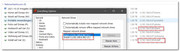
Running ET version 1.5.0.1315a (x64), I noticed that not all of my network shares are added to the "Network Drives" setting, pls see:
Some are added, many others not as shown in the image above, taken from Windows Explorer.
Of course I could manually add them but guess this is not the preferred option, right? Anyway, as far as I remember in a previous version of ET I could manually add my mapped drives and decide myself what to scan, with v1.5 this has obviously been changed.
Will you bring this option back, to avoid such issues I'm facing at the moment?
And I can confirm that all options are set as expected and no admin account is involved.
Nevertheless only two of a bunch of mapped network shares are listed in the options
So, right now I've added manually missing shares as you suggested
OTH, maybe a menu item has been left where it's not useful anymore:
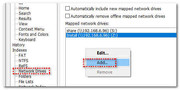
When using the context menu in Network Drives, I can select Add which leads to a selection popup with various GUID, that are not applicable for network drives:
I can select Add which leads to a selection popup with various GUID
The GUID is the network UNC path, for example: \\server\share
I will change the text GUID to UNC path for the next alpha update.
Thank you for your suggestion.
Obviously, drives S and Z point to a different NAS with IP-address 192.168.6.96. Maybe that's the difference why ET does not detect them?
However both (Synology) NAS run the very same Samba version and same most current operation system.
And what's the difference between Z, S and H and the other MUP device?
The only difference I could locate is that for those missing drives, I've enabled:
- opportunistic locking
- SMB leases
- SMB permanent handles
All three settings are not enabled for those mapped Z and S drive letters.
Can't image that these option will affect the drive's availability in ET, can you?