General discussion related to "Everything".
zonetrooperex
Posts: 79Joined: Tue Jun 10, 2014 4:06 pm
Post by zonetrooperex Sat Feb 21, 2015 9:25 am
This colour highlighting for Search Everything is functional and nice.
Enjoy
Version 1.1 is out!
Happy Christmas 2015 Edition
Preview:
Key:
Green = Search Term
Blue = Selected Items
Orange = Sorted Column
How to apply to your Search Everything:
Open the path of "Everything.ini" in Windows Explorer found at %APPDATA%\Everything
Backup a safe copy of "Everything.ini" (found in %APPDATA%\Everything)
Close off Search Everything (program and in task bar)
Make edit as below
Save changes and close off "Everything.ini"
Run Search Everything
1.4.1.877:
Changes Needed (line 649 to 665):
Code: Select all
highlighted_background_color=#daffcc
highlighted_foreground_color=#061500
highlighted_bold=
current_sort_background_color=#fff5e8
current_sort_foreground_color=
current_sort_bold=
current_sort_highlighted_background_color=#ffeacc
current_sort_highlighted_foreground_color=
current_sort_highlighted_bold=
selected_background_color=#feeaff
selected_foreground_color=#140015
selected_bold=
selected_highlighted_background_color=
selected_highlighted_foreground_color=
selected_highlighted_bold=
selected_inactive_background_color=#ccebff
selected_inactive_foreground_color=#000d15
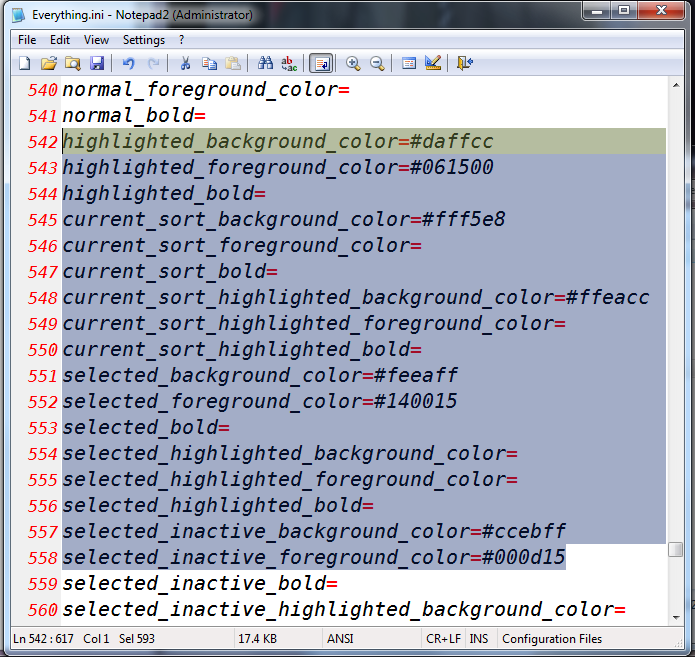
1.4.0.713b Beta Only:
Changes Needed (line 542 to 558):
Code: Select all
highlighted_background_color=#daffcc
highlighted_foreground_color=#061500
highlighted_bold=
current_sort_background_color=#fff5e8
current_sort_foreground_color=
current_sort_bold=
current_sort_highlighted_background_color=#ffeacc
current_sort_highlighted_foreground_color=
current_sort_highlighted_bold=
selected_background_color=#feeaff
selected_foreground_color=#140015
selected_bold=
selected_highlighted_background_color=
selected_highlighted_foreground_color=
selected_highlighted_bold=
selected_inactive_background_color=#ccebff
selected_inactive_foreground_color=#000d15
1.3.4.686 Stable Only:
Changes Needed (line 435 to 445):
Code: Select all
highlighted_background_color=#daffcc
highlighted_foreground_color=#061500
highlighted_bold=
selected_background_color=#feeaff
selected_foreground_color=#140015
selected_bold=
highlighted_selected_background_color=
highlighted_selected_foreground_color=
highlighted_selected_bold=
selected_inactive_background_color=#ccebff
selected_inactive_foreground_color=#000d15
Enjoy
Please let me know if you have any suggestions or comments
Last Checked: 19/03/2017
Last edited by zonetrooperex on Wed Dec 13, 2017 6:28 am, edited 5 times in total.
zonetrooperex
Posts: 79Joined: Tue Jun 10, 2014 4:06 pm
Post by zonetrooperex Fri Dec 18, 2015 6:42 pm
Updated to version 1.1, supports latest beta.
zonetrooperex
Posts: 79Joined: Tue Jun 10, 2014 4:06 pm
Post by zonetrooperex Tue Apr 19, 2016 10:19 am
I'm currently working on version 1.2, stay tuned
zonetrooperex
Posts: 79Joined: Tue Jun 10, 2014 4:06 pm
Post by zonetrooperex Fri Oct 07, 2016 1:29 am
Still working on the next version
zonetrooperex
Posts: 79Joined: Tue Jun 10, 2014 4:06 pm
Post by zonetrooperex Sat Mar 18, 2017 2:26 pm
I've decided that version 1.1 gets the job done and no newer versions will be created.
imcal007
Posts: 20Joined: Fri Feb 27, 2015 7:17 am
Post by imcal007 Mon May 15, 2017 3:11 pm
Is it possible so that search criteria from a certain drive is a different colour?
zonetrooperex
Posts: 79Joined: Tue Jun 10, 2014 4:06 pm
Post by zonetrooperex Wed Dec 13, 2017 6:29 am
Added instructions for 1.4.1.877 of Everything.
BKPB
Posts: 27Joined: Fri Aug 19, 2011 9:13 pm
Post by BKPB Tue Jan 09, 2018 4:11 pm
imcal007 wrote: Is it possible so that search criteria from a certain drive is a different colour?
I agree. It would be very good.
Danny Gi
Posts: 3Joined: Mon Mar 05, 2018 9:38 am
Post by Danny Gi Mon Mar 05, 2018 9:42 am
Hello, is possible to make highlighted only a specific path?
void
Developer
Posts: 20208Joined: Fri Oct 16, 2009 11:31 pm
Post by void Mon Mar 05, 2018 9:46 am
Not yet sorry, it is planned for the next version of Everything.
Danny Gi
Posts: 3Joined: Mon Mar 05, 2018 9:38 am
Post by Danny Gi Mon Mar 05, 2018 10:11 am
Anyway thanks
imcal007
Posts: 20Joined: Fri Feb 27, 2015 7:17 am
Post by imcal007 Tue Oct 15, 2019 4:15 am
Hi was this ever implemented?
NotNull
Posts: 5988Joined: Wed May 24, 2017 9:22 pm
Post by NotNull Tue Oct 15, 2019 5:56 pm
void wrote: Mon Mar 05, 2018 9:46 am
Not yet sorry, it is planned for the next version of Everything.
imcal007 wrote: Tue Oct 15, 2019 4:15 am
Hi was this ever implemented?
The next major version of Everything (version 1.5 or 2.0) is still in development as there are quite a few
things to do .
There is no (indication of a) release date available yet.
You can help @void to spend more time on development by
making a donation .


 Version 1.1 is out!
 Happy Christmas 2015 Edition