Version control

Plug-in and third party software discussion.
Post Reply
NotNull
Posts: 5961
Joined: Wed May 24, 2017 9:22 pm

Version control

Post by NotNull »

Introduction
I started working again on "JumpToFolder" (using Everything to feed folder names to Explorer and Open/Save dialogs), but lost oversight of different versions due to a lot of experimenting.

So now I will "have to" work on some version control system first.
Didn't like the 'big systems' - git. svn, ... - very much (enormous overkill; don't like to have a server, a service and a client running;
and I don't see myself checking in and out files every time).

Unless someone has a brilliant idea for a simple, no fuss version control system, I will write one myself.
That one will:
  • take snapshots of predefined folder (using Everything's EFU files) every <configurable period>
  • copy all new/changed files that were discovered to a central repository
  • <once in a while> or on demand ask to describe the changes that were made
  • have the possibility to restore a 'project' to the state it was at some point of time (also using the description you gave earlier on)
  • have the possibility to restore a single file to the state it was at some point of time (also using the description you gave earlier on)
  • Zip repository projects that are no longer in development (after <x time> )

The question (finally ... :))
Before I start designing and building this: do you see features that I definitely will regret not implementing?


BTW: In a stripped down version, this could also be a simple backup/restore utility..
horst.epp
Posts: 1642
Joined: Fri Apr 04, 2014 3:24 pm

Re: Version control

Post by horst.epp »

Why don't use a tool like the free Gnu RCS version control system ?
Doesn't need any server is small and efficient and in use since many years.
NotNull
Posts: 5961
Joined: Wed May 24, 2017 9:22 pm

Re: Version control

Post by NotNull »

horst.epp wrote: Tue Nov 13, 2018 7:05 pm Why don't use a tool like the free Gnu RCS version control system ?
Doesn't need any server is small and efficient and in use since many years.
Sounds good! (although a quick scan mentions checking in and out, but maybe that's optional). Will check it out. Thanks for your suggestion!
void
Developer
Posts: 19870
Joined: Fri Oct 16, 2009 11:31 pm

Re: Version control

Post by void »

I've written my own version control program "voidsync", it is really really crude, but does what I need, which is:
  • Daily backups with version control
  • Does not delete files, ever.
backup.bat (runs at system shutdown, or daily as a scheduled task)

Code: Select all

c:\dev\voidsync\debug\voidsync.exe c:\dev d:\dev
Which copies everything in C:\dev to D:\dev
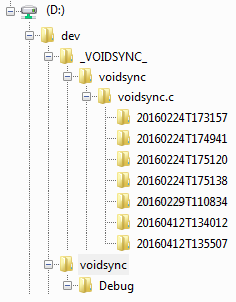
If a file already exists on D:\dev with a different date modified, voidsync will move it to a new folder first, for example:
c:\dev\voidsync\voidsync.c has been modified today, so d:\dev\voidsync\voidsync.c will have a different date modified compared to c:\dev\voidsync\voidsync.c.
When voidsync runs, d:\dev\voidsync\voidsync.c will be moved to d:\dev\_VOIDSYNC_\voidsync\voidsync.c\<OLD FILE DATE MODIFIED>\voidsync.c
and c:\dev\voidsync\voidsync.c will be copied to d:\dev\voidsync\voidsync.c

Restoring has to be done manually.
However, I've never had to restore more than one file at a time.

Example tree layout:


I can search in Everything for voidsync.c and find a copy from a couple days ago..

voidsync source code.

As for must have features: reliability.
My recommendations: stick with something well known.
gl!
horst.epp
Posts: 1642
Joined: Fri Apr 04, 2014 3:24 pm

Re: Version control

Post by horst.epp »

The DSynchronize tool does such a version saving sync similar to voidsync.
Its free and very configurable.
http://dimio.altervista.org/eng/dsynchr ... onize.html
NotNull
Posts: 5961
Joined: Wed May 24, 2017 9:22 pm

Re: Version control

Post by NotNull »

@void, @horst.epp:
Can't test these for the next couple of days, but wanted to say Thank you! upfront. These look a lot of what I want to accomplish.
NotNull
Posts: 5961
Joined: Wed May 24, 2017 9:22 pm

Re: Version control

Post by NotNull »

I have tested DSynchronize.
So far I could not succeed in creating an 'incremental backup' (always copies all files).
I'll do some more tests, as this should be possible.

Is there anyone here that would be so kind to compile the voidsync C code for me? (preferably 64-bit).
I have no compiler on any of my Windows systems and I'm eager to try this.

I wrote something similar in PowerShell. Will post that code later (needs some serious cleaning and reorganizing the code first)
horst.epp
Posts: 1642
Joined: Fri Apr 04, 2014 3:24 pm

Re: Version control

Post by horst.epp »

NotNull wrote: Fri Nov 23, 2018 3:25 pm I have tested DSynchronize.
So far I could not succeed in creating an 'incremental backup' (always copies all files).
I'll do some more tests, as this should be possible.

Is there anyone here that would be so kind to compile the voidsync C code for me? (preferably 64-bit).
I have no compiler on any of my Windows systems and I'm eager to try this.

I wrote something similar in PowerShell. Will post that code later (needs some serious cleaning and reorganizing the code first)
In DSynchronize for a job:
Set "Copy only newer files"
And under Options set the required number in Maintain old versions >
NotNull
Posts: 5961
Joined: Wed May 24, 2017 9:22 pm

Re: Version control

Post by NotNull »

That's how I configured it :?

- Maintain old versions > Unlimited
- Suffix destination with date
- Copy only newer files

And still it copies all files... First I thought those files that shouldn't be copied are hardlinks to the previously copied ones, but that's not the case.
Will start with a fresh install; maybe (probably! :) ) I changed something for the worse.

Thanks for your help!

EDIT: That was it: 'Suffix destination with date' option is not compatible with the 'Copy only newer files' option.
If the first one (suffix ...) is enabled, it will copy all files.
Too bad ....
void
Developer
Posts: 19870
Joined: Fri Oct 16, 2009 11:31 pm

Re: Version control

Post by void »

Added voidsync.exe to voidsync.zip
Native2904
Posts: 112
Joined: Mon Nov 22, 2021 8:36 pm

Re: Version control

Post by Native2904 »

void wrote: Wed Dec 02, 2020 7:27 am Added voidsync.exe to voidsync.zip
Damn, that’s fast – the Everything (1.4 GB) folder and XYplorer (600 MB) folder in one breath..
-now serving as a daily extra safety backup.
ty
horst.epp
Posts: 1642
Joined: Fri Apr 04, 2014 3:24 pm

Re: Version control

Post by horst.epp »

I use ZPAQ backup for any tree which creates a deduplicating archive.
It holds any number of versions with only the amount of space needed for changes.

There is a Total Commander archiver plugin which supports zpaq archives.
I can restore any single file version or whole versions of the tree.
Also, the full TC power is available for previewing files inside the archive.
Native2904
Posts: 112
Joined: Mon Nov 22, 2021 8:36 pm

Re: Version control

Post by Native2904 »

OK, doesn't look too bad either...

Code: Select all

0.000000 + (615.380670 -> 607.836211 -> 300.536819) = 300.536819 MB
162.781 seconds (all OK)
[04/19/2026 17:18:35] SUCCESS
There is a Total Commander archiver plugin which supports zpaq archives.
where can i get it ?
horst.epp
Posts: 1642
Joined: Fri Apr 04, 2014 3:24 pm

Re: Version control

Post by horst.epp »

Native2904 wrote: Sun Apr 19, 2026 3:20 pm
There is a Total Commander archiver plugin which supports zpaq archives.
where can i get it ?
Here the main thread about the TC plugin.
https://www.ghisler.ch/board/viewtopic. ... hilit=zpaq

The link to the current ZPAQ command line tool
which i use in the batch files to create / update archives
https://www.francocorbelli.it/zpaqfranz/win64hw/
Use the zpaqfranzhw.exe

This is for example my batch file to update my Everything ZPAQ archive

Code: Select all

C:\Tools\ZPAQ\zpaqfranzhw.exe add C:\Backup\Everything.zpaq C:\tools\Everything -not C:\Tools\Everything\*.db
Pause
Currently, I have 154 version in this archive which is about 174MB

A TC button to list all versions of an archive

Code: Select all

TOTALCMD#BAR#DATA
cmd.exe 
/k C:\Tools\ZPAQ\zpaqfranzhw.exe i %P%N
C:\Tools\Wincmd\Icons\ZPAQ.2.ico
ZPAQ List archived versions

0
-1
The button to restore a full version without the TC archiver plugin.

Code: Select all

TOTALCMD#BAR#DATA
%COMMANDER_PATH%\PLUGINS\AskParam64.exe
/c"Restore" /p"Until:" /w "c:\tools\zpaq\zpaqfranzhw.exe" x %P%N -until "%%1" -to "%T"
C:\Tools\Wincmd\Icons\ZPAQ.ico
ZPAQ Restore a version to target dir

0
-1
AskParam kann be found in the TC forum.
Native2904
Posts: 112
Joined: Mon Nov 22, 2021 8:36 pm

Re: Version control

Post by Native2904 »

2Horst.Epp

I wanted to thank you for your support on such an important matter and for providing me with your files.

I really appreciate that!
2026-04-22_114334.png
2026-04-22_114334.png (15.47 KiB) Viewed 1427 times

Perhaps you have a better Zpaq icon – I use the one from the GUI... but it really doesn't matter!
Post Reply