Result Omissions
Result omissions hide files and folders from your search results without removing them from the index.
Everything continues to monitor omitted files and folders for changes.
Result omissions are useful for hiding files and folders that you rarely want to see in search results, such as system folders, application data folders, or recycle bins.
Toggling result omissions is instant.
Enable result omissions
Omit a result
Organize result omissions
Enable temporary result omissions
Temporarily omit a result
Clear temporary result omissions
Default settings
Enable result omissions
To enable result omissions:
- In Everything, from the Index menu, check Enable Result Omissions.
OMIT is shown in the status bar when result omissions are enabled.
Double click the
OMIT text in the status bar on the right to disable result omissions.
Toggling result omissions is instant.
Enabling result omissions has no noticeable impact on search performance.
Enabling result omissions may make sorting slightly slower when the search is empty.
To disable result omissions and show omitted results:
- In Everything, from the Index menu, uncheck Enable Result Omissions.
-or-
- include
disable-result-omissions: in your search.
Omit a result
To omit a result:
- Ensure Enable result omissions is checked under the Index menu.
- Right click a result and click Omit.
-or-
- Hold down Shift and Right click a result and click Omit.
Results can also be omitted by file extension.
To omit results by extension:
- Ensure Enable result omissions is checked under the Index menu.
- Right click a result and click Omit Extension.
-or-
- Hold down Shift and Right click a result and click Omit Extension.
For example, omitting the
.tmp extension hides all
.tmp files.
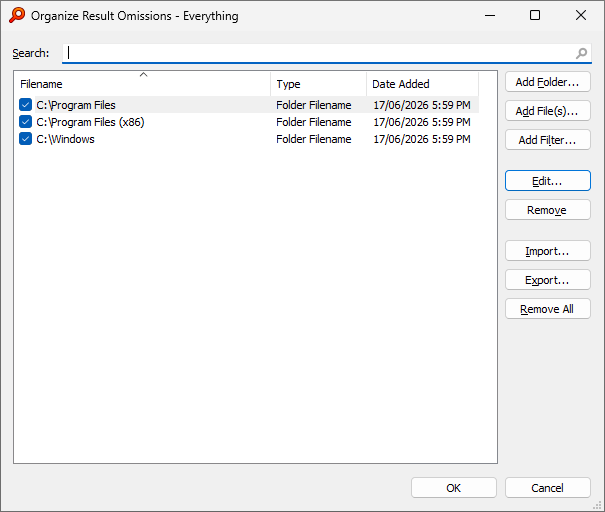
Organize result omissions
To organize result omissions:
- In Everything, from the Index menu, click Organize Result Omissions.
-or-
- Hold down ALT and double click
OMIT in the status bar on the right.
Result omissions must be enabled before they can be organized.
To clear result omissions:
In Organize Result Omissions, click Remove All.
To add the C:\Windows folder to your result omissions:
- In Everything, from the Index menu, click Organize result omissions....
- Click Add Folder....
- Select C:\Windows and click Select Folder.
- Click OK.
To add the AppData folders to your result omissions:
- In Everything, from the Index menu, click Organize result omissions....
- Click Add Filter....
- Check Omit folders.
- Change the filter to:
C:\Users\*\AppData
- Click OK.
To add all recycle bin folders to your result omissions:
- In Everything, from the Index menu, click Organize result omissions....
- Click Add Filter....
- Check Omit folders.
- Change the filter to:
?:\$recycle.bin
- Click OK.
Result omissions are stored on disk in
%APPDATA%\Everything\Omit Results.csv
If Tools -> Options -> Store settings and data in %APPDATA%\Everything is disabled, result omissions are stored on disk in the
Omit Results.csv in the same location as your Everything.exe
Enable temporary result omissions
Results can also be temporarily omitted.
Temporarily omitted results remain hidden until cleared or Everything is closed.
To enable temporary result omissions:
- In Everything, from the Index menu, check Enable Temporary Result Omissions.
Toggling temporary result omissions is instant.
Enabling temporary result omissions has no noticeable impact on search performance.
To disable temporary result omissions and show temporarily omitted results:
- In Everything, from the Index menu, uncheck Enable Temporary Result Omissions.
-or-
- include
disable-temporary-result-omissions: in your search.
Temporarily omit a result
To temporarily omit a result:
- Ensure Enable temporary result omissions is checked under the Index menu.
- Right click a result and click Temporary Omit.
-or-
- Hold down Shift and Right click a result and click Temporarily Omit.
Results can also be temporarily omitted by file extension.
To temporarily omit results by extension:
- Ensure Enable temporary result omissions is checked under the Index menu.
- Right click a result and click Temporarily Omit Extension.
-or-
- Hold down Shift and Right click a result and click Temporarily Omit Extension.
Clear temporary result omissions
To clear temporary result omissions:
- Close the Everything search window.
-or-
- Double click the
TEMP OMIT text in the status bar on the right. -or-
- In Everything, from the Index menu, click Clear Temporary Result Omissions.
Default settings
To always enable Omit Results for new windows:
- In Everything, from the Tools menu, click Options.
- Click the Advanced tab on the left.
- To the right of Show settings containing, search for:
home
- Select home_omit_results
- Set the value to: true
- Click OK.
home_omit_results
