Download
Usage
Search Options
Sort Options
Journal Options
Display Options
Export Options
General Options
Notes
Advanced
Everything 1.5 Changes
Examples
Return Codes
Download
ES-1.1.0.38.x64.zip
ES-1.1.0.38.x86.zip
ES-1.1.0.38.ARM64.zip
ES-1.1.0.38.ARM.zip
ES-1.1.0.38.src.zip
https://github.com/voidtools/es
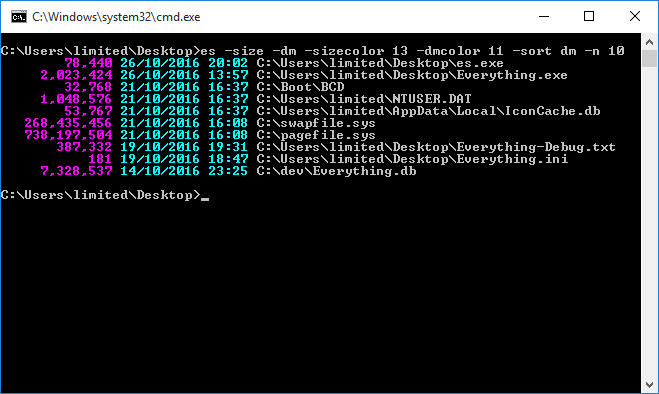
Usage
es.exe [options] search textES uses the Everything Search Syntax.
For example:
es everything ext:exe;iniSearch Options
-r <search>, -regex <search>
Search using regular expressions.
-i, -case
Match case.
-w, -ww, -whole-word, -whole-words
Match whole words.
-p, -match-path
Match full path and file name.
-a, -diacritics
Match diacritical marks.
-prefix
Match start of words.
-suffix
Match end of words.
-ignore-punctuation, -no-punc
Ignore punctuation in filenames.
-ignore-whitespace, -no-ws
Ignore whitespace in filenames.
-n, -count <count>
Request only the specified number of results.
-path <path>
Search for subfolders and files in path.
-parent-path <path>
Search for subfolders and files in the parent of path.
-parent <path>
Search for files with the specified parent path.
/ad
Folders only.
/a-d
Files only.
/a[RHSDAVNTPLCOIEUPM]
DIR style attributes search.
R = Read only.
H = Hidden.
S = System.
D = Directory.
A = Archive.
V = Device.
X = No scrub data.
N = Normal.
T = Temporary.
L = Reparse point.
C = Compressed.
O = Offline.
I = Not content indexed.
E = Encrypted.
U = Unpinned.
P = Pinned.
M = Recall on data access.
- = Prefix a flag with - to exclude.
Sort Options
-s
Sort by full path.
-sort <name[-ascending|-descending]>
Set the sort.
name can be one of the following:
- name
- path
- size
- extension
- date-created
- date-modified
- date-accessed
- attributes
- filelist-filename
- run-count
- date-recently-changed
- date-run
- <property-name>
/on, /o-n, /os, /o-s, /oe, /o-e, /od, /o-d
DIR style sorts.
N = Name.
S = Size.
E = Extension.
D = Date modified.
- = Sort in descending order.
Journal Options
-j, -journal [filename filter]
Show index journal changes.
Any journal option below also shows journal changes.
Optionally specify a filename filter to match journal changes by filename.
The whole filename is matched case-insensitively.
Wildcards are supported in the filename filter.
Use a path separator (\) to match the full path.
The filename filter is matched against both the filename before and after the change.
-get-journal-id
Return the current journal ID.
-get-journal-pos
Return the current journal ID and next change ID.
-action-filter <semicolon (;) delimited list of actions>
Show only changes with the specified actions:
folder-create;folder-delete;folder-rename;folder-move;folder-modify;
file-create;file-delete;file-rename;file-move;file-modify
-added-filename-only
Match filenames created, renamed, or moved after the change.
-removed-filename-only
Match filenames deleted, renamed, or moved before the change.
-watch
Return when a match is found and display the journal position.
-from-journal-pos <journal-id> <change-id>
-from-journal-id <journal-id>
-from-change-id <change-id>
Show changes from the specified journal-id and change-id.
-from-date <date>
Show changes starting from the specified ISO-8601 date.
-from-yesterday
Show changes starting from the beginning of yesterday.
-from-today
Show changes starting from the beginning of today.
-from-now
Show changes starting from the current time.
-to-journal-pos <journal-id> <change-id>
-to-journal-id <journal-id>
-to-change-id <change-id>
Show changes until the specified journal-id and change-id (exclusive).
-to-date <date>
Show changes until the specified ISO-8601 date (exclusive).
-to-today
Show changes until the start of today (exclusive).
-to-tomorrow
Show changes until the start of tomorrow (exclusive).
-to-now
Show changes until the current time (exclusive).
-after-journal-pos <journal-id> <change-id>
Show changes after the specified journal-id and change-id.
-changed-today
Show changes from the start of today until the start of tomorrow.
Same as -from-today -to-tomorrow
-changed-yesterday
Show changes from the start of yesterday until the start of today.
Same as -from-yesterday -to-today
Display Options
-name
-path-column
-size
-full-path-and-name, -filename-column
-extension, -ext
-date-created, -dc
-date-modified, -dm
-date-accessed, -da
-attributes, -attribs, -attrib
-filelist-filename
-run-count
-date-run
-date-recently-changed, -rc
-add-columns <property-name;property-name2;...>
add-columns:<property-name;property-name2;...>
Show the specified column.
-highlight
Highlight results.
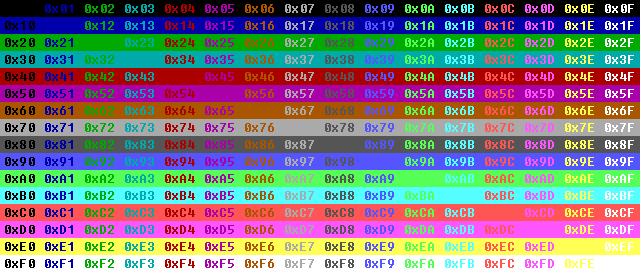
-highlight-color <color>
Highlight color 0x00-0xff.
-viewport-offset <offset>
Show results starting from offset.
-viewport-count <count>
Limit the number of results shown to <count>.
-csv
-efu
-txt
-m3u
-m3u8
-tsv
-json
Change display format.
-size-format <format>
format can be one of the following:
- 0 = Auto
- 1 = Bytes (default)
- 2 = KB
- 3 = MB
-date-format <format>
format can be one of the following:
- 0 = (Use default) (default)
- 1 = ISO-8601
- 2 = FILETIME
- 3 = ISO-8601(UTC)
- 4 = User Locale
- 5 = ISO-8601 (full-resolution)
- 6 = ISO-8601 (UTC) (full-resolution)
-aspect-ratio-format <format>
format can be one of the following:
- 0 = 16:9 (default)
- 1 = 1.777
-filename-color <color>
-name-color <color>
-path-color <color>
-extension-color <color>
-size-color <color>
-date-created-color <color>, -dc-color <color>
-date-modified-color <color, -dm-color <color>>
-date-accessed-color <color>, -da-color <color>
-attributes-color <color>
-file-list-filename-color <color>
-run-count-color <color>
-date-run-color <color>
-date-recently-changed-color <color>, -rc-color <color>
-add-column-colors <property-name=color;property-name2=color;...>
Set the column color 0x00-0xff.
-filename-width <width>
-name-width <width>
-path-width <width>
-extension-width <width>
-size-width <width>
-date-created-width <width>, -dc-width <width>
-date-modified-width <width, -dm-width <width>>
-date-accessed-width <width>, -da-width <width>
-attributes-width <width>
-file-list-filename-width <width>
-run-count-width <width>
-date-run-width <width>
-date-recently-changed-width <width>, -rc-width <width>
-add-column-widths <property-name=width;property-name2=width;...>
Set the column width 0-65535.
-no-digit-grouping
Don't group numbers with commas.
-double-quote
Wrap paths and filenames with double quotes.
Export Options
-export-csv <out.csv>
-export-efu <out.efu>
-export-json <out.json>
-export-m3u <out.m3u>
-export-m3u8 <out.m3u8>
-export-tsv <out.txt>
-export-txt <out.txt>
Export to a file using the specified layout.
-no-header
Do not output a column header for CSV, EFU and TSV files.
-no-folder-append-path-separator
Don't append a trailing path separator to folder paths.
-utf8-bom
Store a UTF-8 byte order mark at the start of the exported file.
-redirect-stdout <out.txt>
Redirect standard output to the specified file.
-redirect-stderr <error.txt>
Redirect error output to the specified file.
General Options
-h, -help
Display this help.
-instance <name>
Connect to the unique Everything instance name.
-ipc1, -ipc2, -ipc3
Use IPC version 1, 2 or 3.
-pause, -more
Pause after each page of output.
-hide-empty-search-results
Don't show any results when there is no search.
-empty-search-help
Show help when no search is specified.
-no-help-on-no-args
Don't show help when no arguments are supplied.
-timeout <milliseconds>
Timeout after the specified number of milliseconds to wait for
the Everything database to load before sending a query.
-set-run-count <filename> <count>
Set the run count for the specified filename.
-inc-run-count <filename>
Increment the run count for the specified filename by one.
-get-run-count <filename>
Display the run count for the specified filename.
-get-result-count
Display the result count for the specified search.
-get-total-size
Display the total result size for the specified search.
-get-folder-size <filename>
Display the total folder size for the specified filename.
-save-settings
Save settings to %APPDATA%\voidtools\es\es.ini
-clear-settings
Delete %APPDATA%\voidtools\es\es.ini
-version
Display ES major.minor.revision.build version and exit.
-get-everything-version
Display Everything major.minor.revision.build version and exit.
-exit, -quit
Exit Everything.
Returns after Everything process closes.
-save-db
Save the Everything database to disk.
Returns after saving completes.
-reindex
Force Everything to reindex.
Returns after indexing completes.
-no-result-error
Set the error level if no results are found.
-debug
Show debug information in stderr.
Notes
Internal -'s in options can be omitted, eg: -nodigitgrouping
Switches can start with a / instead of -
Use double quotes to escape spaces and switches.
Switches can be disabled by prefixing them with no-, eg: -no-size.
Use a ^ prefix or wrap with double quotes (\") to escape \\ & | > < ^
-instance=1.5a is the same as -instance 1.5a
Advanced
-set-columns <property-name;property-name2;...>
Overwrite existing columns.
-remove-columns <property-name;property-name2;...>
Remove existing columns.
-set-column-colors <property-name=color;property-name2=color;...>
Overwrite existing column colors 0x00-0xff.
-remove-column-colors <property-name;property-name2;...>
Remove existing column colors by property name.
-set-column-widths <property-name=color;property-name2=color;...>
Overwrite existing column widths 0x00-0xff.
-remove-column-widths <property-name;property-name2;...>
Remove existing column widths by property name.
-nul
-lf
-crlf
-no-new-line
Set the new line format.
-default-folder-append-path-separator
Reset the folder-append-path-separator setting to the default value.
-default-header
Reset the header setting to the default value.
Reset the footer setting to the default value.
-list-properties
List all available Everything properties.
-locale-grouping <format>
Set the number grouping format.
format can be one of the following:
- 32 = 12,34,56,789
- 3 = 123,456,789
- 2 = 1,23,45,67,89
- 0 = 123456789
-locale-thousand <thousand-separator>
Set the group separator character.
-locale-decimal <decimal-point-character>
Set the decimal point character.
-locale-lzero <format>
Set the leading zero format.
format can be one of the following:
- 1 = show a leading zero.
- 0 = do not show a leading zero.
-locale-negnumber <format>
Set the negative number format.
format can be one of the following:
- 0 = Left parenthesis, number, right parenthesis. Example: (1.1)
- 1 = Negative sign, number. Example: -1.1 (default)
- 2 = Negative sign, space, number. Example: - 1.1
- 3 = Number, negative sign. Example: 1.1-
- 4 = Number, space, negative sign. Example: 1.1 -
-size-leading-zero
Pad the size column with leading zeroes.
-console-window-width <width>
-console-window-height <height>
Specify the console window width and height in characters.
-console-width <width>
-console-height <height>
Specify the console buffer width and height in characters.
-cp <code-page>, -code-page <code-page>
Specify the console code page.
UTF-8 = 65001.
-q*, -s*, -search*
Treat the rest of the command line as a literal search.
-search <search-text>
Append search-text to your search.
The single parameter is processed as a normal command line argument.
Quotes are removed.
--
Disable switch parsing.
-argv
Use CommandLineToArgvW to parse the command line.
Use with Powershell 7 or later.
Everything 1.5 Changes
ES now has access to bookmarks and filters.
ES can now access formulas.
To allow ES access to formulas:
- From the Start menu, search for:
regedit - Right click Registry Editor and click Run as administrator.
- In the Registry Editor, navigate to:
HKLM\Software\Policies\voidtools\Everything
(Please create this key if it doesn't exist) - In the right pane, right click and click New -> dword value.
- Set the value name to:
ipc_allow_read_access - Set the value data to:
1 - Restart Everything (File -> Exit)
For example:
es.exe c:\windows\notepad.exe -sha256es.exe c:\windows\notepad.exe -system.sizeES can now sort by any Everything property or Windows Property System Property.
ES can now search for any Everything property value or Windows Property System Property value.
-console-window-width
-console-window-height
-console-width
-console-height
Journal Options
Examples:
- Export all mp3 files to an Everything file list named mp3.efu
- es.exe *.mp3 -export-efu mp3.efu
- es.exe -sort size -n 10
- es.exe -sort dm -n 10
- es.exe foo bar -highlight
- es.exe -size -dm -sizecolor 0x0d -dmcolor 0x0b -save-settings
Return codes:
Code: Select all
ES_ERROR_SUCCESS                    0 // no known error, search successful.
ES_ERROR_REGISTER_WINDOW_CLASS      1 // failed to register window class
ES_ERROR_CREATE_WINDOW              2 // failed to create listening window.
ES_ERROR_OUT_OF_MEMORY              3 // out of memory
ES_ERROR_EXPECTED_SWITCH_PARAMETER  4 // expected an additional command line option with the specified switch
ES_ERROR_CREATE_FILE                5 // failed to create export output file
ES_ERROR_UNKNOWN_SWITCH             6 // unknown switch.
ES_ERROR_SEND_MESSAGE               7 // failed to send Everything IPC a query.
ES_ERROR_IPC                        8 // NO Everything IPC window - make sure the Everything search client is running.
ES_ERROR_NO_RESULTS                 9 // No results found. Only set if -no-result-error is used
Please let me know if you have any suggestions or comments, thanks.

 .
.